11
Filter Replacement Resetting the Filter
Power on the air purifier, press and hold
the Mode button for 5 seconds to reset the
service life for the new filter.
Note:
· It is recommended to replace the filter every
3–6 months, when it detects that the filter
needs to be replaced, the device will send a
prompt to your app, please replace the filter on
time.
· To ensure your purifier properly works and
purifies, please purchase genuine and
compatible filters from ocial channels.
How to Buy the Filter
Scan the QR Code or
Visit smartmi's online store
https://www.smartmiglobal.com
for more information.
Warning:
· Power o purifier and disconnect it from the power supply before performing the following
operations.
· When the purifier wall-mounted, it is recommended to take down the purifier before replacing the
filter.
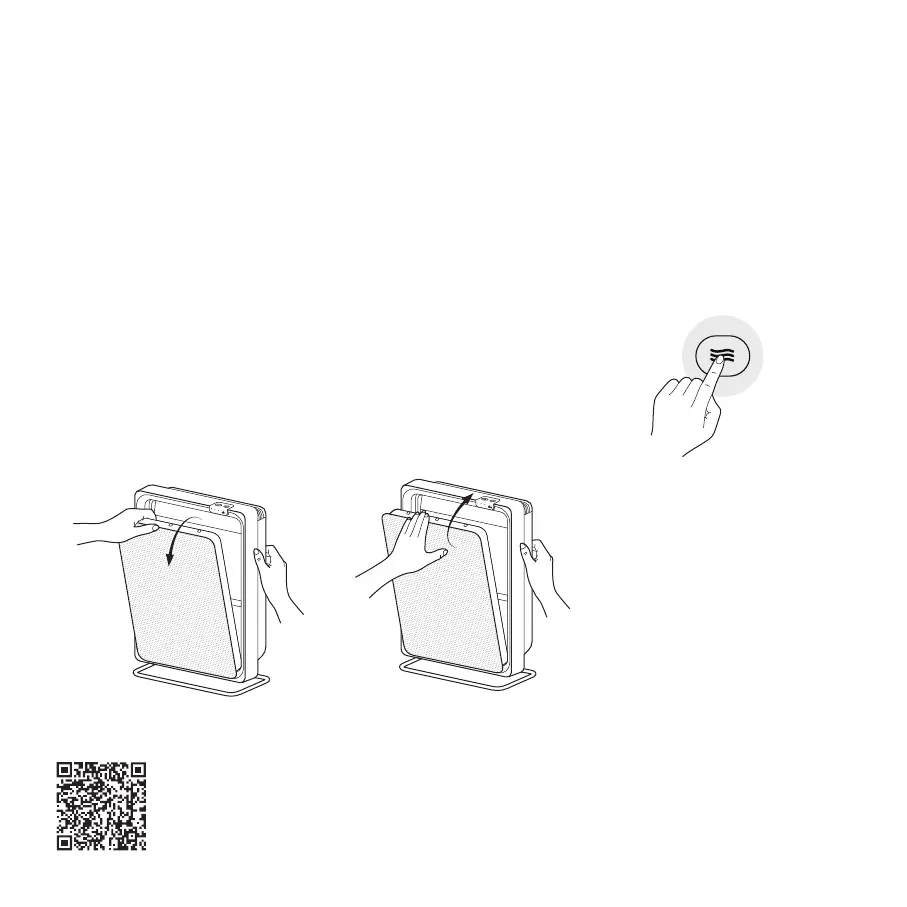
Removing the Old Filter Installing the New Filter
As illustrated in the figure, hold the
purifier with one hand, and pull the
edge of the filter with the other hand
to remove the old filter.
Removing the filter packaging. Insert
the bottom snap of the new filter
into place, and push it up to the top
to fix it in place and complete the
replacement.
01 02


 To Next Page