41
ES
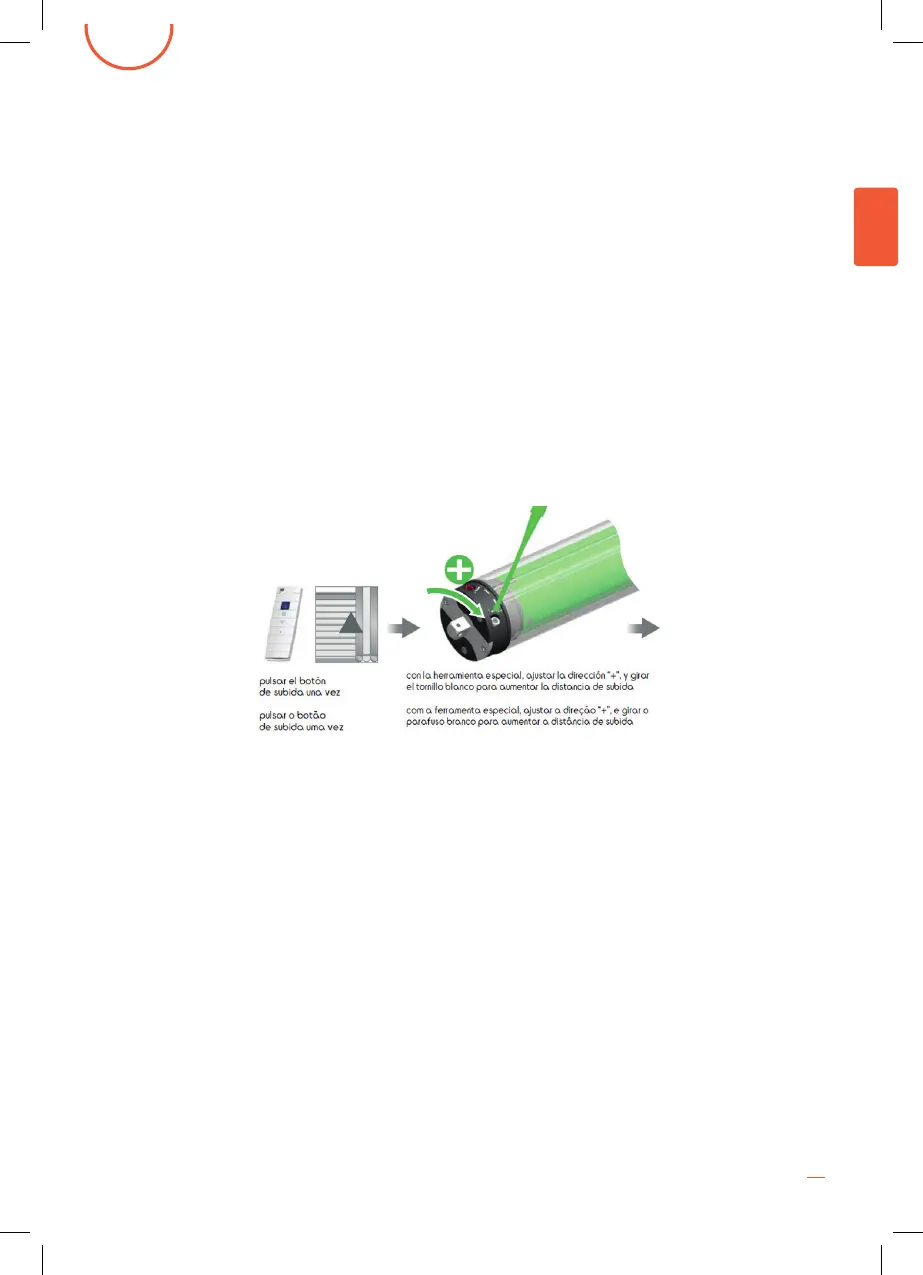
2. Como se ve en la foto de abajo, el motor presenta dos agujeros, uno rojo
y uno blanco, para la regulación de salida y entrada de la lona.
A continuación se describiran los pasos parala regulacion de apertura y de
cierre;
Si quiere regular la recogida de la lona (cierre del toldo)
-Si el toldo frena antes de lo que le gustaria, es decir, te gustaria que la lona
quedara mas recogida, introduzca la herramienta especial en el color
blanco y gire en el sentido contrario a las agujas del reloj ( - )
-Si el toldo recogiendose llega al final y hace tope, MUY IMPORTANTE, pulsar
el botón STOP, introducir la herramienta especial en el color blanco y girar
en el sentido de las agujas del reloj (+) NO HACER ESTE PASO PUEDE
OCASIONAR DEJAR EL MOTOR ACCIONADO Y PROVOCAR UN
RECALENTAMIENTO
Si quiere regular la salida de la lona (apertura del toldo)
-Si acciona el boton de apertura del toldo, y al salir la lona sale menos de lo
que desea, introduzca la herramienta especial dentro del agujero de color
rojo y gire en el sentido contrario a las agujas del reloj ( - )
-Si acciona el botón de apertura del toldo, y la lona sale mas de lo que
desea, MUY IMPORTANTE, pulsar el botón STOP, introducir la herramienta
especial en el color rojo y girar en el sentido de las agujas del reloj (+).
ATENCIÓN: No seguir estas recomendaciones puede causar importantes
daños en el toldo incluso la rotura o inutilización del toldo.
HOW TO ADJUST THE MOTOR
1. The user can adjust wherever the awning is to be closed or wherever it is to be opened as
shown below in the photo by turning in one direction or another the green plastic adjustment
wrench that is included in the awning parts box.
3. Once set, extend and repair the product using the switch and check whether the setting
satises you. If this is not the case, please according to step 2.a.
2. If you want to regulate the collection of the fabric (closing the awning)
-If the awning stops before you would like it, let’s say you would like the fabric to be more collected,
insert the special tool in the white color and turn counterclockwise (-)
- If the awning collecting reaches the end and stops, VERY IMPORTANT, press the STOP button,
insert the special tool in the white color and turn it clockwise (+)
FAILURE TO DO THIS STEP MAY CAUSE LEAKING THE ENGINE AND CAUSING A REHEAT
-If you want to regulate the turning out of the fabric (opening the awning)
-If you operate the awning opening button, and the fabric comes out less than you want, insert the
special tool into the red hole and turn it counterclockwise (-)
-If you operate the awning opening button, and the fabric comes out more than you want, VERY
IMPORTANT, press the STOP button, insert the special tool in the red color and turn it clockwise (+).
CAUTION: Failure to follow these recommendations can cause serious damage to the awning
including breaking or disabling the awning.
ENGLISH


 To Next Page