19
Chapter 3 - Application
Network Connection
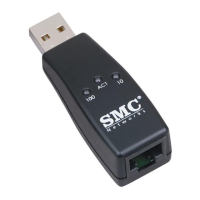
To connect the USB/Ethernet Converter to the local network, follow these
steps:
1. Prepare a straight-through twisted-pair cable, maximum length 100
meters (328 feet). Use Category 3, 4 or 5 cable for connection to 10
Mbps Ethernet, or Category 5 cable for connection to 100 Mbps Fast
Ethernet.
2. Connect one end of the cable to the RJ-45 port on the USB/ Ethernet
Converter, and the other end to any available station port on a network
hub or switch. When inserting an RJ-45 plug, be sure the tab on the plug
clicks into position to ensure that it is properly seated.
3. Check that the USB/Ethernet Converter has a valid connection by
observing the Link/Act LED. If the indicator fails to light when you
connect to a network hub or switch, see
W.e?W.?hg
?W.YeW.Y?hg
?7U?e7U
?@1?e@1
?@@?e@@
Troubleshooting
@@e?@@?hg
3@e?3@?hg
S5e?S5?hg
?W.YeW.Y?hg
?.Y?e.Y
on page 8.
System Network Settings
When installation is complete and you have rebooted your system, the
USB/Ethernet Converter will appear to the system as a normal Ethernet
network adapter.
To enable network access on your system, click on the
W.e?W.?hg
?W.YeW.Y?hg
?7U?e7U
?@1?e@1
?@@?e@@
Network
@@e?@@?hg
3@e?3@?hg
S5e?S5?hg
?W.YeW.Y?hg
?.Y?e.Y
icon in the
W.e?W.?hg
?W.YeW.Y?hg
?7U?e7U
?@1?e@1
?@@?e@@
Windows Control Panel.
@@e?@@?hg
3@e?3@?hg
S5e?S5?hg
?W.YeW.Y?hg
?.Y?e.Y
Provide a name to identify your
computer on the network, and assign it to a workgroup or domain if
necessary. Add any additional network services or protocols you require.
If you need to access the Internet, be sure you configure the TCP/IP
protocol by specifying a DHCP server, or manually entering a valid IP address,
subnet mask, and default gateway. Also be sure to specify a domain name
server which can translate web site names (URLs) to IP addresses. Then
reboot your computer to enable your network settings.


 To Next Page
 Loading...