This document describes the operation and features of the SMC Digital Pressure Switch, models ZSE20C(F)-L and ISE20C(H)-L, which are IO-Link compatible.
Function Description
The Digital Pressure Switch is designed to detect pressure and provide switch output status, diagnostic information, and pressure measurement values. It operates in various modes, including measurement mode, 3-step setting mode, simple setting mode, and function selection mode, allowing for flexible configuration and monitoring.
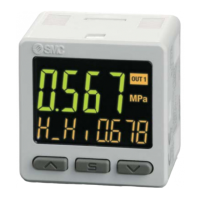
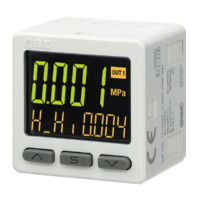
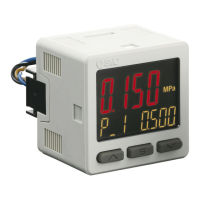
Measurement Mode: This is the basic operating mode where the device detects and displays pressure, along with the switch operating status. The main display shows pressure measurement values and error codes in a 2-color display (red/green), while the sub-displays show items, set values, and peak/bottom values in orange.
Output Modes: The switch supports several output modes:
- Hysteresis Mode: The switch turns ON when pressure exceeds a set value and turns OFF when pressure falls below the set value by a defined hysteresis amount.
- Window Comparator Mode: The switch turns ON when pressure is within a specified range (P1L to P1H) or outside a specified range (n1L to n1H) for reversed output.
- Error Output: The switch output changes to ON/OFF when an error is detected.
- Output OFF: The switch output is turned off.
IO-Link Functions:
- Communication Function: Allows checking pressure measurement values, diagnostic information, and switch output status via cyclic data communication using the IO-Link system.
- Product Status Monitoring: Monitors the device status, detecting internal hardware errors, product internal temperature errors, and measurement pressure errors.
- Data Storage Function: Stores IO-Link device parameter settings to the IO-Link master, enabling easy replacement of the device without re-setting parameters. Parameters can be uploaded from the device to the master and downloaded from the master to a new device.
Important Technical Specifications
Pressure Specifications:
- Applicable Fluid: Fluids that do not corrode SUS630, SUS304.
- Rated Pressure Range:
- ZSE20C (Vacuum pressure): 0.0 to -101.0 kPa
- ZSE20CF (Compound pressure): -100.0 to 100.0 kPa
- ISE20C (Positive pressure): -0.100 to 1.000 MPa
- ISE20CH (Positive pressure): -0.100 to 2.000 MPa
- Display/Set Pressure Range:
- ZSE20C: 10.0 to -105.0 kPa
- ZSE20CF: -105.0 to 105.0 kPa
- ISE20C: -0.105 to 1.050 MPa
- ISE20CH: -0.105 to 2.100 MPa
- Display/Min. Setting Unit: 0.1 kPa (ZSE20C/CF), 0.001 MPa (ISE20C/CH).
- Proof Pressure: 500 kPa (ZSE20C/CF), 2 MPa (ISE20C), 4 MPa (ISE20CH).
Power Supply Specifications:
- Used as Switch Output Device: 12 to 24 VDC (±10%), ripple max. 10%.
- Used as IO-Link Device: 18 to 30 VDC, ripple max. 10% (p-p).
- Current Consumption: 35 mA or less.
- Protection: Polarity protection.
Accuracy:
- Display Accuracy: ±2%F.S. ±1 digit (at ambient temperature 25±3 °C).
- Repeatability: ±0.2%F.S. ±1 digit.
- Analog Output Accuracy: ±2.5%F.S. (at ambient temperature 25±3 °C).
- Analog Output Linearity: ±1%F.S.
- Temperature Characteristics: ±3%F.S. (25 °C standard).
Switch Output (During SIO Mode):
- Output Type: Selectable from NPN or PNP open collector output.
- Switch Operation: Normal output, reversed output.
- Maximum Load Current: 80 mA.
- Maximum Applied Voltage: 30 V (during NPN output).
- Internal Voltage Drop (Residual Voltage): 1.5 V or less (Load current 80 mA).
- Delay Time: 1.5 ms or less, variable at 0 to 60 s/0.01 s step.
- Hysteresis: Variable from 0.
- Short Circuit Protection: Provided.
Display and Environment:
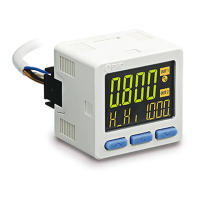
- Display Type: LCD, 3-screen display (Main display, sub display x 2).
- Display Color: Main display: Red/Green; Sub display: Orange.
- Number of Display Digits: Main display: 4 digits (7-segments); Sub display: 4 digits (Upper 1 digit 11-segments, 7-segments for other).
- Operation Light: LED is ON when switch output is ON (OUT1, OUT2: Orange).
- Digital Filter: Variable at 0 to 30 s/0.01 s step.
- Enclosure: IP65.
- Withstand Voltage: 250 VAC for 1 minute between terminals and housing.
- Insulation Resistance: 2 MΩ or more between terminals and housing (with 50 VDC megger).
- Ambient Temperature Range: Operation: -5 to 50 °C, Storage: -10 to 60 °C (No condensation or freezing).
- Operating Humidity Range: Operation, Storage: 35 to 85%RH (No condensation).
- Standard: CE marked (EMC directive, RoHS directive).
- Length of Lead Wire with Connector: 2 m.
Piping/Weight Specifications:
- Port Size: R1/4, NPT1/4, G1/4, Rc1/8, URJ1/4, TSJ1/4.
- Pressure-sensing Part Material: Pressure sensor: SUS630, Fitting: SUS304.
- Body Weight: 51-81 g depending on piping type.
- Leakage: 1 x 10⁻⁵ Pa·m³/s or 1 x 10⁻¹⁰ Pa·m³/s.
IO-Link Communication Specifications:
- IO-Link Type: Device, V1.1.
- Communication Speed: COM2 (38.4 kbps).
- Min. Cycle Time: 2.3 ms.
- Process Data Length: Input Data: 2 byte, Output Data: 0 byte.
- On Request Data Communication: Available.
- Data Storage Function: Available.
- Event Function: Available.
Usage Features
Setting Modes:
- 3-Step Setting Mode: Allows inputting set values (P_1, n_1, P_2, n_2) and hysteresis (H_1, H_2) in three simple steps.
- Simple Setting Mode: Enables changing set values, hysteresis, and delay time while monitoring the current pressure value on the main display.
- Function Selection Mode: Provides access to various functions for detailed configuration, including display units, switch output specifications (NPN/PNP), diagnostic information, output mode, reversed output, pressure setting, hysteresis, delay time, display color, digital filter, auto-preset, fine adjustment of display value, sub-display settings, display resolution, zero cut-off, power saving mode, and security code.
Display Features:
- Sub-Display Customization: The sub-display can show various items and values, including set values, hysteresis, window comparator limits, peak/bottom values, and line names. Users can select the display style (standard, 2-value display, level bar, character string, or display OFF).
- Display Resolution Setting: Allows changing the pressure display resolution to reduce flicker.
- Zero Cut-off Setting: Rounds the display value to zero when the pressure is close to zero, with an adjustable range of 0.0 to 10.0% F.S.
Advanced Features:
- Digital Filter: Reduces output chattering or flicker in the measurement mode display, with a settable range of 0.00 to 30.00 seconds.
- Auto-Preset Function: Automatically calculates and sets optimum pressure based on actual operating conditions when hysteresis mode is selected.
- Fine Adjustment of Display Value: Manually adjusts the displayed pressure value within ±5%R.D.
- Power Saving Mode: Reduces power consumption by turning off the digital display after 30 seconds of inactivity.
- Security Code: Prevents unauthorized changes to settings by requiring a security code to unlock the device.
- Snap Shot Function: Stores the current pressure value to the switch output ON/OFF set point.
- Peak/Bottom Value Indication: Detects and updates the maximum and minimum pressure values since power was supplied.
Maintenance Features
General Maintenance:
- Regular Inspections: Perform regular maintenance and inspections to prevent unexpected malfunctions.
- Drainage: Perform drainage regularly to prevent operating failure of pneumatic equipment due to condensate.
- Cleaning: Use a soft cloth to remove stains. For heavy stains, use a cloth soaked with diluted neutral detergent and fully squeezed, then wipe up with a dry cloth. Avoid solvents like benzene or thinner.
Troubleshooting:
- Troubleshooting Chart: A detailed chart is provided to identify the cause of failures based on symptoms like incorrect operation, chattering, slow response, display errors, and noise.
- Error Indication Function: Displays specific error codes (e.g., Er1 for overcurrent, HHH/LLL for pressure range exceedance, Er0/4/6/7/8/9 for system errors, Er15 for version mismatch) to help diagnose problems.
- Reset to Default Settings: Allows restoring all settings to their factory default values if configurations become uncertain.
- Output Check: Enables manual ON/OFF of the switch output to confirm correct operation.
IO-Link Specific Maintenance:
- IODD File: The IODD (I/O Device Description) file, which provides all properties and parameters, can be downloaded from the SMC website for device configuration and communication.
- System Commands: Supports system commands like Device Reset, Application Reset, Restore Factory Settings, and Zero Clear via the IO-Link setting tool.
- Device Access Lock: Prevents physical changes to settings (button operation) but allows changes via IO-Link communication.
- Data Storage Lock (DS Lock): Invalidates the data storage function, preventing backup and restoration of data.
- Diagnostic Information: Provides detailed event contents for readable device status, including internal failures, temperature limits, pressure range exceedance, and data storage upload requests.
- Endian Type: Specifies the byte order for process data (Big-Endian or Little-Endian) for compatibility with upper communication protocols.
Safety Precautions:
- Power Off During Wiring/Maintenance: Always turn off the power supply before making connections or performing maintenance to prevent electric shock or damage.
- Proper Wiring: Route wires separately from power or high voltage cables to prevent noise interference. Ensure proper insulation.
- Environmental Considerations: Avoid corrosive gases, chemicals, sea water, direct sunlight, areas with surges, or extreme temperatures.
- Mechanical Stress: Do not apply excessive stress to the product during mounting or handling. Do not pull lead wires forcefully.
- Fluid Compatibility: Use only fluids that do not corrode SUS630 and SUS304.
- Static Electricity: Take measures against static electricity, especially when using resin piping.
- Interlocking Circuits: For interlocking circuits, provide a double interlocking system and perform regular checks.

 Need help?
 General



 To Next Page