Instructions for the User
52
5. DESCRIPTION OF CONTROLS
5.1 The front panel
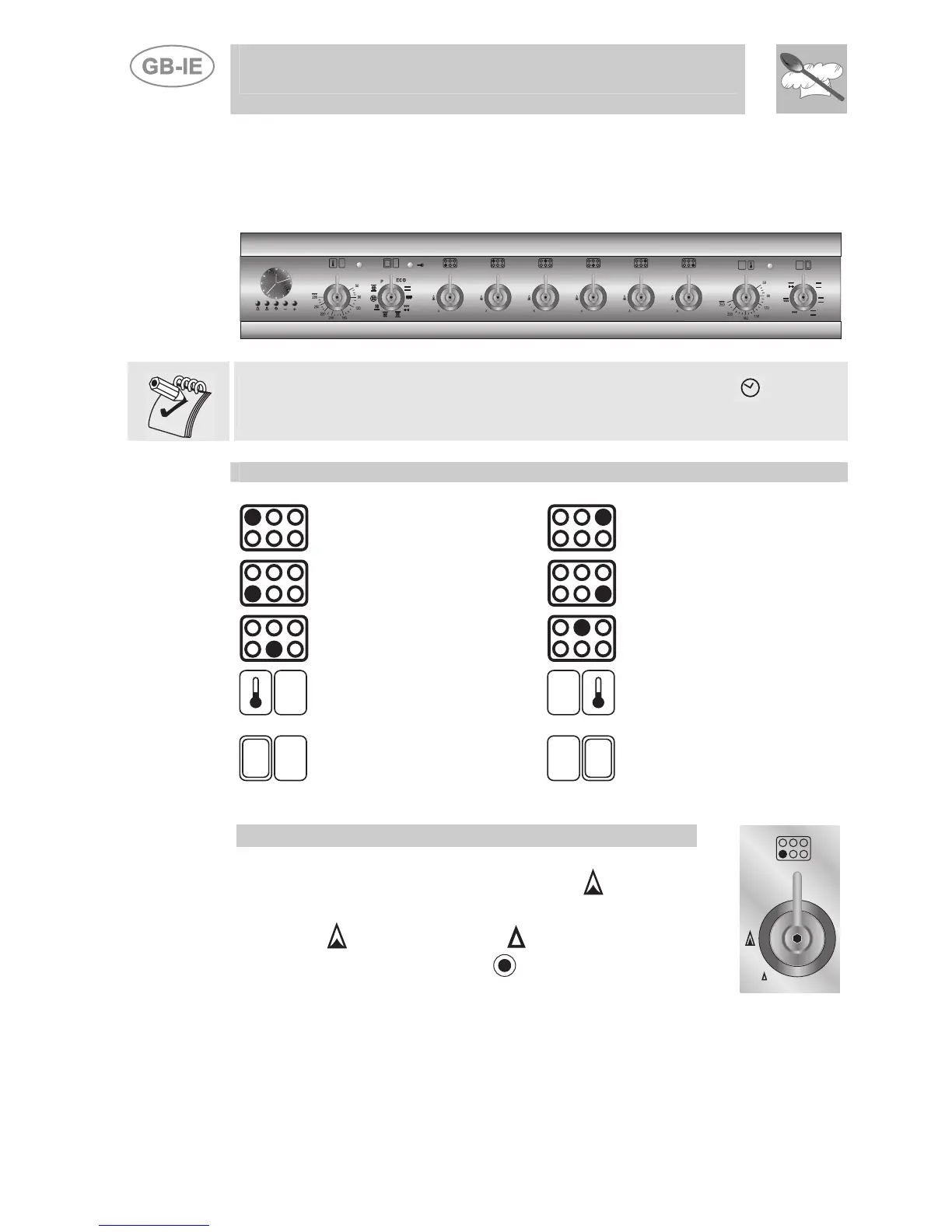
All the cooker's control and monitoring devices are placed together on the
front panel.
At first use after a power blackout, press the middle knob for 1 / 2
seconds to enable oven cooking operations.
KEY TO SYMBOLS
LEFT REAR
BURNER
RIGHT REAR
BURNER
LEFT FRONT
BURNER
RIGHT FRONT
BURNER
CENTRAL FRONT
BURNER
CENTRAL REAR
BURNER
MAIN OVEN
THERMOSTAT
AUXILIARY OVEN
THERMOSTAT
MAIN OVEN
FUNCTIONS
AUXILIARY OVEN
FUNCTIONS
HOB BURNER CONTROL KNOB
To light the flame, press the knob and turn it anti-
clockwise to the maximum flame symbol . To adjust
the flame, turn the knob to the zone between the
maximum and the minimum settings. To turn off
the burner, turn the knob to the position.


 To Next Page