EN - 8 -
USAGE INFORMATION
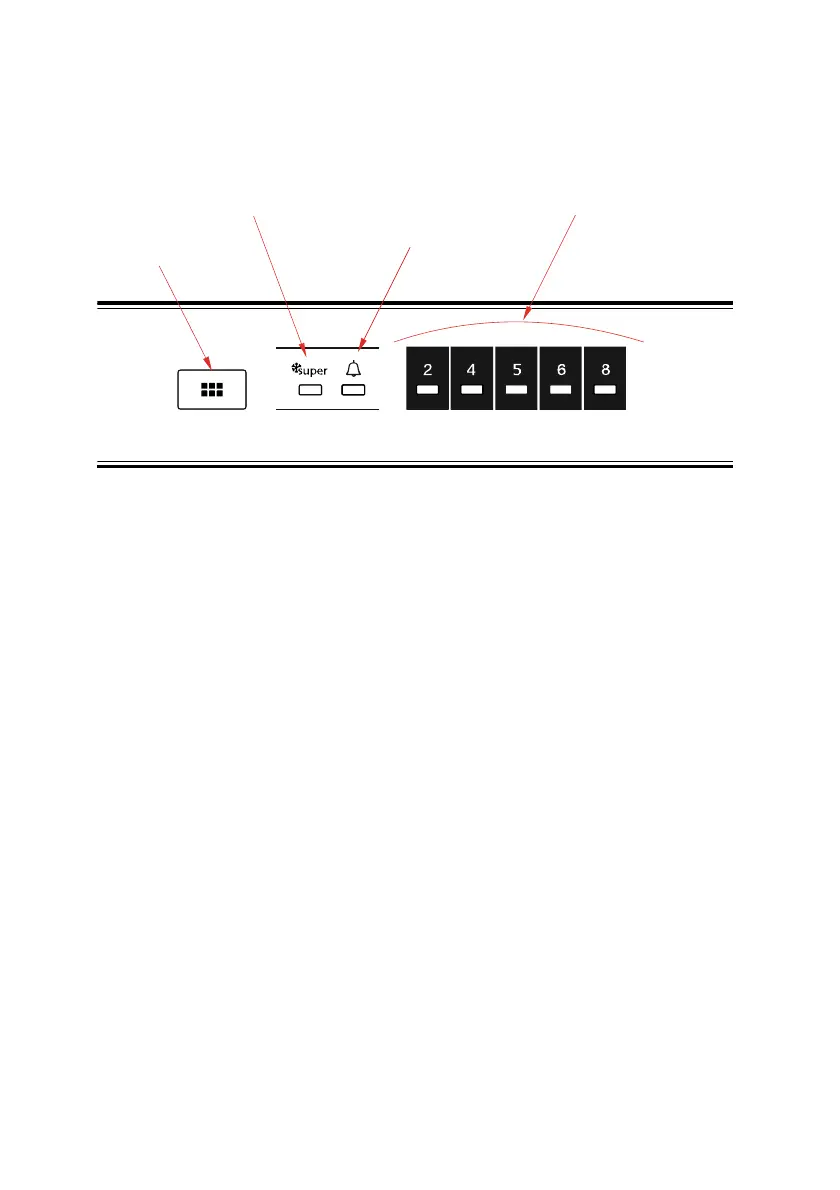
Control panel
Temperature
set button
Symbol of
Super Cooling Mode
Alarm indicator led
Fridge adjusted
temperature indicator
Temperature set button
This button allows setting temperature of the fridge. In order to set values for fridge
partition, press this button. Use this button also to activate Super Cooling mode.
Alarm light
In case of a problem within the fridge, the alarm led will release red light
Super Cooling Mode
When would it be used?
• To cooling huge quantities of food.
• To cooling fast food.
• To cooling food quickly.
• To store seasonal food for a long time.
How to use?
• Press temperature set button until super cooling light comes on.
• Super cooling led will light during this mode.
• For optimal appliance performance in maximum cooling capacity, set the appliance
to active Super Cooling mode 6 hours before you put the fresh food into the fridge.
During this mode:
If you press temperature set button, the mode will be cancelled and the setting will be
restored from 2.
Note: “Super cooling” mode will be automatically cancelled after 6 hours or when cooling
sensor temperature drops beneath 2 °C.
Fridge Temperature Settings
• The initial temperature of the Setting Display is 5°C.
• Press fridge setting button once.


 To Next Page