EasyManua.ls Logo

Smiths Medical SurgiVet V3404 Plus - User Manual

Smiths Medical SurgiVet V3404 Plus
86 pages
Print Icon
To Next Page IconTo Next Page
Loading...
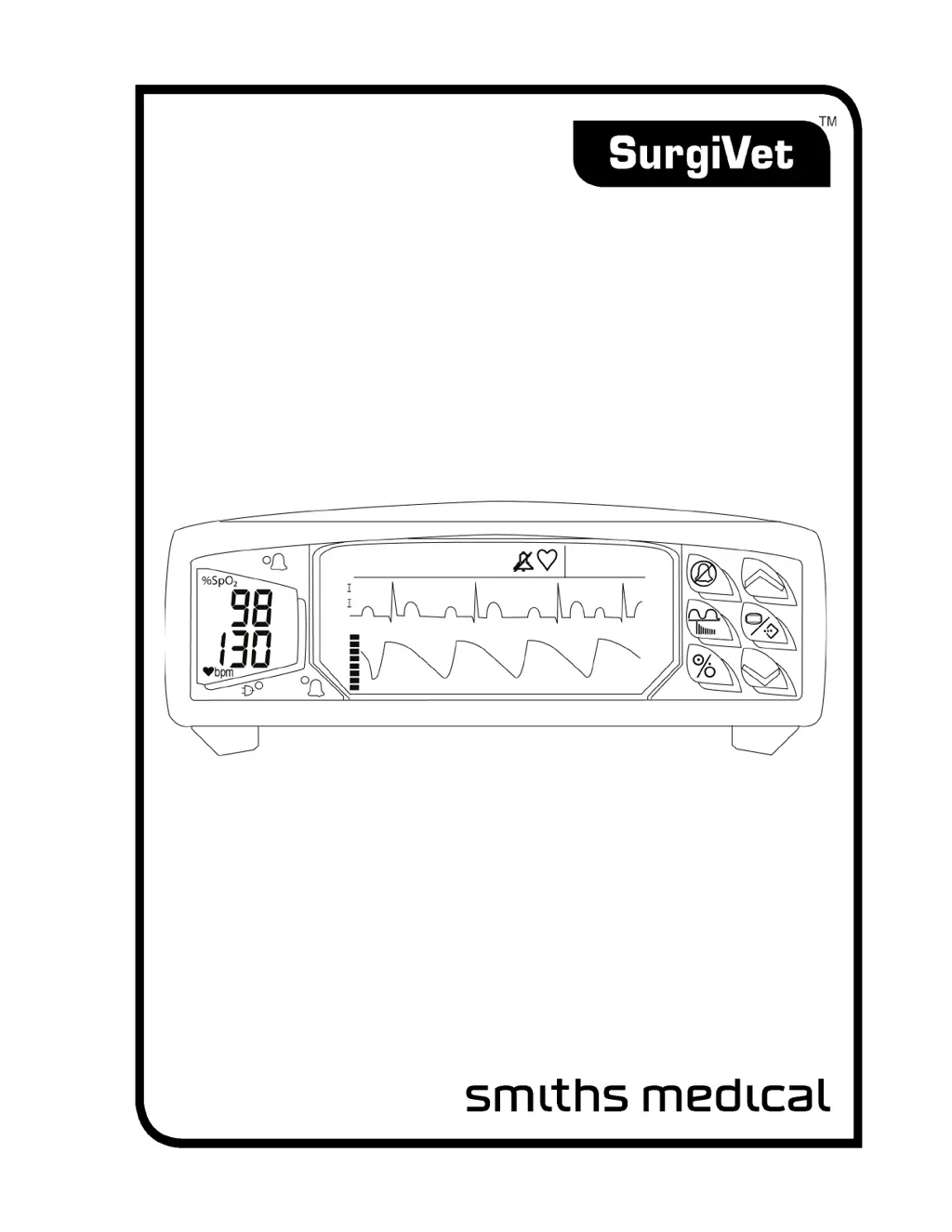
SurgiVet® V3404 Plus
ECG, Pulse Oximeter,
Respiration & Temperature
Operation Manual
- English
Catalog Number V1888TR
Version 2, August 2007
©
2007 Smiths Medical family of companies. All rights reserved.
RR
/m
25

Table of Contents

Questions and Answers

  • P
    Philip MorrisAug 13, 2025
    Why is 'Check SpO2 Sensor' displayed on my Smiths Medical SurgiVet V3404 Plus?
    • B
      Betty MyersAug 13, 2025
      The 'Check SpO2 Sensor' message appears on your Smiths Medical Medical Equipment for several reasons: the sensor might not be correctly connected to the monitor or the patient; the sensor could be improperly positioned; the wrong sensor is being used; or the sensor or patient cable may be defective. To resolve this, ensure the sensor is properly connected to both the patient cable and the monitor. Reposition the sensor on the patient. Verify that you are using the correct sensor for the application. If problems persist, try changing the sensor or contact Smiths Medical Veterinary Division service department.
  • C
    Christopher Case PhDAug 16, 2025
    Why is there no pulse registering on the bargraph of my Smiths Medical Medical Equipment?
    • A
      Amber DavisAug 17, 2025
      If there's no pulse registering on the bargraph of your Smiths Medical Medical Equipment, it could be due to several reasons. The sensor or patient cable might be disconnected from the monitor. The sensor may be incorrectly positioned on the patient, or the patient may have poor perfusion. Also, the sensor or patient cable could be defective. Check the connections to the patient cable and sensor. Reposition the sensor on the patient. If the issue continues, try a new sensor or contact Smiths Medical Veterinary Division service department.
  • E
    Elizabeth ByrdAug 20, 2025
    What to do if the pulse rate is erratic, intermittent, or incorrect on Smiths Medical SurgiVet V3404 Plus?
    • D
      David LittleAug 20, 2025
      If the pulse rate on your Smiths Medical Medical Equipment is erratic, intermittent, or incorrect, it could be due to: * The sensor being incorrectly positioned. * Poor patient perfusion. * Patient motion. * Ambient light interference. To address this, reposition the sensor on the patient. Ensure the patient remains still for the monitor to function correctly. Place the extremity on a pillow to minimize motion and shield it with a towel to reduce ambient light.
  • D
    deborahthompsonAug 25, 2025
    What to do if Lead Off is displayed on Smiths Medical Medical Equipment?
    • J
      Jerry GriffinAug 25, 2025
      If 'Lead Off' is displayed on your Smiths Medical Medical Equipment, it could be due to: * ECG lead(s) not connected to the patient cable. * A broken ECG lead (high impedance). * Electrode impedance being too high. To resolve this, connect the ECG lead(s) to the patient cable. If a lead is broken, replace it. If electrode impedance is too high, reapply the electrodes.
  • J
    Jeremy GarrettAug 27, 2025
    Why won't my Smiths Medical Medical Equipment operate on battery power but works when connected to the external charger?
    • S
      Shawn RomeroAug 28, 2025
      This could be because the battery shelf life has been exceeded. Contact Smiths Medical Veterinary Division service department.
  • R
    Rhonda HallAug 31, 2025
    How to fix a Smiths Medical SurgiVet V3404 Plus Medical Equipment display that does not light up?
    • C
      Christopher YoungAug 31, 2025
      If the display on your Smiths Medical Medical Equipment does not light up and you are operating on battery, the battery may need charging. Recharge the battery.
  • R
    Robert MartinSep 4, 2025
    What to do if ECG electrodes are connected, but no ECG waves or messages are displayed on Smiths Medical Medical Equipment?
    • C
      Christina CaldwellSep 4, 2025
      If the ECG electrodes are connected but no ECG waves or messages are displayed on your Smiths Medical Medical Equipment, the ECG function might be disabled. Use the ECG menu to enable the ECG function.
  • T
    Tyrone GibsonSep 8, 2025
    Why is the green (charge) LED not lit on my Smiths Medical Medical Equipment?
    • A
      Aaron AndersonSep 8, 2025
      If the green (charge) LED is not lit on your Smiths Medical Medical Equipment, the external charger might be disconnected. Connect the charger.

Summary

Warranty and Service Information

Limited Warranty

Outlines warranty terms for the product and accessories, duration, and conditions.

Loaner Device (Domestic Sales Only)

Details availability of loaner devices during repair for domestic sales.

Disclaimer of Warranties

States exclusion of all other warranties and disclaims responsibility for specific uses.

Warranty Procedure

Describes the process for obtaining warranty service and return authorization in the USA.

Chapter 1: Introduction

Definition of Symbols

Explains the meaning of various symbols used throughout the manual.

General Warnings, Cautions and Notes

Lists essential safety guidelines, precautions, and important notes for device operation.

Oximetry Warnings, Cautions and Notes

Lists safety warnings and precautions specific to the oximetry function of the device.

ECG Warnings, Cautions and Notes

Lists safety warnings and precautions specific to the ECG function of the device.

Chapter 2: Description of Measurements, Controls and Features

Intended Use

Defines the purpose and application of the SurgiVet V3404 Plus monitor.

Front Panel

Details the components and indicators located on the front of the monitor.

EL Display

Explains the functions and elements of the electroluminescent display screen.

Keys

Describes the function of each key on the monitor's control panel.

Chapter 3: Setting Up the Monitor

Unpacking the Monitor and Checking the Shipment

Instructions for unpacking and verifying the contents of the monitor shipment.

Freezing and Releasing Displayed Waveforms

Explains how to freeze and unfreeze waveform displays for analysis.

Working With System-Wide Settings

Covers system-wide settings adjustments via the Setup/Volume menu.

Adjusting the Line Filter Parameter

Guidance on adjusting the line filter based on input line voltage frequency.

Chapter 4: Alarms

High Priority Alarms

Explains what triggers high priority alarms and how they are indicated.

Low Priority Alarms

Explains what triggers low priority alarms and how they are indicated.

Adjusting or Viewing Alarm Limits

Step-by-step instructions for setting and checking alarm limit values.

System Information Signal: Low Battery

Describes the indicators and alerts for a low battery condition.

Chapter 5: ECG

Theory of Operation

Explains how the monitor acquires and processes ECG signals.

Setting Up ECG Monitoring

Steps to ensure the ECG parameter is enabled and configured correctly.

Attaching the ECG Leads to the Patient

Provides instructions on correctly attaching ECG electrodes and leads to the patient.

ECG Display

Explains how ECG waveforms and related information are displayed on the monitor.

Chapter 6: Oximetry

General Description

Overview of the oximeter's functions, including SpO2 and pulse rate monitoring.

Oximeter Display

Explains the components of the oximeter display, including SpO2 and pulse rate.

Oximeter Menu

Describes the settings and options available in the oximeter menu.

Attaching the Patient - Oximetry

Guidance on selecting and attaching appropriate oximetry sensors to patients.

Chapter 7: Respiration

Theory of Operation

Explains the thermistor-based method used for respiration measurement.

Respiration Menu

Describes the settings and options available in the respiration monitoring menu.

Chapter 8: Temperature

Temperature Theory of Operation

Explains how thermistors are used to measure patient temperature.

Setting up Temperature Monitoring

Steps to ensure the temperature parameter is enabled and configured.

Units

Information on displaying temperature in Fahrenheit or Celsius.

Chapter 9: Trends

Trends Menu

Describes how to access and adjust trend display settings.

Chapter 10: Serial Output

Serial Out Menu

Configuration options for serial data output to a computer or printer.

Serial Output Setup for RS-232 Connections

How to configure data format and interval for RS-232 serial output.

Serial Output Setup for Graphics Printer

Instructions for setting up serial output for printing real-time strip charts.

Output Examples

Examples of patient data output formats for RS-232 and BCI printers.

Chapter 11: Analog Output

Analog Out Menu

How to select parameters and waveforms for analog output channels.

Chapter 12: Routine Maintenance

Operators Maintenance

Provides a schedule and details for daily operator maintenance tasks.

Long Term Storage

Guidelines for storing the monitor and accessories for extended periods.

Chapter 13: Troubleshooting

Troubleshooting Table

Lists common problems, possible causes, and corrective actions for the monitor.

Chapter 14: Supplies and Accessories

Supplies and Accessories List

Catalog of available supplies and accessories for the SurgiVet V3404 Plus monitor.

Chapter 15: Specifications

Parameters Monitored

Lists all parameters that can be monitored by the device.

SpO2 Specifications

Technical specifications for the SpO2 monitoring function, including range and accuracy.

Pulse Rate Specifications

Technical specifications for pulse rate monitoring, including range and accuracy.

ECG Specifications

Technical specifications for ECG monitoring, including configuration and response.

Appendix A: Guidance and Manufacturers Declaration

Electromagnetic Emissions - Emissions Test

Details RF and harmonic emissions compliance and guidance.

Electromagnetic Emissions - Immunity

Details immunity test levels for electrostatic discharge and compliance guidance.

Recommended Separation Distances

Recommends distances for RF communication equipment to prevent interference.

Appendix B: Revision History

Revision History Table

Lists revisions made to the manual, including dates and changes.

Smiths Medical SurgiVet V3404 Plus Specifications

General IconGeneral
BrandSmiths Medical
ModelSurgiVet V3404 Plus
CategoryMedical Equipment
LanguageEnglish

Related product manuals