SMOKE-FACTORY –
DATA II Operating Instructions
5 Operating the DATA II
The DATA II is a powerful fog generator, producing every desired effect from a tiny puff of smoke to
the thickest fog. Digital technology makes fine adjustments of the pump possible. In steps of 1% the
output can be adjusted from 1-99%.
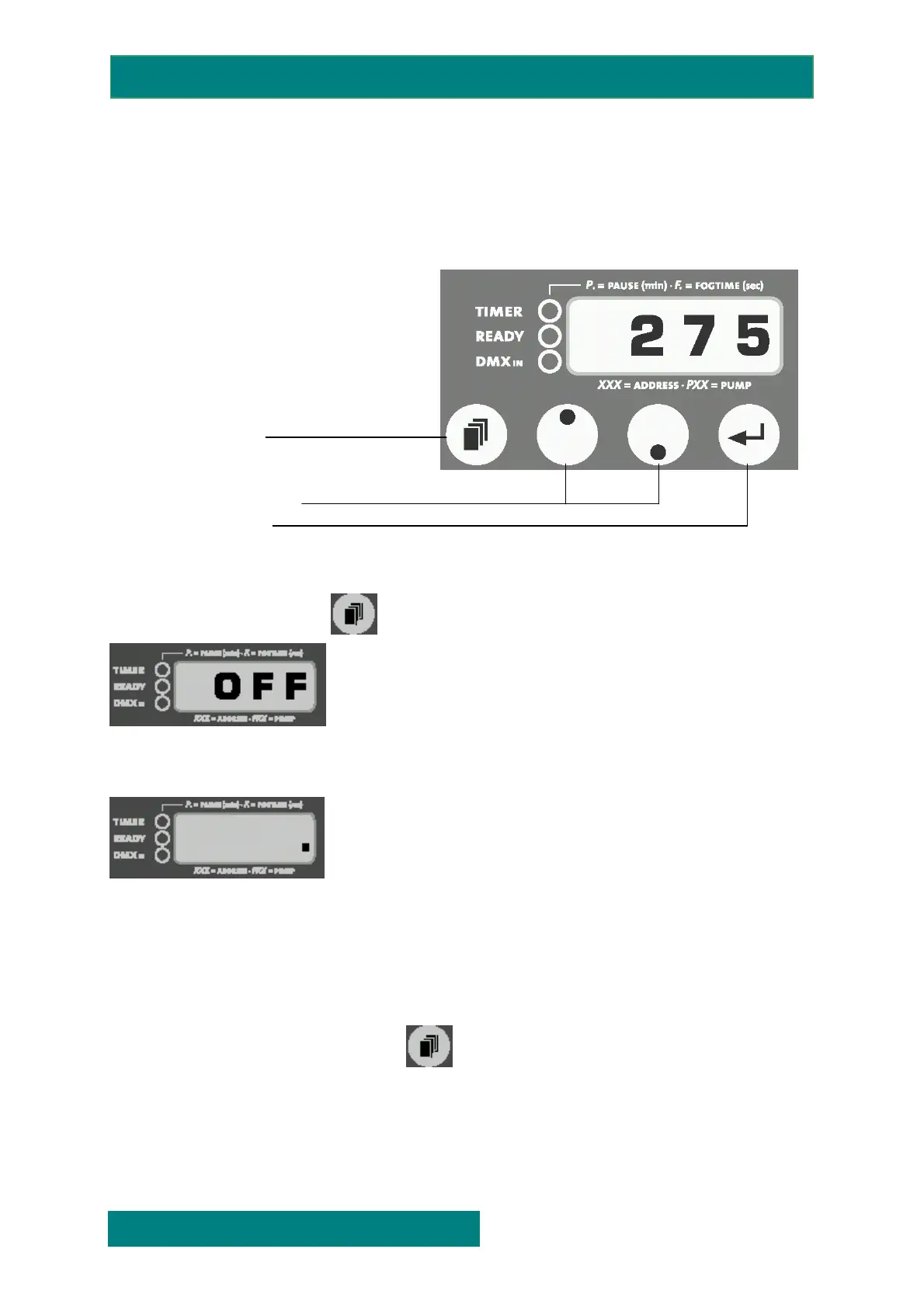
5.1 Control panel DATA II
• TIMER-LED, red
• READY-LED, green
• DMX IN-LED, yellow
• MODE
• UP/DOWN
• ENTER
5.2 Switch of the device
Press the Mode butten til „OFF“
appears on the display.
After 15 seconds the machine will switch off automatically. On the right bottom edge of the display a
red decimal point appear.
You can also switch off the machine within these 15 seconds by pressing the Enter-button.
When you switch off the DMX signal, the machine will be switched off automatically after 15
seconds.
Please note that the Mode button is not designed to scroll between the different menus.
If you press the mode button longer than 2 sec. the display will change into the timer menue.
SMOKE FACTORY
issue 1.0 Page: 7 of. 15
FOG GENERATORS NEBELMASCHINEN


 To Next Page