Alarm Page (Key 5)
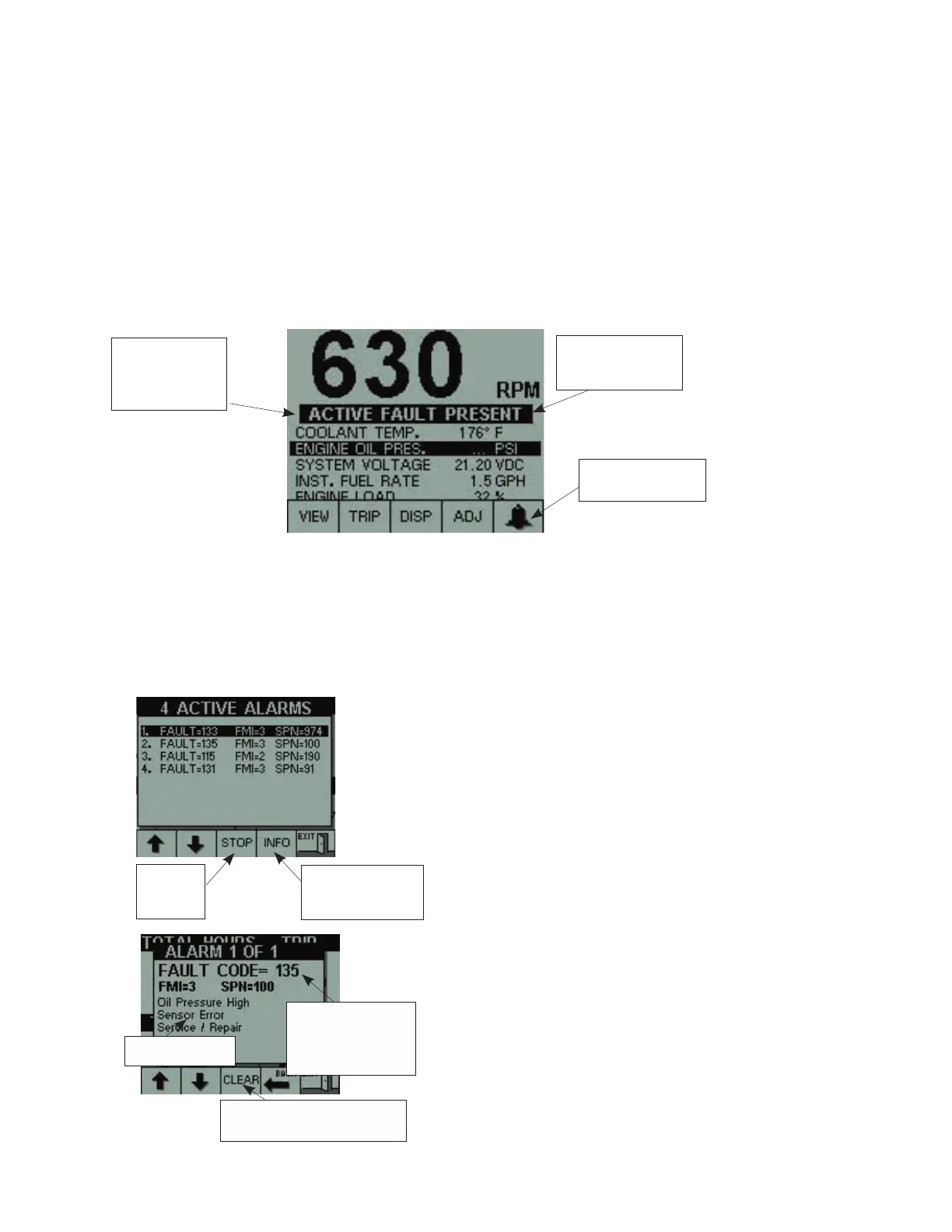
When an alarm is present, the display will bleep and the “Active Fault Present” banner will
flash over the screen on every page. While in BASIC PAGE, parameters related to active
faults will flash.
The display will detect selected faults depending on the engine application. The fault
condition must be corrected and each individual fault must be cleared in the ALARM PAGE
to remove the flashing banner. Refer to the appendix for a list of faults for each engine
application.
NOTE: There is an external alarm driver available from the Electronic Display. Refer to the
wiring diagram in the appendix for information.
On every page, a bell icon is displayed on Key 5. Press Key 5 to select the ALARM PAGE
where the bleep can be turned off and the alarm text information can be read.
Alarm will stay active
until fault condition is
eliminated
Press Key 5 to go to
ALARM PAGE
Banners will flash
and beeper will
sound during an
active alarm
The ALARM PAGE is a pop-up window that displays the list of all current active faults.
Alarms are listed in reverse chronological order.
The most recent alarm will be shown at the top of the list.
Pressing key 3 will silence the alarm until
a new alarm becomes active.
Key 1 and Key 2 are used to navigate
through the list of active faults. Press Key
4 to read the text information associated
with the selected fault.
When active fault information is displayed,
the fault can be cleared by pressing Key
3. The fault will then be removed from the
list.
Key 1 and Key 2 can still be used to
navigate through active faults.
Press Key 4 to go back to the fault list.
Press Key 5 to go back to the background
screen.
Press Key
3 to stop
the beeper
Press Key 4 to read
text information of
selected alarm
When giving infor -
mation to Cummins,
use this fault code
number
Fault description
Press Key 3 to clear this fault
and remove it from the list


 To Next Page
 Loading...