Initial Setup
On initial power up the display will automatically enter screens within the Settings and
Config Menus which need to be set up by the user in order to use the display. Once these
are set on the initial power-up, it is not necessary to repeat these steps. If the initial settings
have been set incorrectly, the setup screens can be corrected via the Configuration Menu
(see Configuration Menu section).
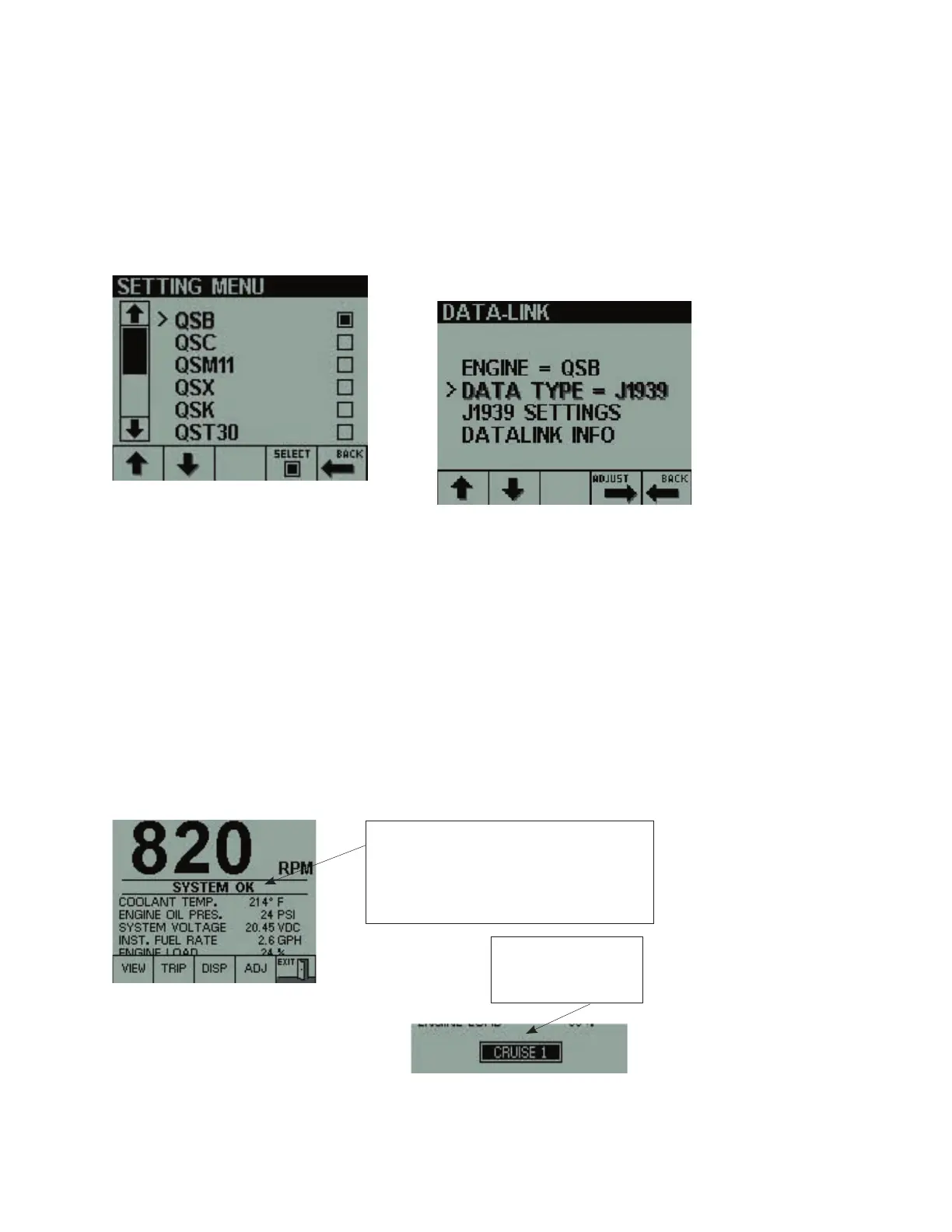
The user is first prompted to select the engine
model to which the display is connected.
Use up/down scroll keys (Key 1 or Key 2)
to move the pointer to the desired engine
model. Press the SELECT key (Key 4) to
fill in the box in the right hand column
adjacent to the desired model, then press
the BACK key (Key 5).
Key 1 Key 2 Key 3 Key 4 Key 5
Use the up/down scroll keys (keys 1 and 2)
to move the pointer to the data type item
followed by the ADJ key (key 4) to select
between J1939 and J1587 Data type.
The display then enters the Data-link
screen and the user should select Data
type, either J1587 or J1939.
Default Screen (BASIC PAGE)
The BASIC PAGE is displayed after the power on screen is finished testing the functionality
of the unit. The “SYSTEM OK” banner is displayed for the first 60 seconds, then turned
off. The “ACTIVE FAULT PRESENT” banner is only displayed if certain ECM (Engine Control
Module) fault codes are active. The Electronic Display does NOT show all possible ECM fault
codes at this time.
If no keys are pressed within 5 seconds, the
button bar will slide down out of view and
reveal engine feature switches that are
turned on (if this feature is supported by the
installation).
Pressing keys 1 to 4 will restore the menu
button bar to the screen, whereas pressing
key 5 will allow the user to set lighting and
contrast values (see Lighting and Contrast
section).
Engine Feature
switch indication. Only
available with certain
engines and data types
Key 1 Key 2 Key 3 Key 4 Key 5
“SYSTEM OK” banner displayed upon power up and
turns off after 60 seconds
“ACTIVE FAULT PRESENT” banner is displayed if a fault
code becomes active.
“DATA LINK INACTIVE” banner displayed when no
engine data is available


 To Next Page
 Loading...