Maintenance
MAINTENANCE SCHEDULE & PROCEDURES
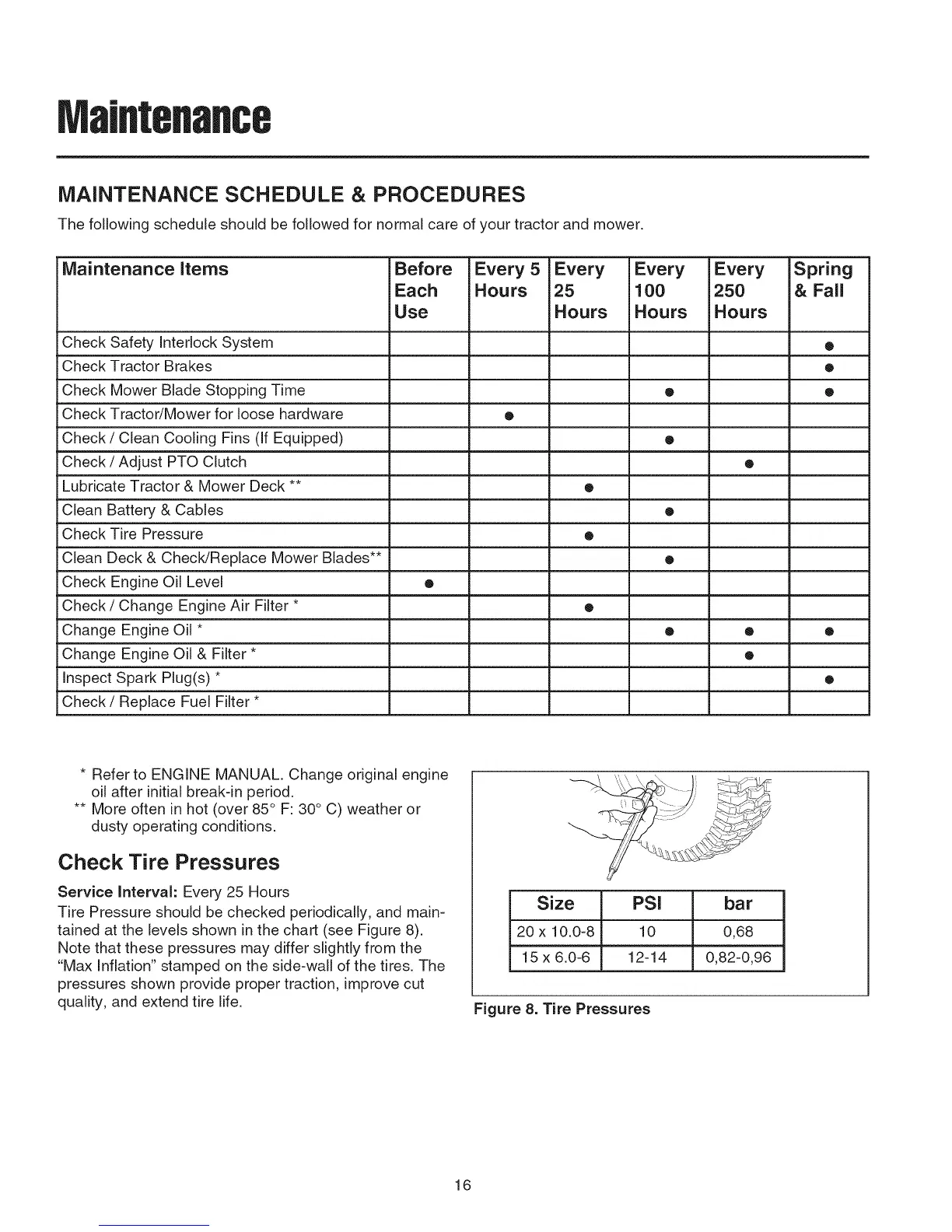
The following schedule should be followed for normal care of your tractor and mower,
Maintenance items Before Every 5 Every Every Every Spring
Each Hours 25 100 250 & Fall
Use Hours Hours Hours
Check Safety Interlock System •
Check Tractor Brakes •
Check Mower Blade Stopping Time • •
Check Tractor/Mower for loose hardware •
Check / Clean Cooling Fins (If Equipped) •
Check / Adjust PTO Clutch •
Lubricate Tractor & Mower Deck ** •
Clean Battery & Cables •
Check Tire Pressure •
Clean Deck & Check/Replace Mower Blades** •
Check Engine Oil Level •
Check / Change Engine Air Filter * •
Change Engine Oil * • • •
Change Engine Oil & Filter * •
Inspect Spark Plug(s) * •
Check/Replace Fuel Filter *
* Refer to ENGINE MANUAL. Change original engine
oil after initial break-in period.
** More often in hot (over 85° F: 30° C) weather or
dusty operating conditions.
Check Tire Pressures
Service Interval: Every 25 Hours
Tire Pressure should be checked periodically, and main-
tained at the levels shown in the chart (see Figure 8).
Note that these pressures may differ slightly from the
"Max Inflation" stamped on the side-wall of the tires. The
pressures shown provide proper traction, improve cut
quality, and extend tire life.
Size PSI bar
20 x 10.0-8 10 0,68
15 x 6.0-6 12-14 0,82-0,96
Figure 8. Tire Pressures
16




 To Next Page