EasyManua.ls Logo

Snom 821 - Page 4

Snom 821
16 pages
Print Icon
To Next Page IconTo Next Page

To Previous Page IconTo Previous Page
Loading...
4
8
Confirm key
22
Microphone for speaker
function
9
Navigation key
23
Speaker
10
End key
24
Receiver speaker
11
Voicemail key with LED
25
Receiver microphone
12
Alphanumeric keypad
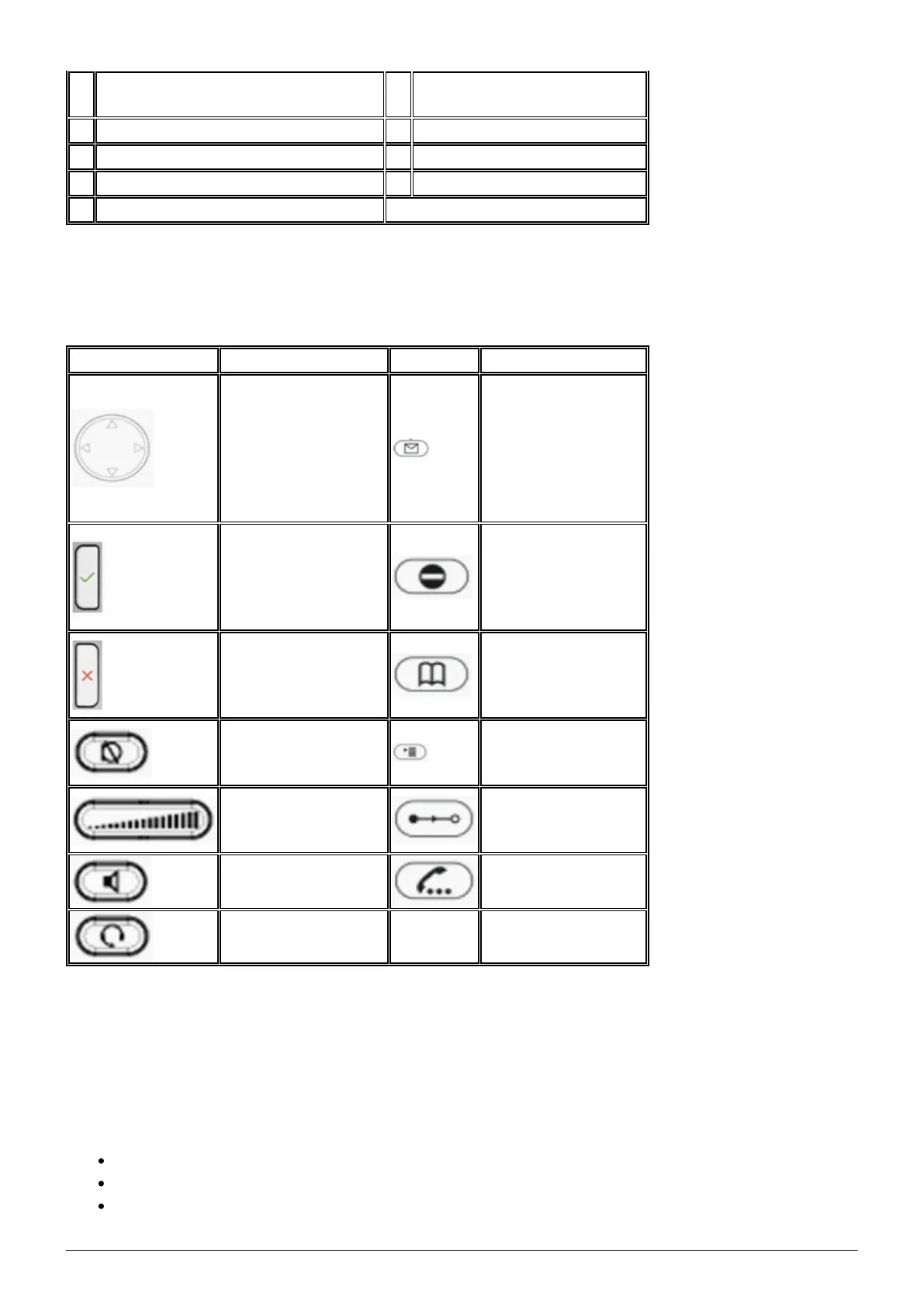
1.2. Keys in detail
Use the toggle key
to browse through
the display
(on the home
screen:
Down: Call lists;
Up: Settings)
Access voicemail
Confirms an action,
selection or entry
Do not Disturb
mode on / off.
Extension works as
in “Delayed call
forwarding”.
Cancels an action,
selection or entry
Phone book (Set up
via the
administration
portal)
Mutes the
microphone during a
call
Menu
Adjusts the receiver
volume or the ring
tone volume
Transfer call
Hands-free mode
(answering possible)
Hold call
Headset mode
LED indicators
1. Call LED:
Rapidly flashes red with an incoming call.
Continuous, bright red while dialling, during a call and when a call is placed on hold.
Continuous somewhat less intensive red indicates a missed call.

Other manuals for Snom 821

Related product manuals