8
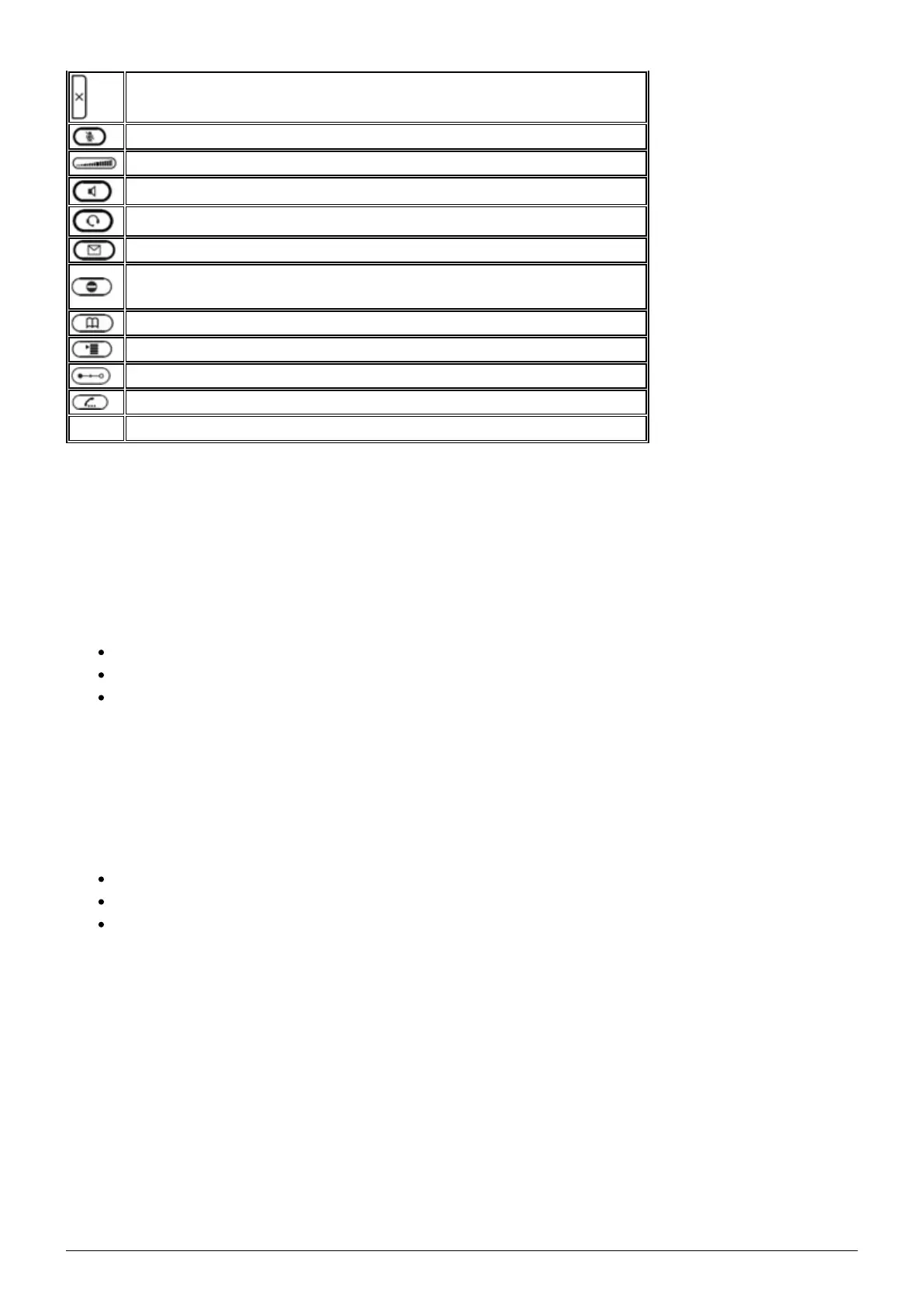
Cancels an action, selection or entry
Mutes the microphone during a call
Adjusts the receiver volume or the ring tone volume
Hands-free mode (answering possible)
Headset mode
Access voicemail
Do not Disturb mode on / off. Extension works as in “Delayed call
forwarding”.
Phone book (Set up via the administration portal)
Menu
Transfer call
Hold call
Hold key on snom D735 and D785
LED indicators
Call LED*
Rapidly flashes red with an incoming call.
Continuous, bright red while dialling, during a call and when a call is placed on hold.
Continuous somewhat less intensive red indicates a missed call.
Function keys LED
The standard setting is “Line”. I.e., if the first four freely programmable function keys are not
programmed, the function keys with LEDs can be used as line keys.
Rapidly flashing green when the respective line has an incoming call.
Continuous green when the line is in use.
Slowly flashing green when the line has a call on hold
Voicemail LED
A continuous red light indicates a new message has been saved in voicemail.
*The LED indicator of snom 710 flashes solely in green color.
1.2. Outgoing call
Note:



 To Next Page