11
Setting Code Lengths via Serial Commands
While the length (number of characters/digits) of some barcodes is fixed (e.g., UPC, EAN, JAN), most
symbologies allow you to configure among various options for barcode length.
Depending on the option you choose, your scanner will be able to decode one of the following:
• One discrete length barcode
• Two discrete length barcodes
• Barcodes within a range of lengths within the scan engine capability
• Any length of barcodes within the scan engine capability
There are two lengths (L1 and L2) for each variable length code type. Please refer to the individual
code types in the following pages for the L1 and L2 parameter numbers for specific symbologies.
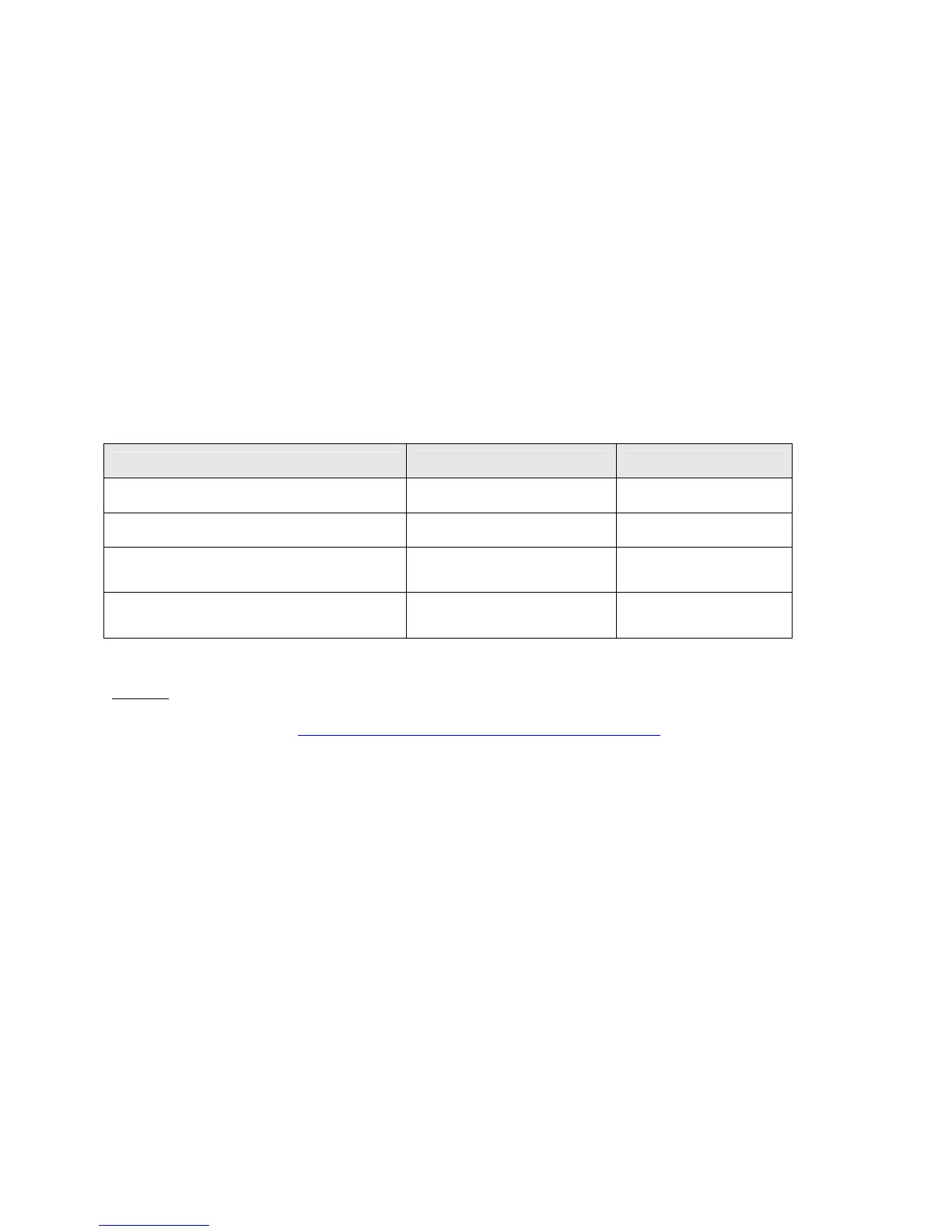
Setting Variable Code Lengths
Code length option Length 1 value Length 2 value
One discrete length will be decoded Discrete length to decode 0x00
Two discrete lengths will be decoded Higher length value Lower length value
Lengths within a range will be
decoded within the scanner capability
Lower length value Higher length value
Any length barcode will be decoded
within the scanner capability
0x00 0x00
CSE-600: Socket has created a Configuration Utility (ScanParams.exe) that makes it easy for Pocket
PC and Palm users to send serial commands to products using the CSE-600. Download the utility
from Socket’s website at: http://www.socketmobile.com/support/downloads



 To Next Page