22
10. AUTOMATION
There are various ways you can enhance your smart product experience� Automation
lets you control your SO-255WUI Air Purier based on other conditions such as:
• Weather changes (example: when local temperature is greater than 28°C)
• Schedule (example: 7:00am every morning)
• The operation of another device
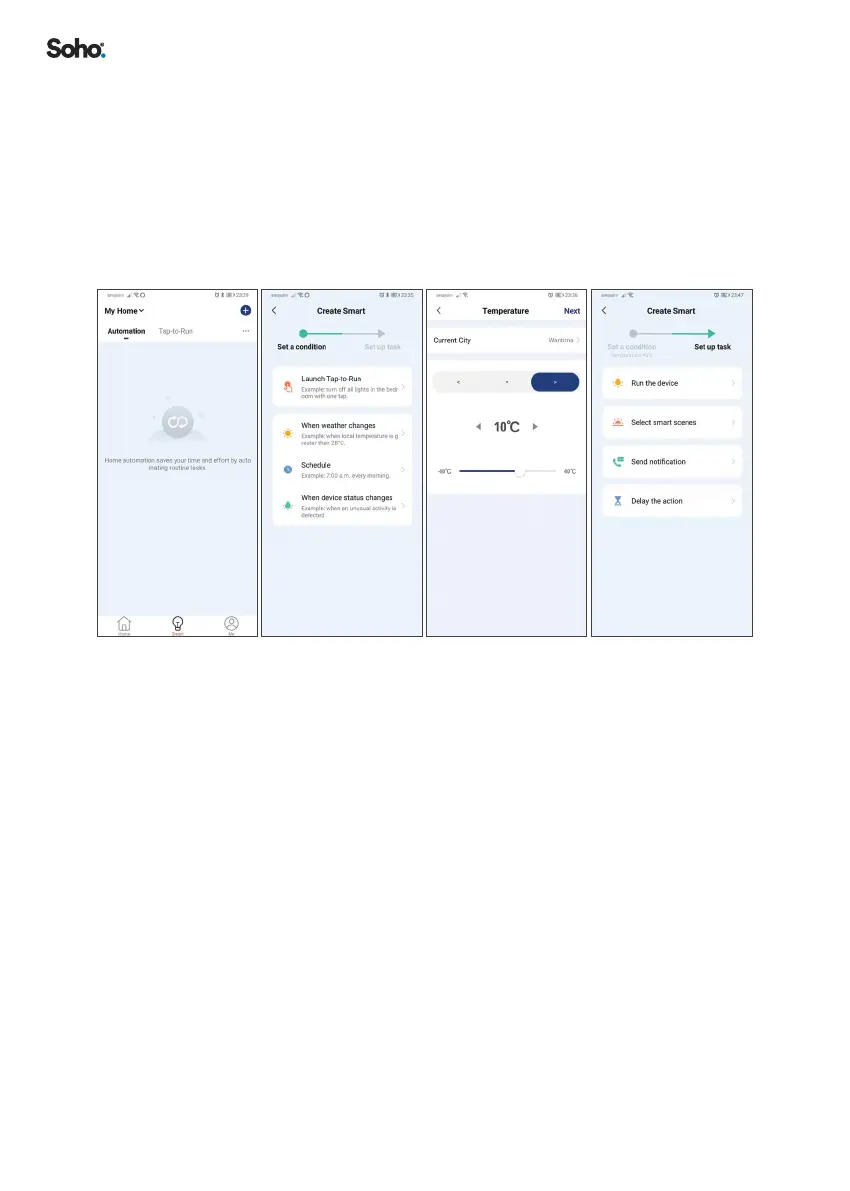
To activate the Automation function, follow these steps:
From the home screen, perform the following actions
1. Select ‘SMART’ on the menu at the bottom of the screen�
2. Add an automation routine, select ‘+’ (circled at the top right of the screen)�
3. Select an automation action� In this example, we will select ‘WHEN WEATHER
CHANGES’�
4. Select a specic weather condition, so we will select ‘TEMPERATURE’�
5. Select the trigger condition and set the trigger temperature then click ‘NEXT’�
6. Select the action to be performed, we will select ‘RUN THE DEVICE’ for this
example�
7. Select the device you want to control�
ADDITIONAL APP FUNCTIONS
Additional App functions are described in ‘FAQ & FEEDBACK’ section, and via the
‘ME’ menu in the App�


 To Next Page