For the most current Installaon Instrucons, please visit www.solatube.com/instrucons
Solatube Internaonal, Inc. | 2210 Oak Ridge Way | Vista, CA 92081-8341 | www.solatube.com | T: 888.SOLATUBE
© 2020 Solatube Internaonal, Inc. Part No. 951845 v1.1
4
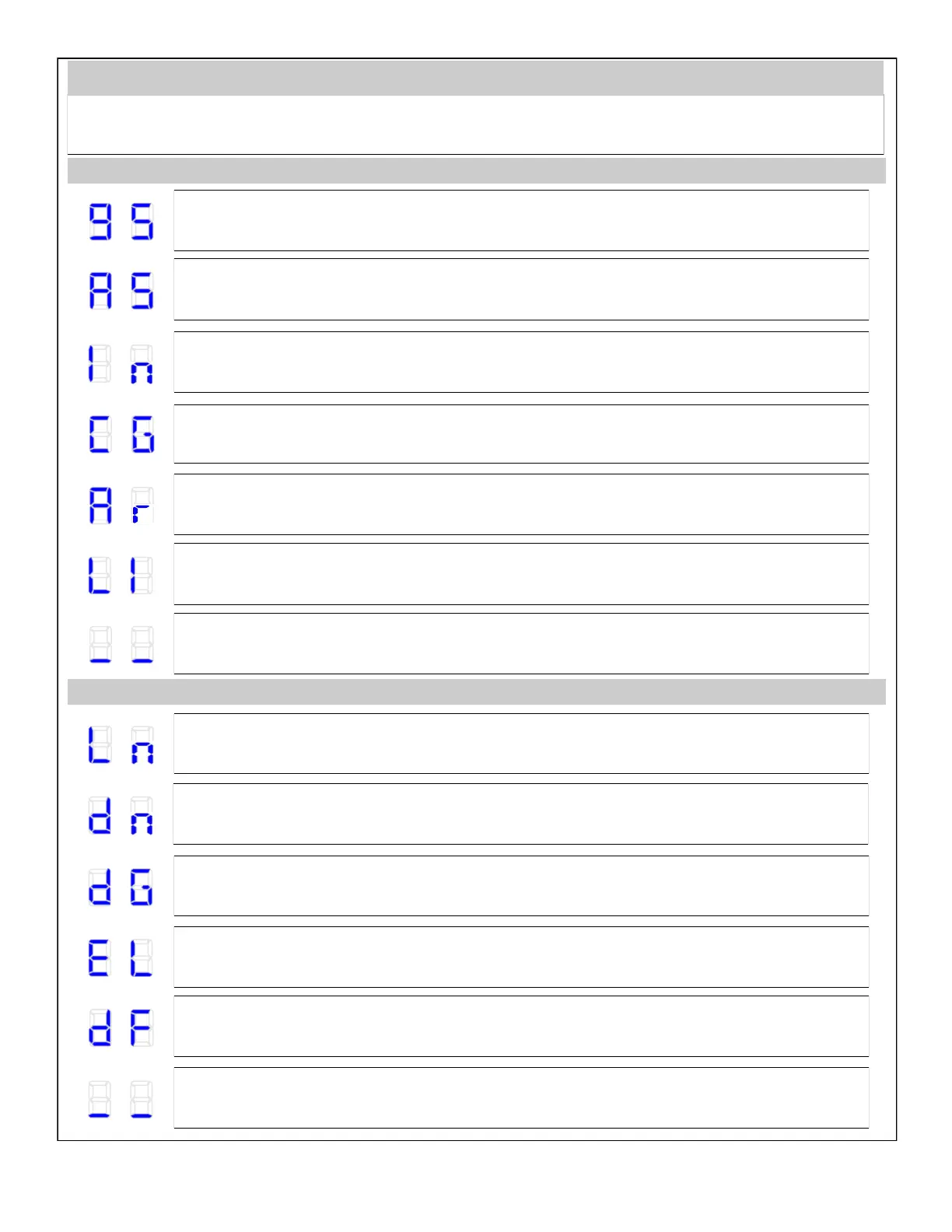
The Solatube remote control is equipped with a hidden screen located under the front of the housing. This makes it easy to nd
the funcon that you are interested in. Abbreviaons displayed on the screen are described below.
Remote Control Menu Descripon
Holding Stop + Up Buon for 3 Seconds
Quick Start / Adding Device (Quick Start)—
Adding devices both to network and group.
Associate / Adding Devices to Group.
Include / Adding Device to Network.
Copy Group—
Copying groups to other remote controls in the same network.
Assign A Route / Associang Devices—
Control signal is sent between associated devices.
Listening Mode—
Enables remote conguraon of the remote control from another controller.
Back to Previous Screen.
Holding Stop + Down Buon for 3 Seconds
Learn Mode—
Enables to add the remote control to the network as Secondary.
Delete Mode / Removing Devices from Group
Delete Group / Removing Group—
Removes the enre selected group.
Exclude / Removing Device from Network.
Default / Reseng Remote Control—
Resets seng of the remote control and removes informaon about devices and network.
Back to Previous Screen.


 To Next Page