For the most current Installaon Instrucons, please visit www.solatube.com/instrucons
Solatube Internaonal, Inc. | 2210 Oak Ridge Way | Vista, CA 92081-8341 | www.solatube.com | T: 888.SOLATUBE
© 2020 Solatube Internaonal, Inc. Part No. 951845 v1.1
8
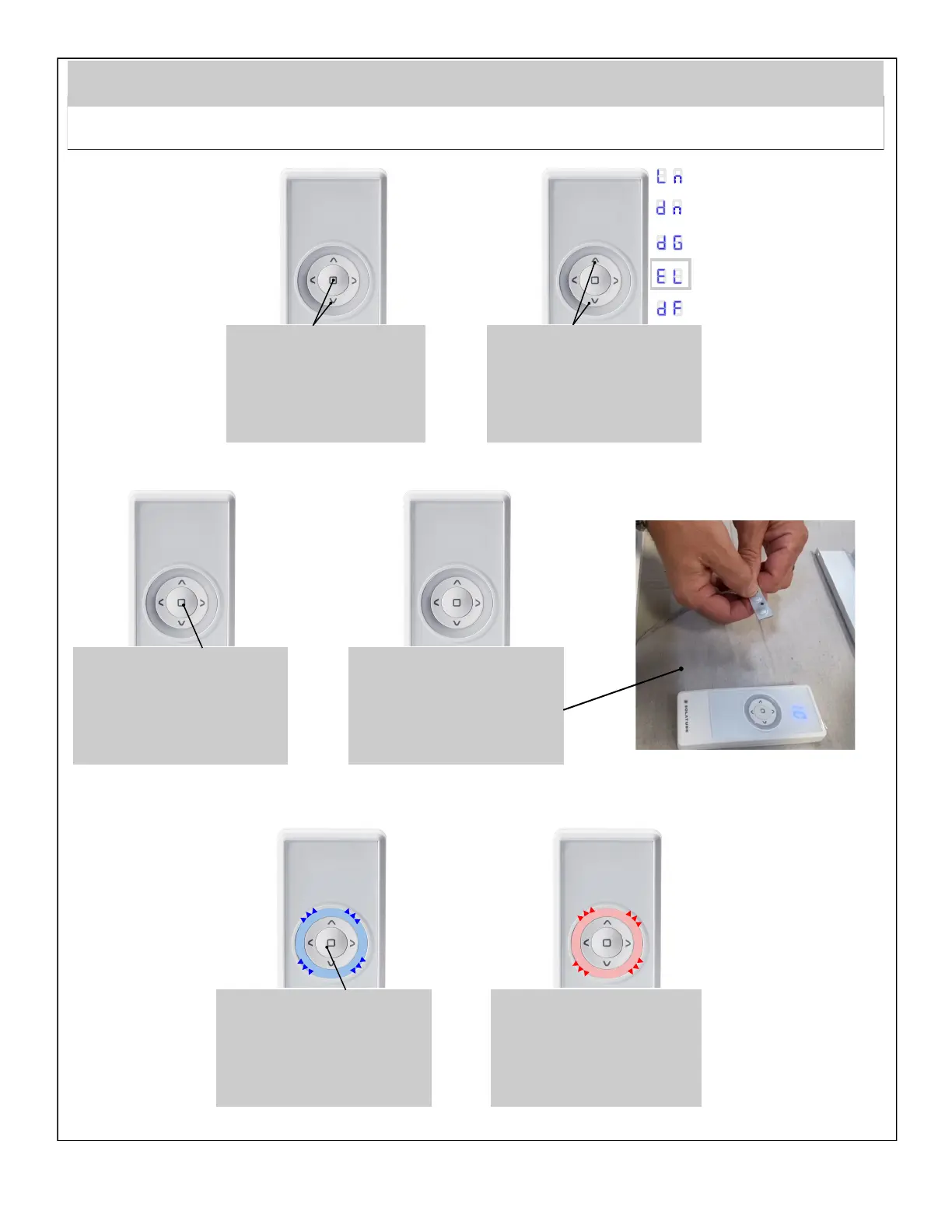
This step allows a remote to be removed from a skylight memory.
Remove Device From Network
Unpair Remote From Skylight
Using UP / DOWN buons select
the marked posions.
8 8
e
Hold simultaneously STOP and
DOWN Buons unl you enter
conguraon mode.
8 8
Procedure performed correctly.
Blue backlight ashes once.
8 8
1
l
Accept by pressing STOP buon.
8 8
Display will begin to count down.
Within 12 seconds press the “P”
buon of the skylight being
unpaired.
8 8
1
2
Error. Red backlight ashes 3
mes. Repeat procedure or see
page 12, point 5.
8 8
1
e
.
8 8 e 7
. .
e l
e l


 To Next Page