For the most current Installaon Instrucons, please visit www.solatube.com/instrucons
Solatube Internaonal, Inc. | 2210 Oak Ridge Way | Vista, CA 92081-8341 | www.solatube.com | T: 888.SOLATUBE
© 2020 Solatube Internaonal, Inc. Part No. 951845 v1.1
7
This funcon allows you to assign a second remote control as a SECONDARY. This allows you to use two remote controls to
operate skylights. Follow this step if you want a secondary remote to do the same as the primary remote.
Assign Remote As Secondary (Mirror / Clone Remote) and Copy Group Connued
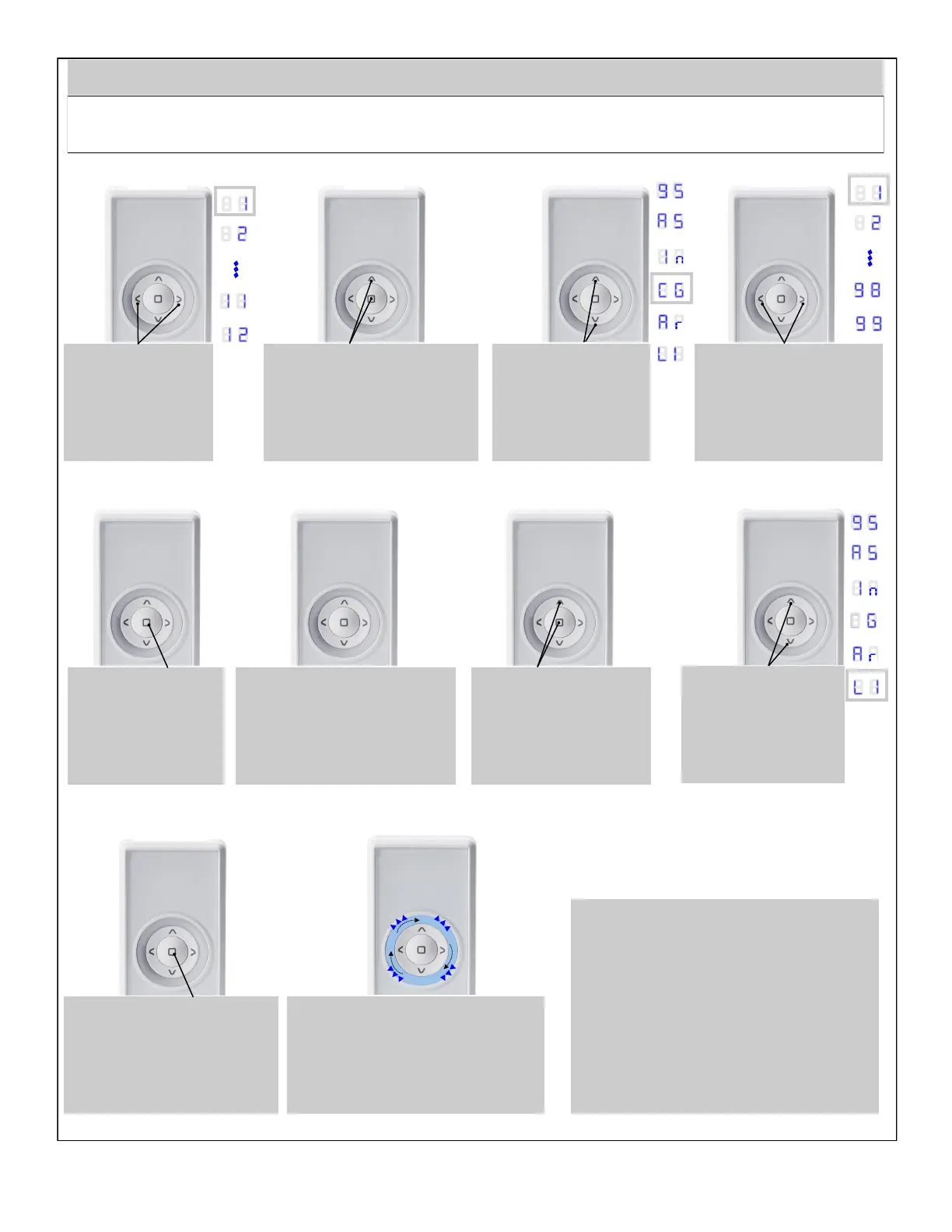
Using LEFT / RIGHT buons
select a target group.
8 8
1
Hold simultaneously UP and
STOP buons unl you enter
conguraon mode.
8 8
c
Using UP / DOWN
buons select marked
posion.
8 8 c
Using LEFT / RIGHT
buons select group
which you want to
remove (e.g. 1).
8 8 1 g g
Accept by pressing
STOP buon.
8 8
1
Display will begin to count down.
Within 12 seconds run LISTENING
MODE on the Secondary remote
control.
8 8
1
2
Primary Primary
Primary
Primary
Primary
Primary
The remote control enters Listening
Mode. Blue LEDs ash sequenally,
Clockwise. The remote control remains
in the Listening Mode for 30 seconds
aer the data transmission.
8 8
Accept by pressing STOP buon.
8 8
Hold simultaneously STOP
and UP buons unl you
enter conguraon mode.
8 8 l
Using UP and DOWN
buons select marked
posion.
8 8 l 1
1
l 1
l 1
Secondary
Secondary
Secondary
Secondary
The Secondary remote has now Copied the
selected Group from the Primary remote
control and will operate the skylight(s).


 To Next Page