Notice: Ensure your scooter is on level ground, before using the fold/unfold function of
your Solax Charge
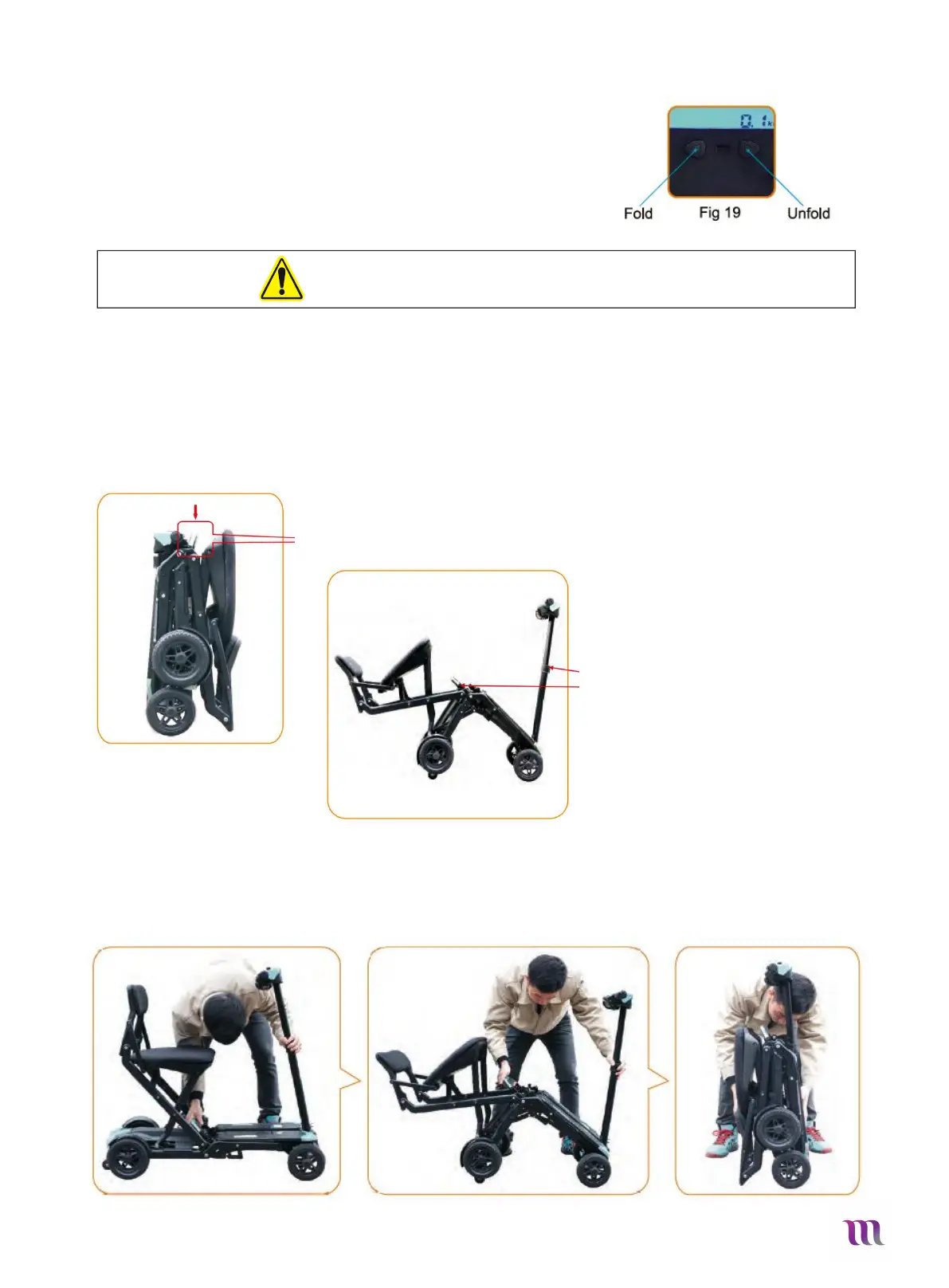
4.2 Automatic folding and unfolding buttons on the control panel:
In case your scooter remote is flat or damaged you can also use the
Buttons located on the dash to fold your scooter. Please follow the
Folding instructions outlined in 4.1, but instead of pushing the remote
Buttons push the buttons on the dash.
Please see Fig.19 for fold/unfold reference
5 Manual Folding & Unfolding
5.1 Manual unfolding
Place the scooter on a level ground and use your hand to lift the red bar located under the seat
After manually lifting the bar you will notice the scooters front and rear wheels coming together. When
about half-way folded, use both hands to push together the scooter until you hear a “click”.
Push down the carry handle as far as possible and the scooter will start to
unfold.
Use one hand to hold the tiller and the
other to hold the handle or bottom of the
seat to guide the scooter apart.
5.2 Manual Folding
Pull the carry-handle and pull in upward, you will notice the front and rear to
come together. Once the scooter is about half-way folded use your hands to
push the front and rear together until you hear a click.


 To Next Page