de
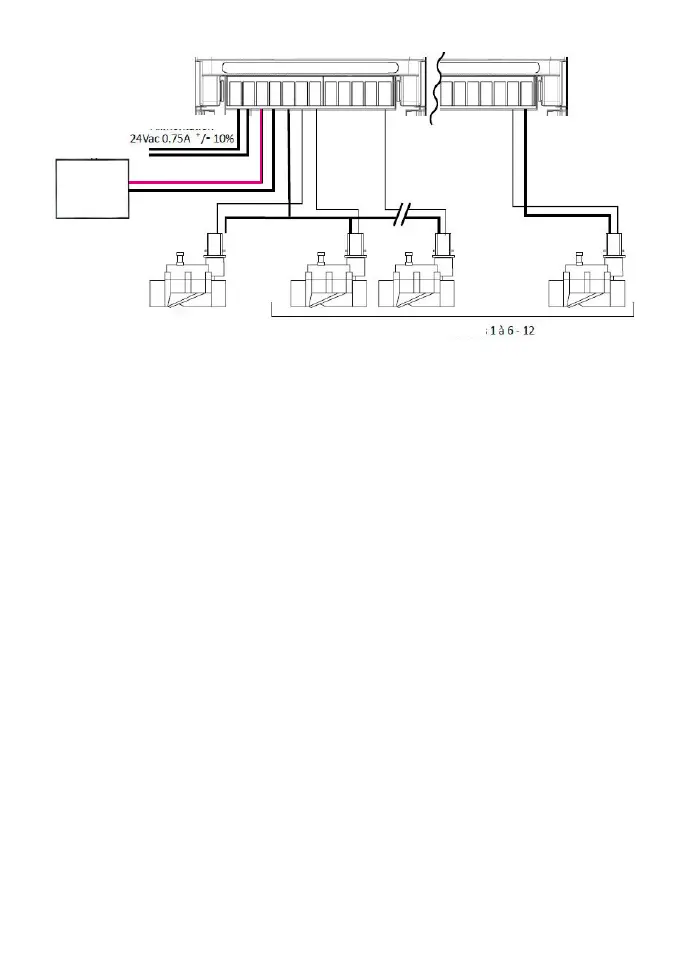
Flowmeter
SMART-IS 1 - 6 SMART-IS 9 - 12
Plug the
-
S + input to a water meter equipped with a flow sensor, as described
below. Use flow sensors in dry contact or equivalent.
For polarized flow sensors respect the polarisation :
Red cable > + / Black cable > -
LED STATUS INFORMATIONS
Green LED: standard functioning
Green LED blinking: one station is working (the number of blinking corresponds to
the activate station’s number)
Orange LED blinking: ongoing firmware actualization
Orange LED 4 flashes: short-circuit on one station
Fixed red LED: the product is in initialization mode during 2 minutes
Fast blinking red LED: Default (sensor opened or flow threshold reached).
Suspended watering but the program goes on. If «Default» disappears, the program
starts again (the LED’s flashes number corresponds to the actual inactive station).
Red LED blinking twice: the controller is no more time-syncronized, connect again
to re-synchronize it.
Red LED blinking 3 times: Wi-Fi signal lost (wrong Wi-Fi key or the SMART-IS
installation is too far or the internet connection has been lost)


 To Next Page