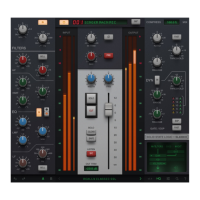
Input trim control with +/-20 dB gain, polarity (ϕ) phase invert & mic pre-amp 'drive'
circuit with automatically gain-compensated gain stage for adding saturation without
effecting the level of the signal.
5) EQ
4-band EQ with LF, LMF, HMF & HF bands - including bell options on LF & HF
bands and additional high- and low-pass filters.
6) Dynamics
Dynamics section with compression & gate/expander processing.
7) Routing Menu
Allows you to re-arrange the order of processing (dynamics, EQ) or move them to
the sidechain.
8) Input/Output Meters
Instantaneous input & output signal meters and RMS average metering.
9) Output Section
Output section with mid-side (M/S) width control & pan (stereo and mono-to-stereo
instances only), as well as modelled VCA fader, solo, cut, solo clear and safe
options, sidechain listen and a clean output trim.
10) High Quality (HQ) mode
Enables or disabled High Quality (HQ) mode, which turns on intelligent
oversampling under-the-hood for higher quality audio at the cost of increase CPU
use.
11) Advanced Settings
Access 'under-the-hood' DSP parameters such as advanced Width control modes,
toggling the analogue VCA emulation, and turn off the automatic make-up gain in the
compressor.
12) Scale/Zoom
Click to set the scale of the plug-in, from 50% to 200%.
13) Built-in Help
When enabled, the '?' button drops the plug-in into help mode. Hover over the GUI,
and a text box will provide a brief explanation of each parameter or GUI element.
14) Preset Manager
Clicking this area will open the Preset Manager. The Preset Manager list allows you
to load factory or used-saved presets. Use the left and right arrows to quickly move
between presets.


 To Next Page