EasyManua.ls Logo

SolidRF SOHO Dual Bands - Troubleshooting Guide; Initial Startup Indicators; Error Conditions and Symptoms

SolidRF SOHO Dual Bands
16 pages
Print Icon
To Next Page IconTo Next Page
To Previous Page IconTo Previous Page
Loading...
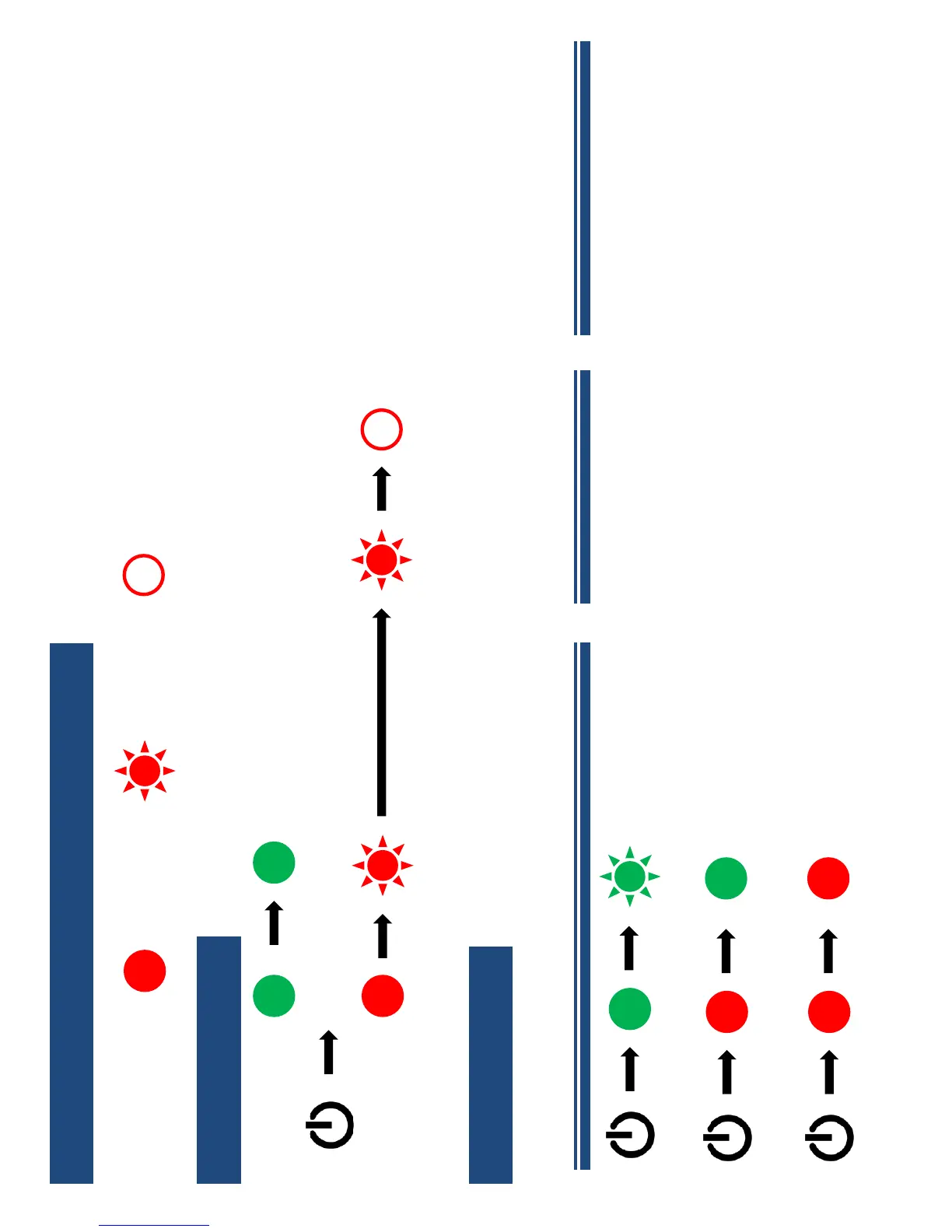
Initial Startup
Troubleshooting
Power Light
Status Light
Solid Green
Flash 1 times to 10 times
Off 5 seconds
Flash same counts as first
OFF
Error Condition
Trouble Symptoms
Power Light
Flashing Power Light
Possible Cause
Defective Power Supply
Defective Amplifier
Suggested Correction
Replace Power Supply
Contact Customer Service
Status Light
Solid GREEN Status Light
Improper Connections
Check and re-screw all
connectors properly
Status Light
Solid RED Status Light
Insufficient Isolation
Between the antennas
Increase the separation
distance, especially vertically
Adjust the antennas’
orientation
Solid
Symbol Meaning:
OFF
Flash

Related product manuals