20
3. Setting the automatic shutdown
You can adjust whether you want the appliance to switch to standby mode after
10 minutes, 30 minutes or 120 minutes. The default setting is 10 minutes. The
standby mode itself lasts for 20 minutes (not adjustable), after that, the appliance
switches itself off.
●
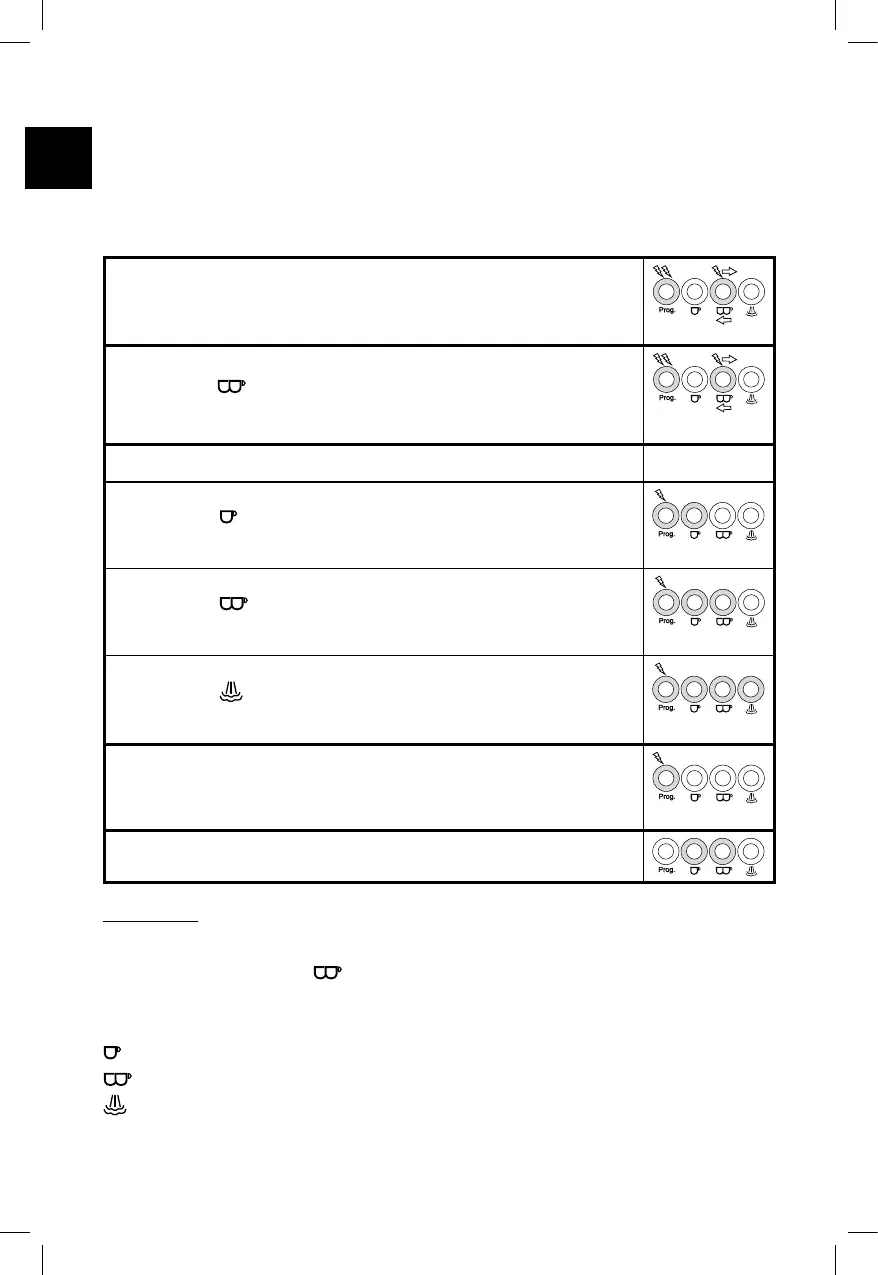
In operation mode, push the Prog. button to switch to pro-
gramming mode. The Prog. button flashes quickly, a signal
sounds and the other three buttons flash alternately.
●
Push the button. The machine indicates the current auto-
matic shutdown setting with the button illumination.
●
Now, set the desired changeover time:
Push the
button to set a changeover time of
10 minutes
Push the button to set a changeover time of
30 minutes
Push the button to set a changeover time of
120 minutes
●
Push the Prog. button again to save the setting.
The Prog. button flashes twice and a signal sounds twice.
●
After that, the appliance returns to operation mode.
In general:
Pushing the Prog. button gets you to programming mode.
Subsequently pushing the
button gets you to the automatic standby changeover
time interval settings menu.
After that, you can perform the following settings:
is the setting for “10 minutes” (default setting)
is the setting for “30 minutes”
is the setting for “120 minutes”
Push the Prog. button to save the program.





 To Next Page