29 TROUBLESHOOTING
• To connect your ANT+ sensors, your SOLOS unit must be switched on and
connected to your phone. This is because we use the headset as a ‘bridge’ due
to most phones not containing an ANT+ radio.
• If you find that a sensor you have connected/saved in the SOLOS app will not
automatically reconnect, try these troubleshooting steps:
* Ensure the sensor has battery power remaining
* If the sensor is magnet operated, ensure that the magnet is passing close
enough to the sensor to register a reading and wake the sensor from sleep
* If the sensor is BLE, ensure that it is not already connected to another device
such as a bike computer (BLE sensors can only manage one connection
at a time)
* Check that the SOLOS app is running and your headset is connected (the
headset should show the ‘Press Start Ride/Run to Begin’ screen or live ride
screens
• If you’re still finding it dicult to
connect your sensor:
* Switch o your headset and then
switch it back on again, then head
to the Sensor Connection Screen
in the app to reconnect it
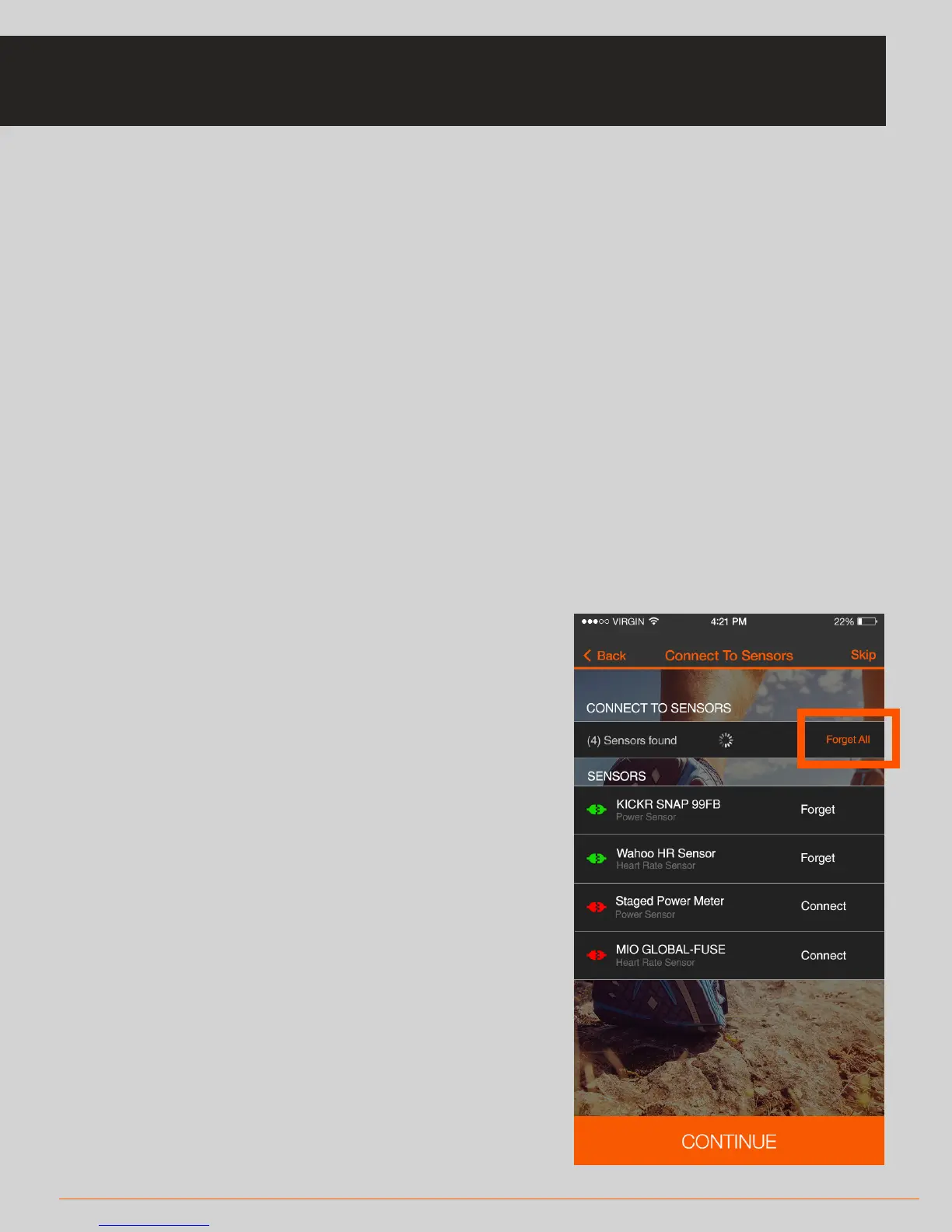
* If the above doesn’t work, in the
Sensor Connection Screen press
‘Forget All’ and reconnect your
sensors
TROUBLESHOOTING: SENSOR CONNECTIVITY



 To Next Page