14 RIDE & RUN
a
b
c
d
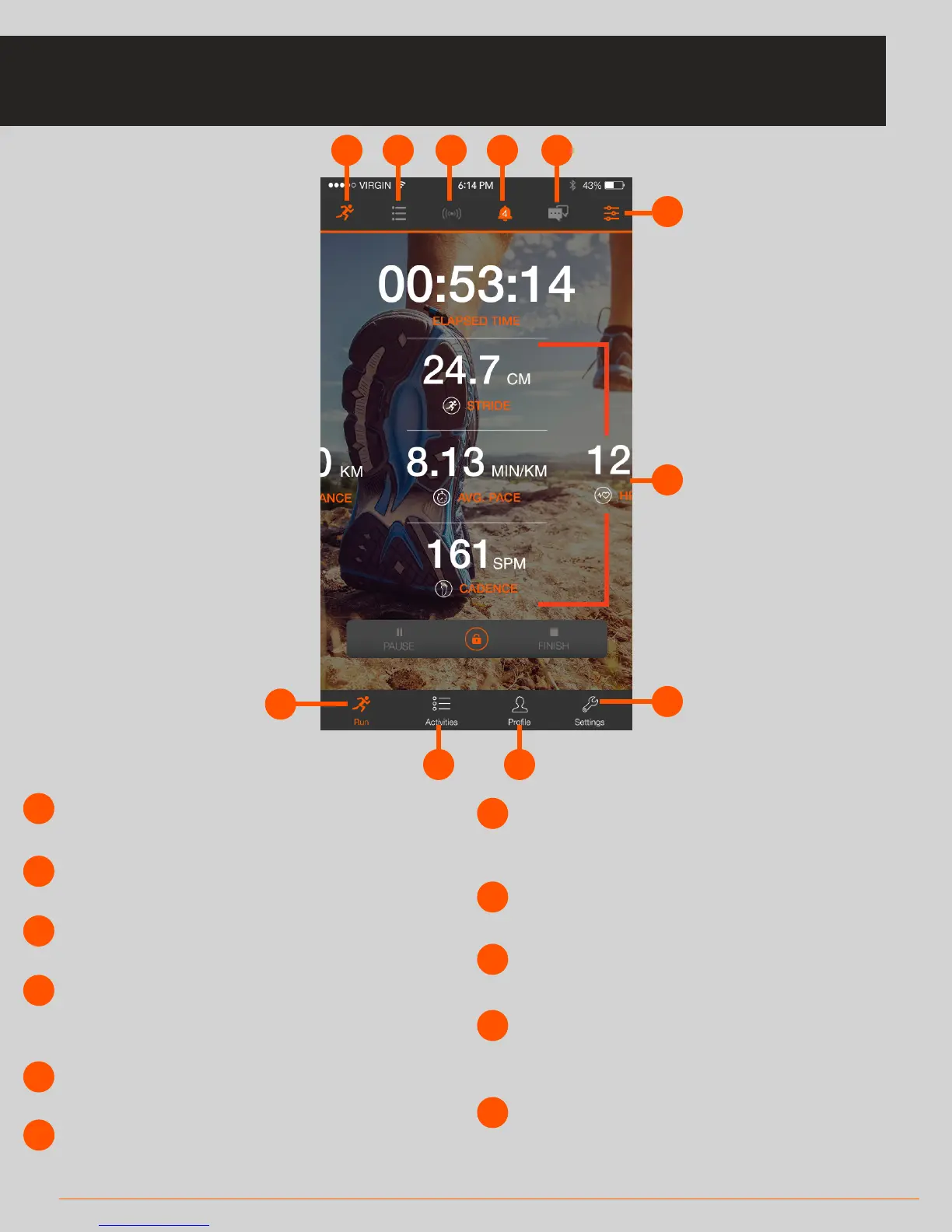
Select Workout button
Switch between running and cycling mode
e
Group Communication icon
Tap to access this feature
f
Metric List
Long press on a metric and scroll sideways to
switch to metric of your choice
g
Quick Settings
Tap to configure easy-access settings options
h
Run/Ride Main Screen
Tap to navigate to the main screen
i
k
j
Activities
View your activities in detail
Settings
In Settings you can control various elements of
your experience (see page 18)
Profile
View your stats & edit your profile. (In Ride mode
you can add/delete bikes and also do a FTP test)
List Icon
Use to access Navigation and other features
Warnings icon
Tap to see any warnings related to your
sensor setup and other items of interest
Sensors icon
See the status of your BLE and ANT+ sensors
RIDE & RUN SCREEN
This is the centre of the application and allows you to start a new activity.
a
b
c
d
e
f
g
h
i
j
k



 To Next Page