pg 9 | Pod Demo Guide | www.mersive.com | © Copyright 2019 Mersive
• Approve: The post will appear on the display.
5. To control collaborators in the session, use the moderating device to click on the meeple group icon in the user
panel. A list of the connected users will appear with an option to Disconnect the user or Make Moderator.
6. To exit moderator mode, go to Meeting in the sidebar and toggle Moderate this meeting to “Off”.
Step 8: Try out Solstice Ink
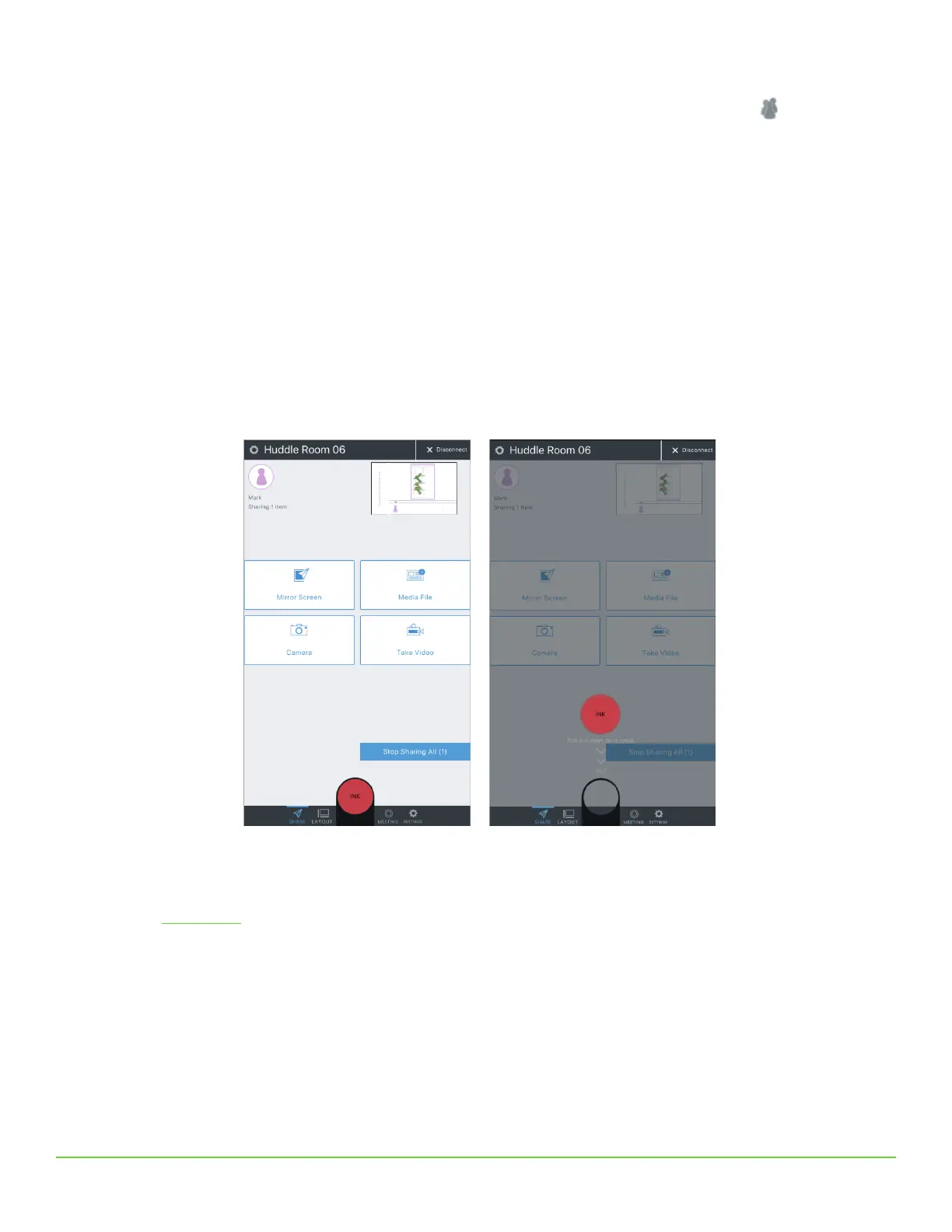
Available in the mobile version of the Solstice App (for iOS and Android devices), Solstice Ink allows users to highlight and
temporarily mark up content on the Solstice display from anywhere in the room by simply pointing and drawing with their
smartphones. This feature is also supported in moderator mode. As a note, this feature not supported on tablets.
Solstice Ink has three modes of use:
• Pointer: Press and hold the red Ink button or drag the button to the center of the screen to use your phone as a
pointer.
• Pulse: Tap the Ink button to pulse the pointer.
• Temporary markup: Drag the Ink button to the center of the screen, then press and hold the button to draw.
To exit Ink mode, drag the Ink button down to re-dock it.
Like what you see?
Check out our How to Buy page for more information on buying options, or to get in contact with one of our authorized
channel partners.


 To Previous Page