© SOMFY SYSTEMS, INC. 4/08 REV.1
TI N
B Y
my
my
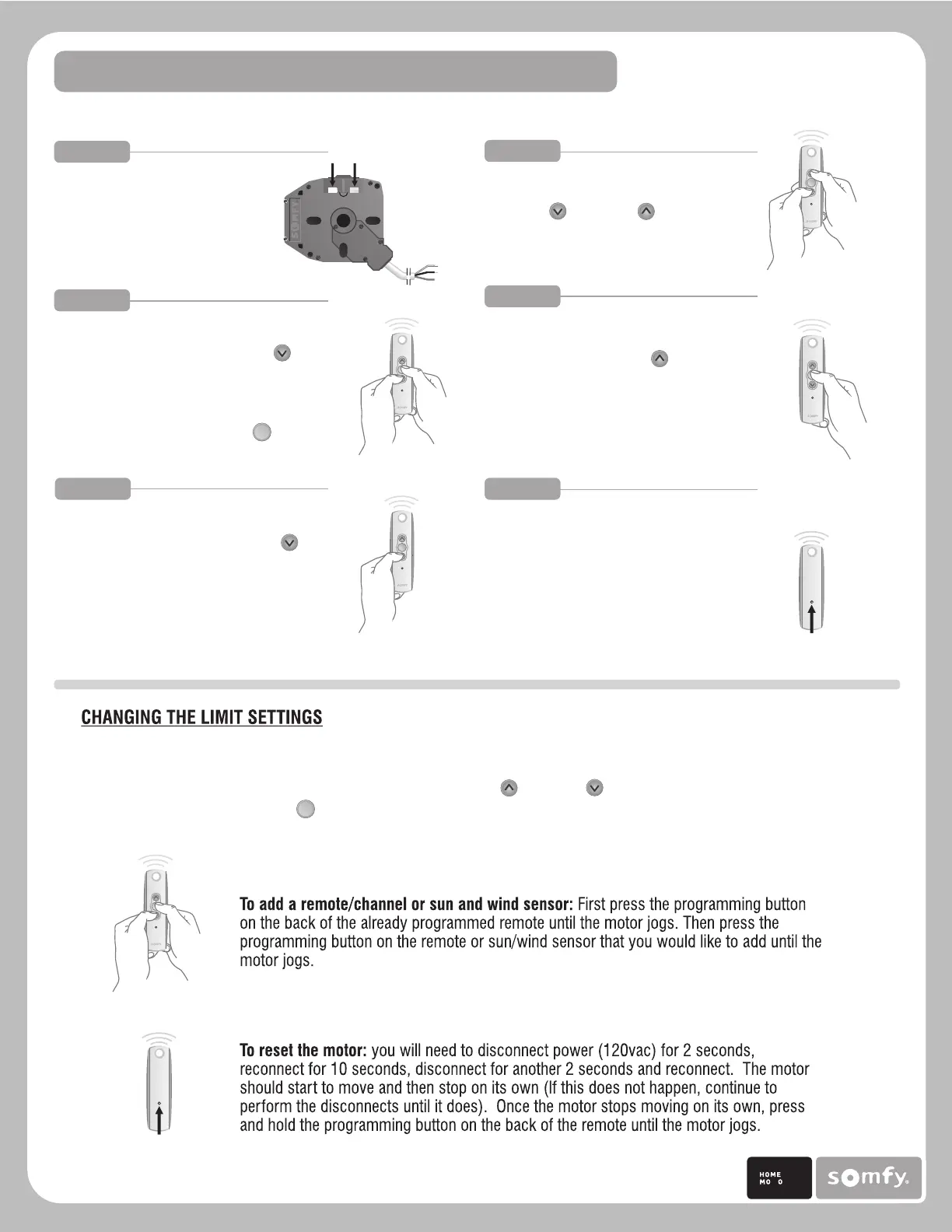
RTS CMO VISUAL REFERENCE GUIDE
Before programming
the motor make sure
the limits are depressed
in the RTS CMO motor.
Initiate programming by pressing both
the UP and DOWN buttons at the
same time until the motor jogs.
Check the direction of operation.
Press and hold the DOWN button
and confirm it moves the motor
out (the motor will be in momentary
fashion). To change the direction
press and hold the MY (stop)
button until the motor jogs.
SET UPPER LIMIT
Press and hold the UP button
of the remote to move the motor
to the desired UPPER limit position,
then release. Press and release
the UPPER limit button on the motor.
SET LOWER LIMIT
Press and hold the DOWN button
of the remote to move to the desired
lower limit position, then release.
Press and release the lower limit
button on the motor.
USER MODE
Once the desired limits are set, press
and hold the Program Button on the
back of thee transmitter until the motor
jogs, then release. The motor now
operates in maintained fashion. Double
check limits as a precaution.
STEP 1 STEP 2
STEP 3
STEP 4
STEP 5 STEP 6
Programming
Button
my
my
my
my
my
Programming Button
To change the limit settings press the MY (stop) button on the remote. Make sure the limit is depressed
into the motor, then repeat steps 3 or 4 keeping in mind that the motor is operating in a maintained
fashion. Therefore you only need to press the UP or DOWN buttons momentarily to move the
motor, and the MY (stop) button must be presses in order to stop it at its desired limit.







 To Previous Page