Radio
Safety instructions
• The local safety regulations for the system must be complied with to
ensure safe operation. Information is available from electrical utility
companies, VDE (Association for Electrical, Electronic & Information
Technologies) and professional associations.
• The operator is not protected against interference caused by other
telecommunications equipment or devices (e.g., wireless systems
which are being operated properly in the same frequency range).
• Replace the handheld transmitter unit's batteries if you experience
reception problems.
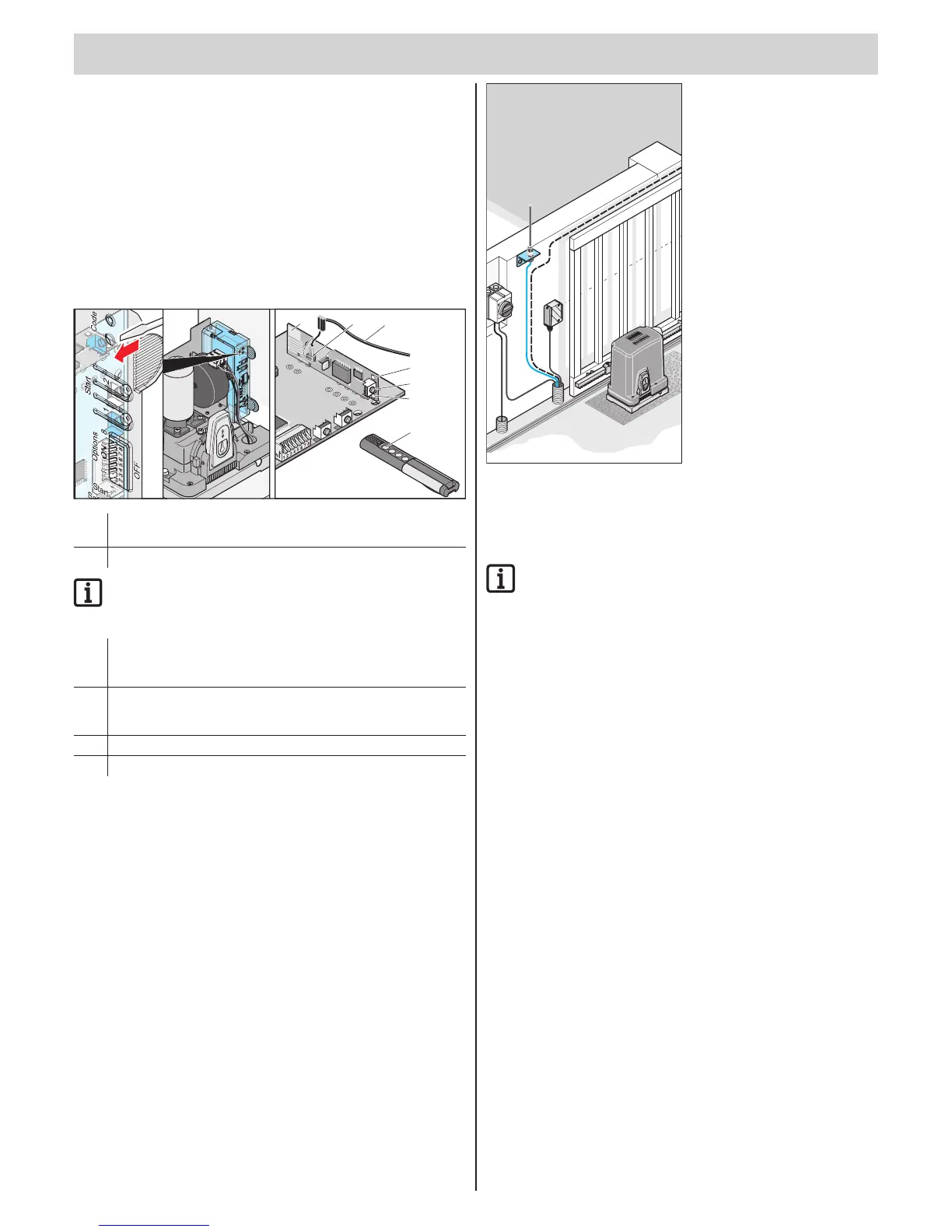
Display and button explanation
T1 T2
5
3.1
3.2
1
1. Sets the radio receiver to different operating modes:
Learn, delete, normal mode
2. internal antenna
IMPORTANT INFORMATION!
Channel 2 (3.2) is only required for the "Defined opening and
closing or partial opening" functions.
3. LEDs - show which channel has been selected.
3.1 LED radio channel 1
3.2 LED radio channel 2
4. Connection for external antenna
An external antenna can be used if the range with the internal
antenna is not sufcient. See p. 18 Chapter "External antenna."
5. Handheld transmitter button
6. External antenna
External antenna
• If reception is inadequate with the radio receiver internal antenna,
an external antenna can be connected.
• The antenna cable may not exert any mechanical force on the
radio receiver; provide for stress relief.
• Dene the installation location together with the operator.
O
Programming the handheld
transmitter
IMPORTANT INFORMATION!
Deletethememoryoftheradioreceiverbeforetherst
teach-in of the handheld transmitter.
1. Press the learn button (1).
▫ 1 x for channel 1; the LED (3.1) lights up.
▫ 2 x for channel 2; the LED (3.2) lights up.
⇒ If no code is sent within 10 seconds, the radio receiver switches to
Normal mode.
2. Press the desire handheld transmitter button (5) until the LED (3.1/3.2)
extinguishes, depending upon which channel has been selected.
⇒ LED goes out - programming is nished.
⇒ The handheld transmitter has transferred the radio code to the
radio transmitter.
3. Repeat the above steps to program by teach-in any additional
handheld transmitters. A maximum of 112 storage locations for each
radio receiver are available.
Cancelling the teach-in mode:
Press the Learn button (1) until no more LEDs are lit.
Deleting the handheld transmitter
from the radio receiver
If a handheld transmitter is to be deleted from the radio receiver,
every button and every short cut of the handheld transmitter must be
deleted for security reasons!
1. Press the teach-in button (1) and keep it pressed for 5 seconds.
⇒ An LED ashes (3.1 or 3.2).
2. Release the teach-in button (1).
⇒ The radio receiver is in Deletion mode.
3. Press the transmitter button whose code should be deleted in the
radio receiver.
⇒ The LED goes out. The deletion procedure is ended.
4. Repeat the procedure for all buttons and shortcuts.



 To Next Page
 Loading...