Command15
Owner’s Manual
5
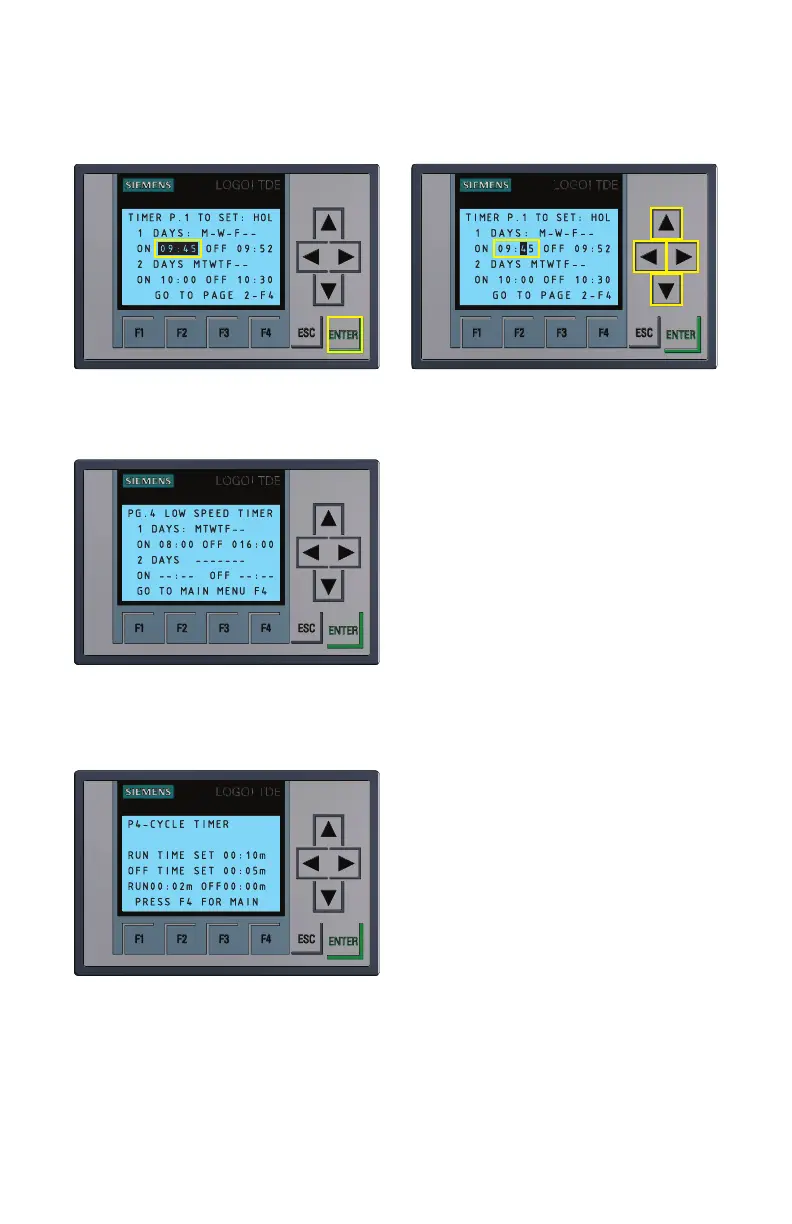
Figure 4.4
Selecting individual digits in timer ON/OFF function
Figure 4.5
Low Speed Timers (p.4 of Timer
Menu)
The timers on Page 4 of the timer menu
(Figure 4.5) contain two low speed timer
options for operating fan separately in
lower speed modes (30, 40, 50 Hz). If the
prior first four high speed (60 Hz) timers
are activated to overlap with operation of
the lower speed timers, the higher speed
timer operation will always override the
lower speed.
Programming the Cycle
Timers
Figure 4.6
Cycle timer menu
• From the default control screen, press
F4 to access the Timer Menu. Once in the
Timer Menu, press F4 again to cycle
through the pages until you reach “P5–
Cycle Timer” (Figure 4.6).
• Repeat the steps from the previous
section to set each of the two individual
cycle timers. “Run Time Set” controls
how long the fans will run, while “Off
Time Set” controls how long the fans will
remain off after each “Run Time” cycle.
The “Run” and “Off” timers at the bottom of the Cycle Timer screen display the
remaining run time and off time of the current cycle.
Note: If the cycle timer overlaps with the low speed timer, the fan will cycle between on
and low speed rather than on and off.


 To Next Page