Command15
Owner’s Manual
4
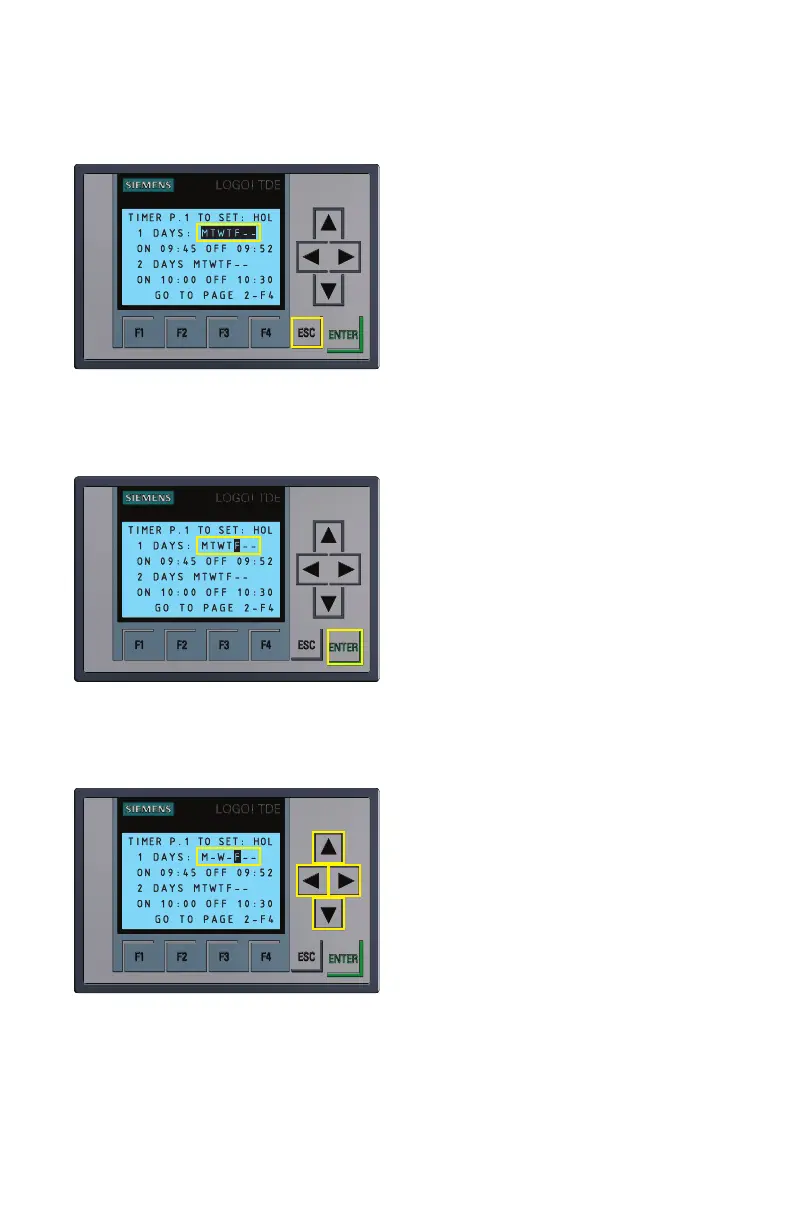
Figure 4.1
Days of the week highlighted
days. Use the up/down arrows to select/
unselect days (”-” designates the fans
will not run on a particular day when
using the automatic timer feature.
If letters M T W T F are shown, timer will
function on all the days/letters shown).
• Once all the desired days that timer
should function are selected, press
ENTER. This will lock in your selection and
re-highlight your desired full selection of
days.
Figure 4.2
Individual day of the week
highlighted
Now that your timer day schedule has
been set, once again use the arrow keys
shown in Figure 4.3 to navigate to the
timer ON time selection to set the specific
hours and minutes you would like the
fans to turn ON and OFF.
• To begin, after navigating with arrow
keys to the 24 hour hour:minute time
selection just below the day selection.
Press ENTER to highlight the time
selection. Now, using the keypad, select
individual digits as shown in Figure 4.4.
Figure 4.3
Arrow keypad
Use the up/down arrows to set the
desired ON time for that digit. Use the
right/left arrows to move between digits.
When done press ENTER.
• Now use the arrows to navigate to
the OFF time selection and repeat the
previous instruction for selecting digits
for the desired OFF time. Make sure to
press ENTER to save time selection.
Press ESC to save timer settings.
Note: There are 6 individual timers that can be set on the Command panel. Repeat the
above steps to set each timer as needed. When in the timer menu, press F4 button to
cycle through all three timer pages and return to the home screen.


 To Next Page
 Loading...