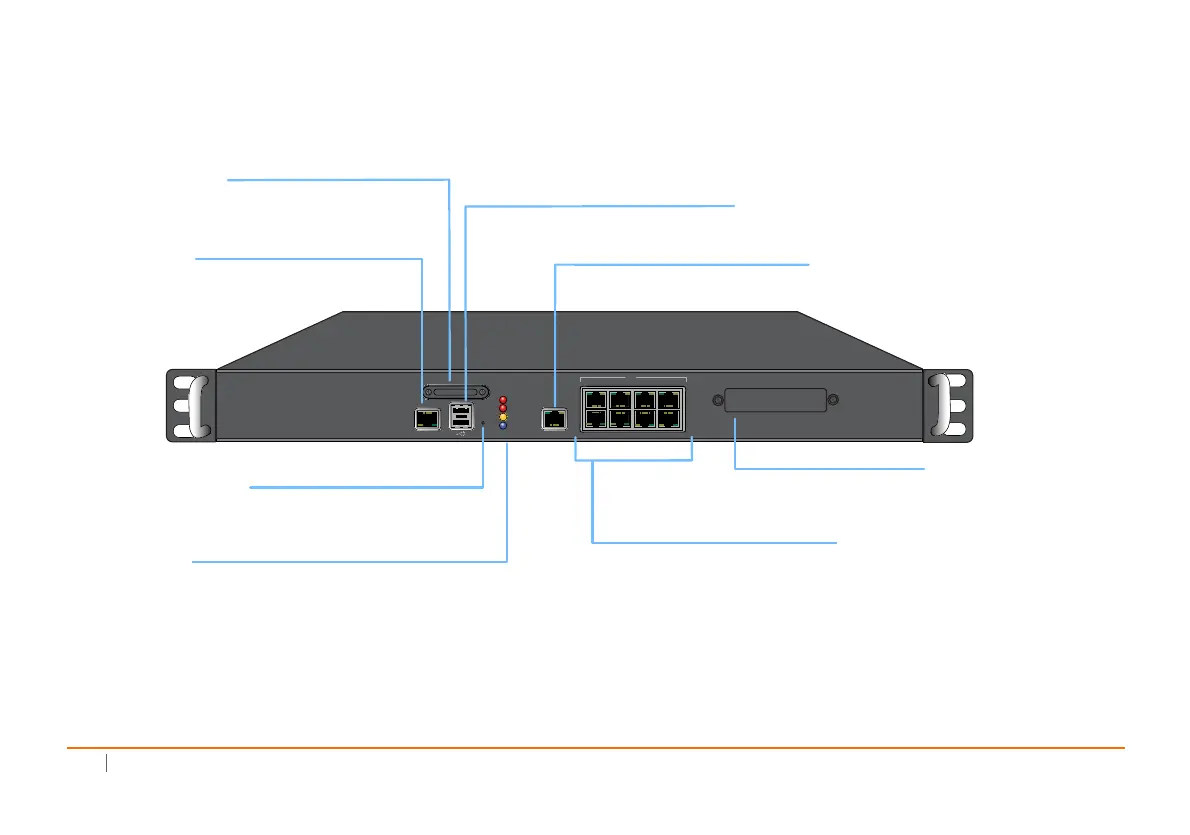
SonicWall NSA 2600
CONSOLE
SDHC
MGMT
X6 X4
1GE
X2 X0
M0
X1X3X5X7
ALARM
M0
TEST
PWR
Expansion Module
Console Port
USB Ports (2)
SafeMode Button
LED Indicators
MGMT Port (1 GE)
X0-X7 (1 GE)
Access the SonicOS Command Line
Interface (CLI) via the enclosed serial
CLI cable
For 3G/4G/Analog modem adaptor support
Press and hold until Test LED starts blinking
to set the appliance into SafeMode.
High-speed copper Gigabit Ethernet ports
Expansion Module Bay
For SonicWall-approved
expansion modules
Power: Blue: Indicates power supply is operating correctly
Yellow: Indicates power supply is disconnected
Test: Quick Blinking Yellow: Initializing
Slow Blinking Yellow: Safe Mode
Solid Yellow: Test mode
Alarm: Indicates alarm activity in Red LED
M0: Indicates Expansion Module 0 activity in Red LED
1 Gigabit Ethernet Management Interface
SDHC Port
Secure Digital High-Capacity (SDHC)
port for future use













 To Next Page