SonicWallNSA2600/3600/4600/5600/6600GettingStartedGuide
25
UsingtheSetupWizard
Whenyouarereadytobegininitialsetup,configureyour
managementcomputerwithastaticIPaddressonthe
192.168.1.0/24subnet,suchas192.168.1.20.Thisallowsyour
computertoconnecttoSonicOSviatheMGMTinterface.
ToconfigureinitialsettingsusingtheSetupWizard:
1WithyourcomputerconnectedtotheapplianceMGMT
port,startyourwebbrowserandnavigatetothe
defaultMGMTinterfaceIPaddress:
http://192.168.1.254
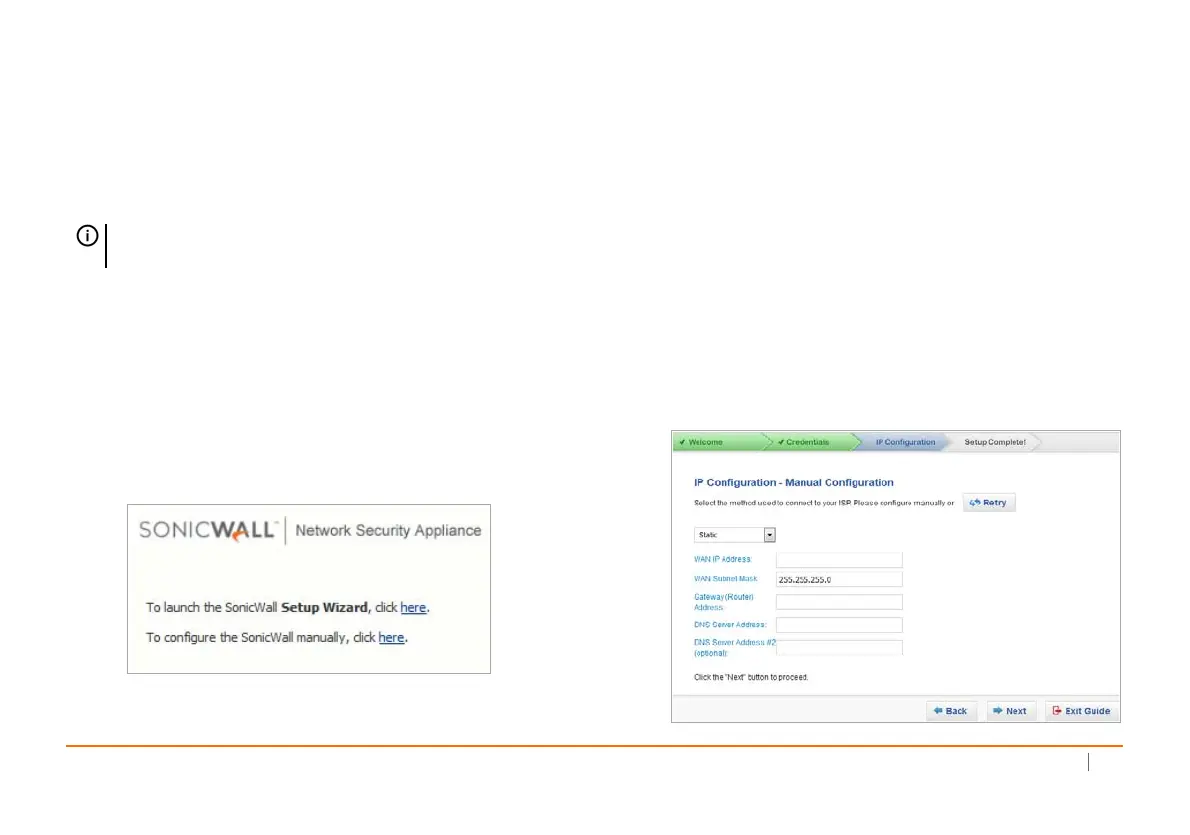
Theinitialscreendisplaystheoptionstolaunchthe
SetupWizardorconfiguretheappliancemanually.
2LaunchtheSonicOSSetupWizardbyclickingthefirst
herelink.Thiswizard
helpsyouquicklyconfigurethe
SonicWallappliancetosecureyourInternet
connection.
3Followtheon‐screenpromptstoconfiguretheadmin
passwordandnetworksettings.
IfaDHCPserverisavailableonthenetwork,thewizard
requestsIPsettingsfromit.YoucanclickNexttoaccept
theseorclick
ManualConfigtoenterastaticIPaddress
andothernetworksettings.
IntheManualConfigurationscreen,clickRetryto
reverttoDHCP,orenteryourownsettingsandthen
clickNext.
NOTE:Besuretodisablepop‐upblockingsoftware,or
setyourwebbrowsertoallowpop‐upsandcookies.













 To Next Page