INTELLIGENT Control Panel Manual v202205
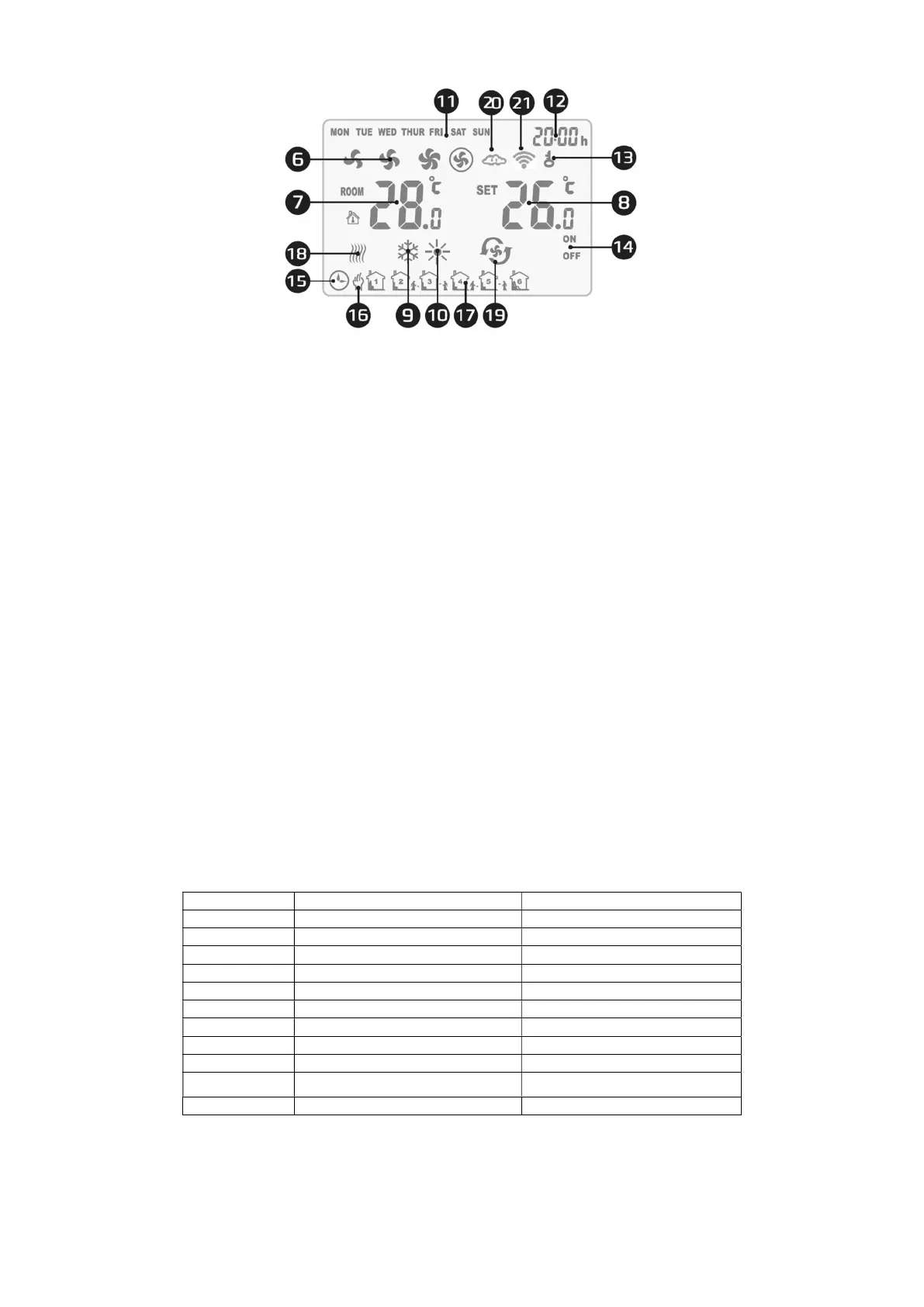
6. fan speed
7. room temperature
8. set temperature
9. cooling operation mode
10. operation mode heating
11. day of the week
12. time
13. controller lock
14. on/off in schedule
15. operation according to schedule
16. manual operation
17. schedule operation interval
18. antifreeze mode
19. ventilation mode
20. synchronization of settings with the ap-
plication
21. connection to the Internet
3. FUNCTIONS AND MODES
3.1. MODES OF OPERATION
MANUAL MODE - The fan operates at the selected speed (I, II, III) and according to the selected mode of operation:
heating, cooling and ventilation. The device works according to the set temperature
AUTOMATIC MODE - the fan speed is set automatically depending on the difference between the preset temperature
and the room temperature (it is not possible to change the fan speed manually).
3.2. METHOD OF WORK
HEATING - if the set temperature < room temperature, the valve is open and the fan runs
COOLING - if the set temperature > room temperature, the valve is open and the fan runs
VENTILATION - the fan is on and runs at a pre-set gear regardless of the temperature. TERMOSTAT ANTIFREEZ
When the temperature sensor detects a temperature drop below 5°C (the default value), it immediately opens the valve and
starts the fan, even if the controller is turned off.
4. MENU
4.1. PARAMETER SETTINGS
When the controller is off, hold down the MODE buttons for 3 seconds.
Use the MODE button to change options.
Use the +/- buttons to change the value.
Menu Preset Option Value
1 Temperature calibration -9°C ~ +9°C
2 EEPROM 0: not memorized
3 Operation mode 1: memorized
4 Sensor selection C1: Thermostatic operation mode
5 Antifreeze C2: Continuous operation mode
6 Antifreeze setting range 0: Internal sensor
7 ALARM signal 1: External NTC
8 Potential-free contact setting 0: Off
9 MODBUS functions 1: On
10
BMS speed
+5°C ~ +15°C
11 BMS Protocol Settings 1~247 (01~F7)


 To Next Page