Need help?
Do you have a question about the Sonoff GK-200MP2-B and is the answer not in the manual?
Guide to download the eWeLink app from the App Store or Google Play for camera setup.
Instructions for powering on the camera and its default factory reset behavior upon first use.
Steps to add the camera to the eWeLink app using sound pairing configuration.
Connect the camera using an Ethernet cable for a stable local network connection.
Details about the camera's infrared night vision capabilities and effective range.
Instructions on how to add and bind the camera to the eWeLink app.
Options for placing or mounting the camera for optimal monitoring.
Important safety and usage precautions to ensure proper operation and longevity.
Troubleshooting steps for failing to connect Wi-Fi and pair the device.
Explanation for squealing sounds from the speaker during communication.
Troubleshooting audio issues when communicating with the camera.
Guidance on playing back video recordings from the TF card.
Instructions for enabling and configuring activity detection reminders in the eWeLink APP.
Reasons and solutions for videos getting stuck during playback.
Tips to prevent false alarms by adjusting motion detection sensitivity.
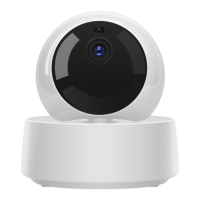
The SONOFF GK-200MP2-B is a Wi-Fi wireless IP security camera designed for real-time monitoring and surveillance. This versatile device allows users to keep an eye on their surroundings, whether for home security, pet monitoring, or simply checking in on loved ones. Its core function revolves around providing live video feeds and recording capabilities, accessible remotely via a smartphone application.
One of the primary usage features of the GK-200MP2-B is its ability to be controlled and managed through the eWeLink APP. This application serves as the central hub for all camera operations, enabling users to view monitoring images, adjust image resolution, and control the pan and tilt angles of the camera. The camera offers a wide viewing range, with a 340° horizontal and 120° vertical rotation, ensuring comprehensive coverage of the monitored area. This flexibility allows users to remotely adjust the camera's perspective to focus on specific points of interest without needing to physically reposition the device.
The camera supports 1080P HD images, providing clear and detailed video quality for effective monitoring. This high-definition capability is crucial for identifying details in the footage, which can be vital for security purposes. In addition to live viewing, the GK-200MP2-B also offers recording functionalities. Users can set up "activity alert" notifications, which push an alarm message to their smartphone when motion is detected. If a TF card is inserted, the camera will automatically record a 40-second video clip and store it on the card when motion detection is triggered. This feature ensures that important events are captured and readily available for review. The camera requires a TF card with a transmission speed of at least class 10 for optimal performance.
Another significant feature is its infrared night vision capability. The GK-200MP2-B is equipped with two built-in infrared night vision LEDs, which automatically activate in low-light conditions. This provides a clear monitoring image even in complete darkness, with a night vision distance of up to 15 meters. This ensures continuous surveillance around the clock, regardless of lighting conditions.
The camera also supports two-way audio communication. This means users can not only hear what's happening in the monitored area but also speak through the camera, allowing for remote interaction. This feature can be used to communicate with family members, deter intruders, or comfort pets.
For enhanced connectivity and stability, the GK-200MP2-B offers multiple connection options. While primarily a Wi-Fi wireless IP camera, it can also connect via an Ethernet cable. This is particularly useful in environments where the Wi-Fi network might be unstable, as an Ethernet connection ensures stable video monitoring and avoids interruptions. When connecting via Ethernet, users need to ensure their mobile phone and the camera are accessing the same network. If the device was previously connected via Wi-Fi, it's recommended to delete the connected device in the eWeLink app before connecting via Ethernet to ensure normal operation.
The camera is designed for flexible installation. It can be placed on a desktop, mounted on a wall, or installed on the ceiling, depending on the user's monitoring needs and the layout of the space. This adaptability makes it suitable for various indoor environments.
In terms of usage and management, the GK-200MP2-B allows for sharing control with family members. This means multiple users can access and control the camera through their respective eWeLink accounts, enabling collaborative monitoring. The camera can also be bound to the APP control pages of other SONOFF devices, such as BASIC, S26, and TX, after it has been connected to the eWeLink APP, creating a more integrated smart home ecosystem.
Maintenance features are straightforward and user-friendly. The device includes a "RESET" button located on the bottom of the camera. Long-pressing this button for 3 seconds will reset the camera to factory defaults, indicated by a "Reset success" voice prompt. This is particularly useful when changing users or connecting the camera to a different Wi-Fi network. After a successful reset, the camera restarts and enters quick pairing mode, simplifying the re-configuration process.
To ensure the longevity and optimal performance of the camera, certain cautions are advised. Users should avoid exposing the camera to direct sunlight for extended periods and prevent it from getting wet. If the video quality becomes blurred, it is recommended to wipe the lens with a cloth dampened with alcohol to keep it clean. To avoid disturbing neighbors and to ensure the speaker's long lifetime, users are advised not to keep motion detection alerts on for very long periods, especially if the camera is in an area with frequent, non-critical motion.
Troubleshooting common issues is also addressed. For Wi-Fi connection problems, users are advised to check the Wi-Fi password, ensure they are using a 2.4GHz network (disabling 5GHz if using a dual-band router), keep the camera close to the router, and pair it in an interference-free environment. If the speaker makes a squealing sound during "Talk" function, it's usually due to mutual interference between the smartphone and the camera, and moving the smartphone away can resolve this. If there's no sound during communication, users should ensure the "Talk" function is enabled on their smartphone and check if the microphone is muted. For playing back video recordings, the TF card can be inserted into a computer after powering off the camera. To enable "Activity detection reminder," users can access the camera's settings page in the eWeLink APP, select the desired sensitivity (high, medium, or low), and turn on "Sound Alert." If videos get stuck, connecting to a broadband network is recommended, with an uplink broadband of 2Mbps for the camera and a downlink broadband of 2Mbps for the smartphone. To avoid false alarms from motion detection, users can set the motion detection sensitivity to "low level," as the system monitors object movement rather than specifically human movement, meaning light rays, tree shadows, or flying animals can trigger alerts.
 General
| Night Vision Distance | Up to 10m |
|---|---|
| Two-Way Audio | Yes |
| Power Supply | DC 5V/1A |
| Local Storage | MicroSD card (up to 128GB) |
| Motion Detection | Yes |
| Video Resolution | 1080p (1920x1080) |
| Field of View | 110 degrees |
| Night Vision | Yes, Infrared |
| Wi-Fi Connectivity | 802.11 b/g/n |
| Operating Temperature | -10°C to 50°C |
| Operating Humidity | 10% to 90% |

 To Next Page