Getting to know your P910i 19
This is the Internet version of the user’s guide. © Print only for private use.
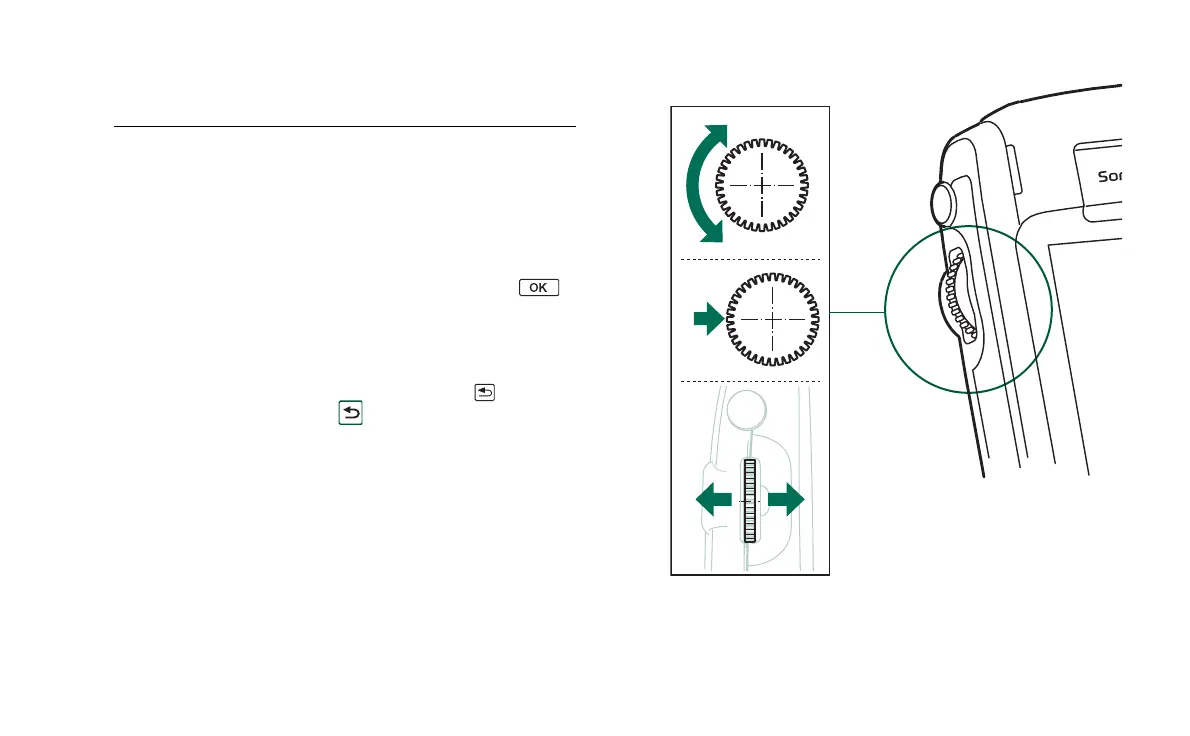
Jog Dial
Action Function
Rotate the Jog Dial
up
Scrolls items in a list up/to the left, increases
volume during a call, moves back a page when
playing a multimedia message.
Rotate the Jog Dial
down
Scrolls items in a list down/to the right,
decreases volume during a call, moves forward
a page when playing a multimedia message.
Press the Jog Dial
inwards
Selects a highlighted item, dials selected phone
numbers. Generally the same action as
in flip closed.
Press the Jog Dial
backwards
Goes back to the previous screen, dismisses
dialogs, and sends a busy signal to the calling
party when you receive a call. It will not end a
call. Always the same action as in flip
closed and in flip open.
Press the Jog Dial
forwards
Flip closed: Brings up the Options menu. Press
and hold takes you to the Applications list.
Flip open: Toggles the Application, Edit and
Category menus. Press and hold takes you to
the Application launcher.
Up
Down
Inwards
Backwards
Forwards














 To Next Page