78 Internet
This is the Internet version of the user’s guide. © Print only for private use.
Using the browser view
The P910i can display the
Internet page in normal view
or full screen view. Use the
Internet button to change
between the views. In full
screen view, press the Jog Dial
forwards to display a menu
with the most frequently used
commands.
Browser view options
• Internet menu
–
Open page
– Enter the URL, or select from the drop-down
list.
–
Add to bookmarks
– Enter the name of the bookmark and
select the folder to save it in.
–
Save page
– Enter the name of the page and select the
folder to save it in.
–
Send as
– Send the current URL via text or multimedia
message, email, Infrared, or Bluetooth wireless
technology.
–
Find
– Enter text and search for the text in the page.
–
Find next
– Search for the next occurrence of the search
text.
–
Scan text
– Go to the area with the greatest amount of text.
–
Back
– Move bact to the previously viewed page.
–
Reload page
– Reload the page.
–
Load all images
– Load all images of the page.
–
Page information
– Show the page information.
–
Bookmarks
– Open the bookmark view.
•Edit menu
–
Cut
– Cut out the marked information from an input field.
–
Copy
– Copy the marked information.
–
Copy all
– Copy all information on the page.
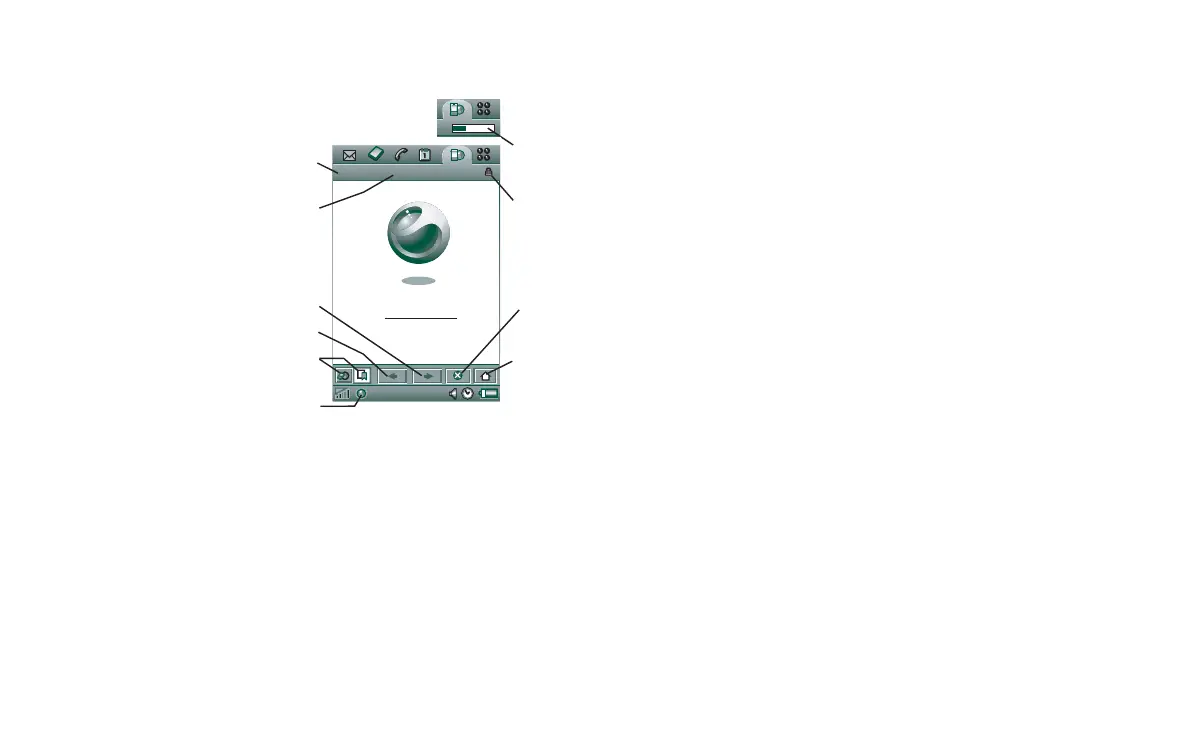
A Internet menu.
B Edit menu.
C Go to the next page.
D Go to the previous page.
E Shift between the browser view and the bookmarks view.
F Disconnect or get information about the connection.
G Go to the home page.
H Stop loading the page.
J A secure connection is established.
K Progress bar, shows the loading progress.
0:03
Chat Edit
Internet Edit
A
H
J
G
B
C
D
E
F
K
Sony Ericsson















 To Next Page