Imaging
You can take photos and record videos to view, save or send. You can find saved photos
and videos in Media and in File manager.
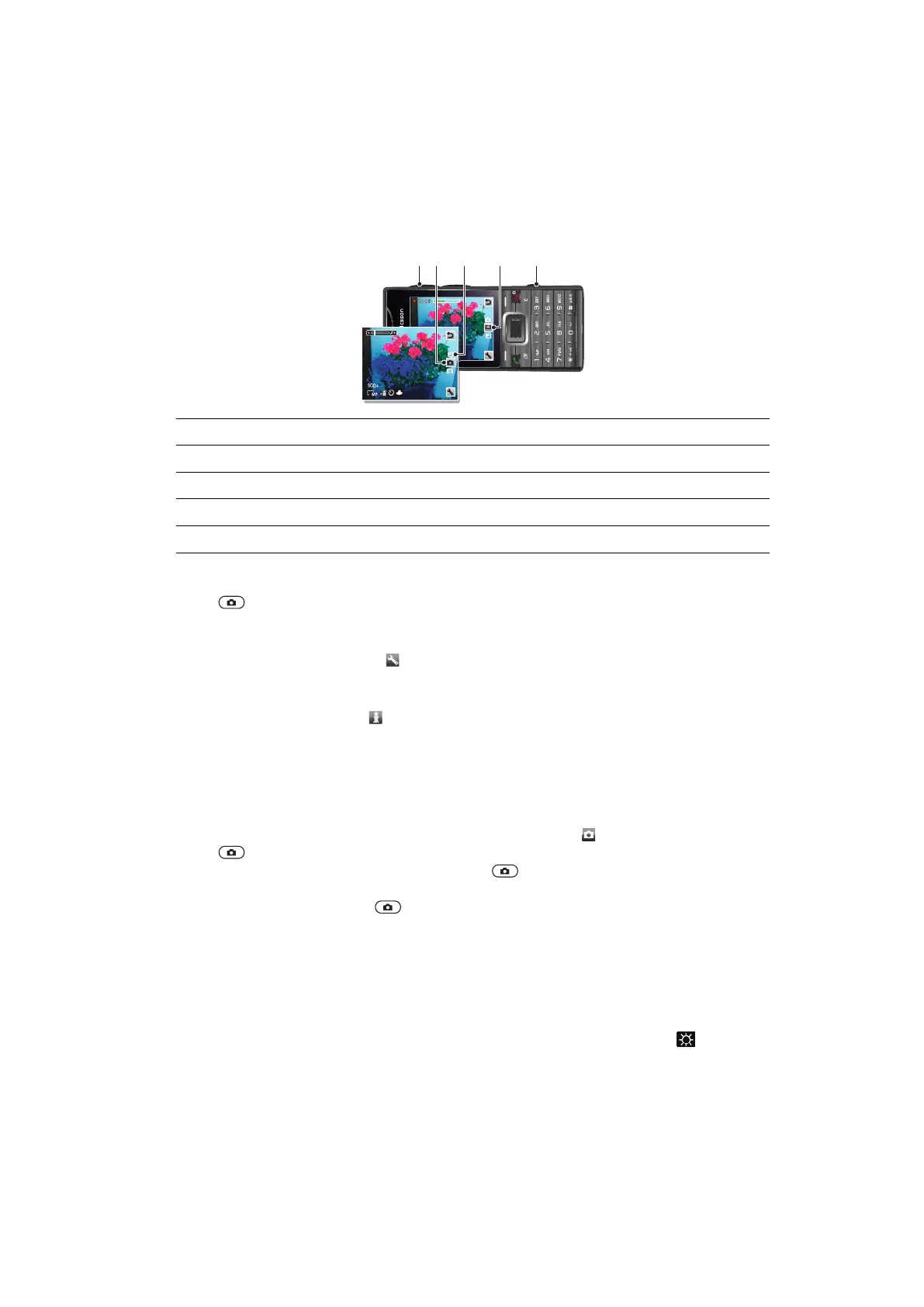
Viewfinder and camera keys
1 Zoom in or out
2 Indicates photo mode
3 View photos and video clips
4 Indicates video mode
5 Activate the camera/Take photos/Record video clips
To activate the camera
•
Press .
To change settings
•
Activate the camera and select .
To view information about settings
•
Scroll to a setting and select
.
Using the still camera
To take a photo
1
Activate the camera and press the navigation key to scroll to .
2
Press halfway down to use auto focus.
3
When the dot and focus frame are green, press fully down to take a photo. The
photo is saved automatically.
4
To take another photo, press to return to the viewfinder.
To use zoom
•
Press the volume key.
To adjust brightness
•
Press the navigation key left to decrease the brightness. Press the navigation key
right to increase the brightness. The level of brightness appears beside the
.
Face detection
You can use face detection to bring an off-center face into focus. The camera automatically
detects up to three faces, indicated by white frames. A green frame shows which face has
been selected for focus. Focus is set to the face closest to the camera.
25
This is an Internet version of this publication. © Print only for private use.













 To Next Page