Electrical Connections 7
Audio Connector
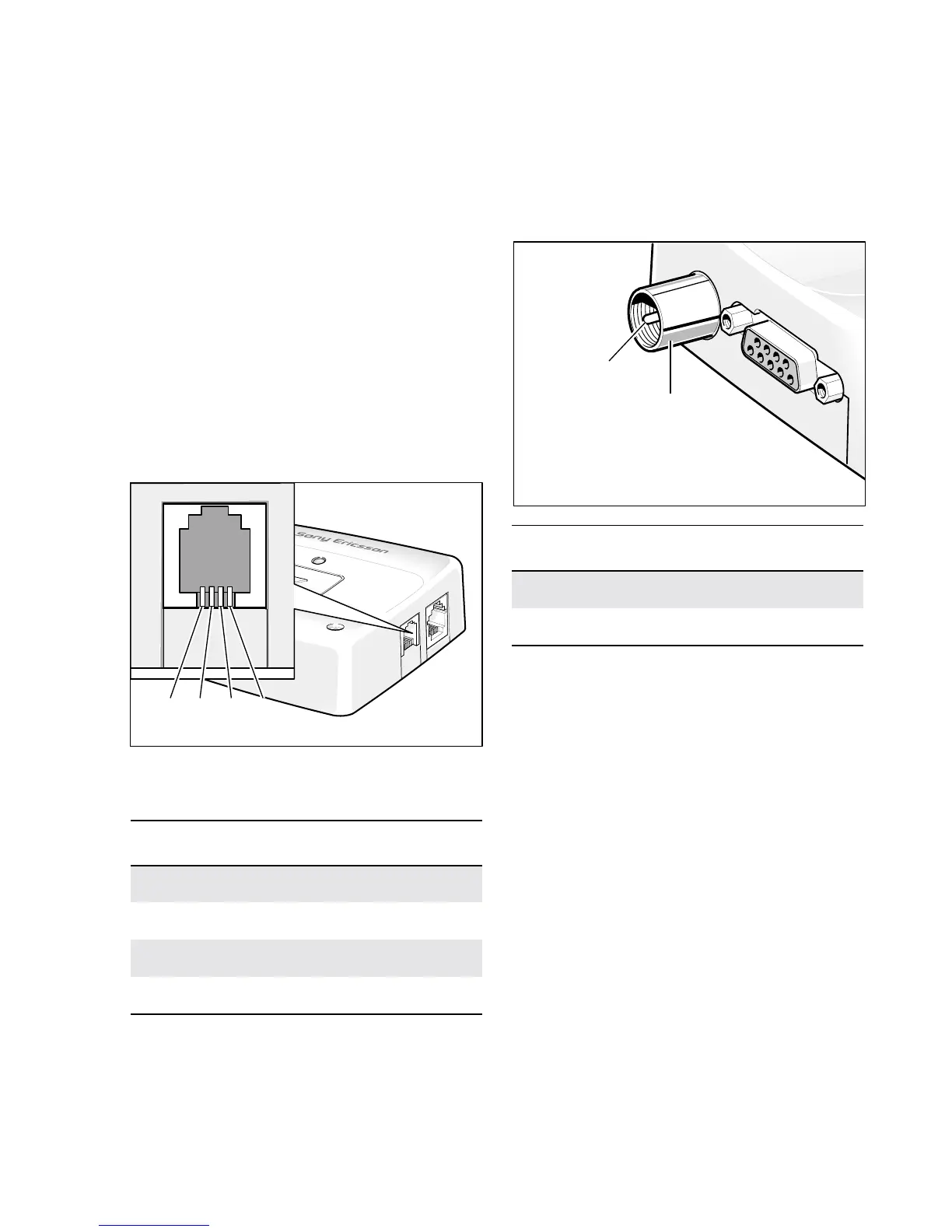
A 4-way RJ9 connector, as shown below,
allows a telephone handset to be plugged into
the modem, giving access to the microphone
and earpiecesignals.Theconnectormayalsobe
used to drive other analogue audio sub-systems
or devices.
TheGM29isconfiguredtoworkwitharange
of handsets.
CAUTION! Not all handsets use the pin-outs
shown below for microphone and
earpiece.
If necessary, changes can be made to the
characteristicsof theaudio interface by sending
the modem appropriate AT commands.
RJ9 Handset Connector
Antenna Connector
Connect a GSM antenna to this port. Single
(900 or 1800MHz) or dual band
(900/1800MHz) antennas may be used. The
modem is fitted with a 50Ω, FME male coaxial
jack.
FME Connector
Signal Description
MICN Microphone negative input
BEARN Earpiece negative output
BEARP Earpiece positive output
MICP Microphone positive input
4321
1 MICN
2 BEARN
3 BEARP
4 MICP
Signal Description
RF RF input/output
GND Ground connection
GND
RF Signal


 To Next Page