Electrical Connections 9
SIM Card Reader
TheGM29isfittedwithaSIMcardreaderin
which 3V and 5V SIM cards will operate. The
type of card fitted is automatically detected by
the modem.
Tooperate themodema SIMcardmustbe fitted
as follows:
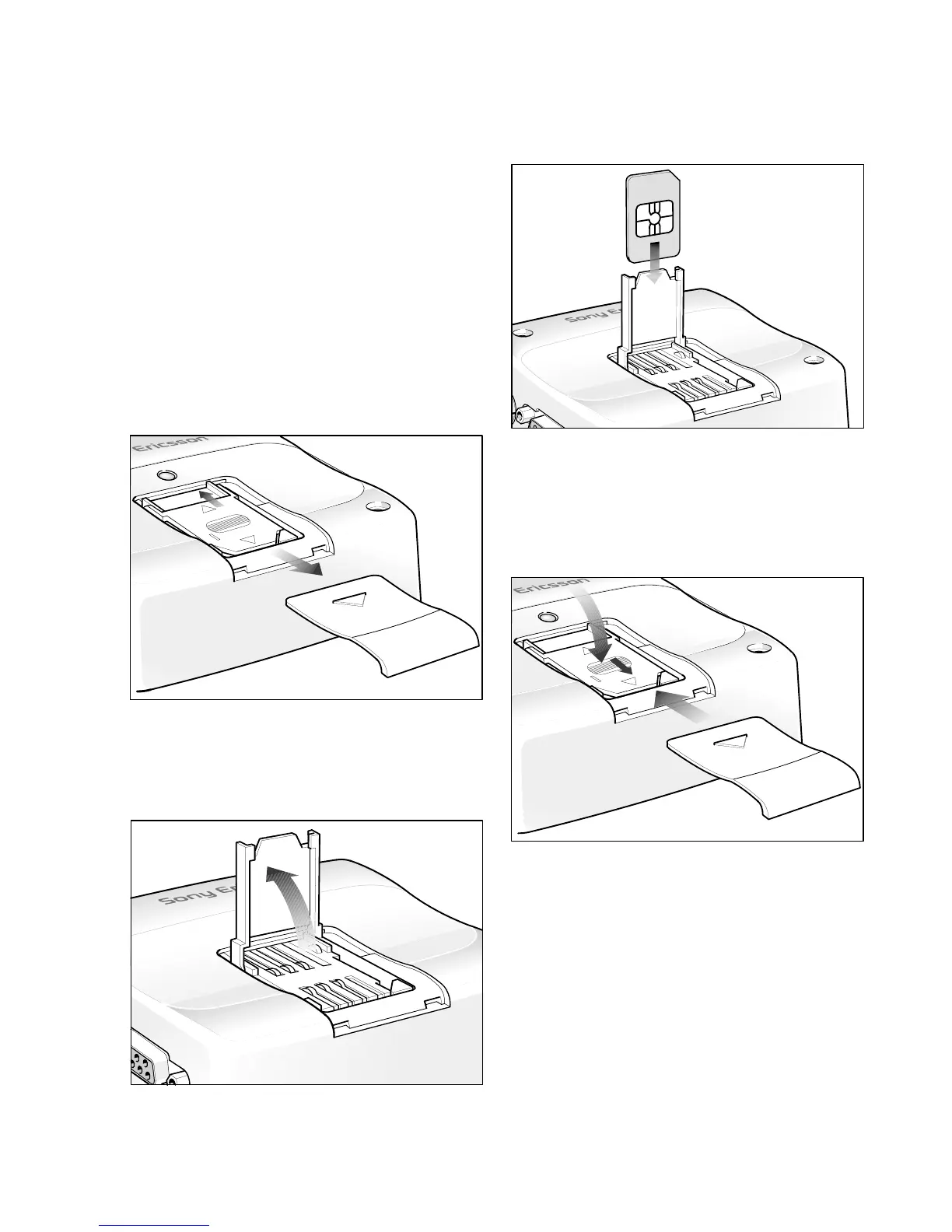
1. Disconnect power to the GM29;
2. Remove the cover panel by applying light
downward pressure and sliding outwards as
shown below;
3. Applying light pressure, slide the SIM card
holder to the “OPEN” position as shown
below;
4. Carefully raise the SIM card holder until it
is in the vertical position as shown below;
5. Orientate the SIM card and slide into the
holder as shown below;
6. Close the SIM holder and slide into the
“LOCK” positon;
7. Refit the cover panel.
To replace or remove a SIM card, follow the
same procedure as described above except
remove or exchange the card at step 5.


 To Next Page