To enter text using predictive text input
1
If is not displayed in the text input indicator, tap and select Activate
predictive text.
2
Press each key only once, even if the letter you want is not the first letter on the key.
For example, to write the word “Jane”, tap
for J,
for a,
for n and
for e. Write the whole word before looking at the suggestions.
3
To view more word suggestions, tap the underlined word. Select a word.
4
To add a space, tap
.
5
To add symbols and punctuation marks, tap
.
To enter text using the multitap method
1
If is displayed in the text input indicator, tap and select Predictive text >
Off to change to multitap text input.
2
Tap
–
repeatedly until the desired letter appears.
3
To add a space, tap
.
4
To add punctuation marks or symbols, tap
.
When using a text input method, you can enter digits by tapping and holding down the number
keys.
To enter punctuation marks, you can also tap
repeatedly until the desired punctuation mark
appears.
To add words to the built-in dictionary
1
When you enter text using predictive text input, tap
and select Predictive text >
Add word.
2
Write the word using multitap input and select OK.
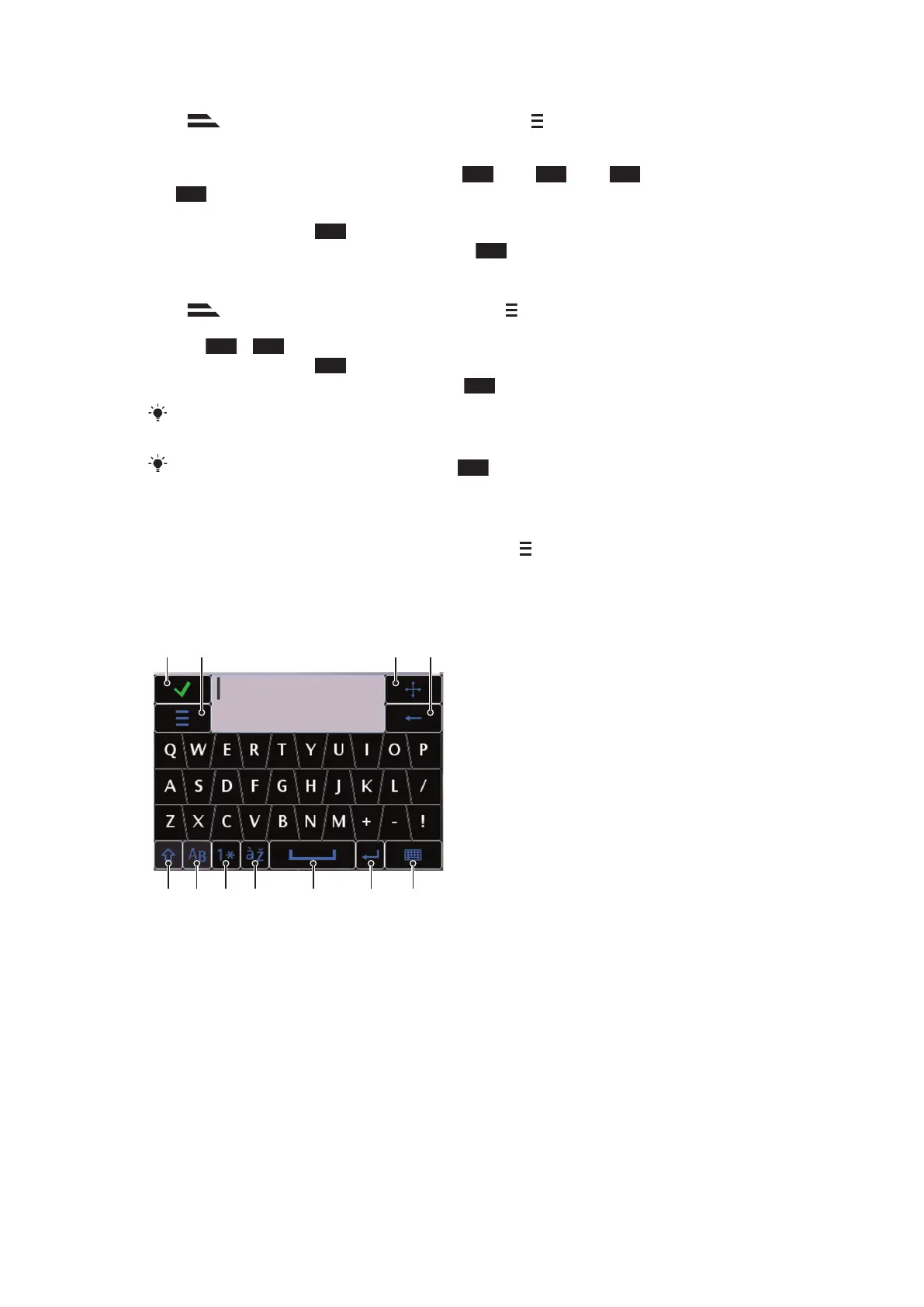
Mini QWERTY keyboard
1
Close – tap to accept the text in the input window and close the keyboard view
2 Options – tap to open the input options menu to change, for example, the Writing language or view
Help
3 Dock – tap and hold to move the input window around the screen
4 Backspace – tap to delete a letter to the left of the cursor
5 Shift and Caps Lock – tap to change the character case
6 ABC – tap to display alphabet letters and most-used symbols
7 Number mode – tap to display digits and most-used symbols
8 Accented letter – tap to display accented letter ranges
9 Space – tap to enter a space
20
This is an Internet version of this publication. © Print only for private use.












 To Next Page