52
Imaging
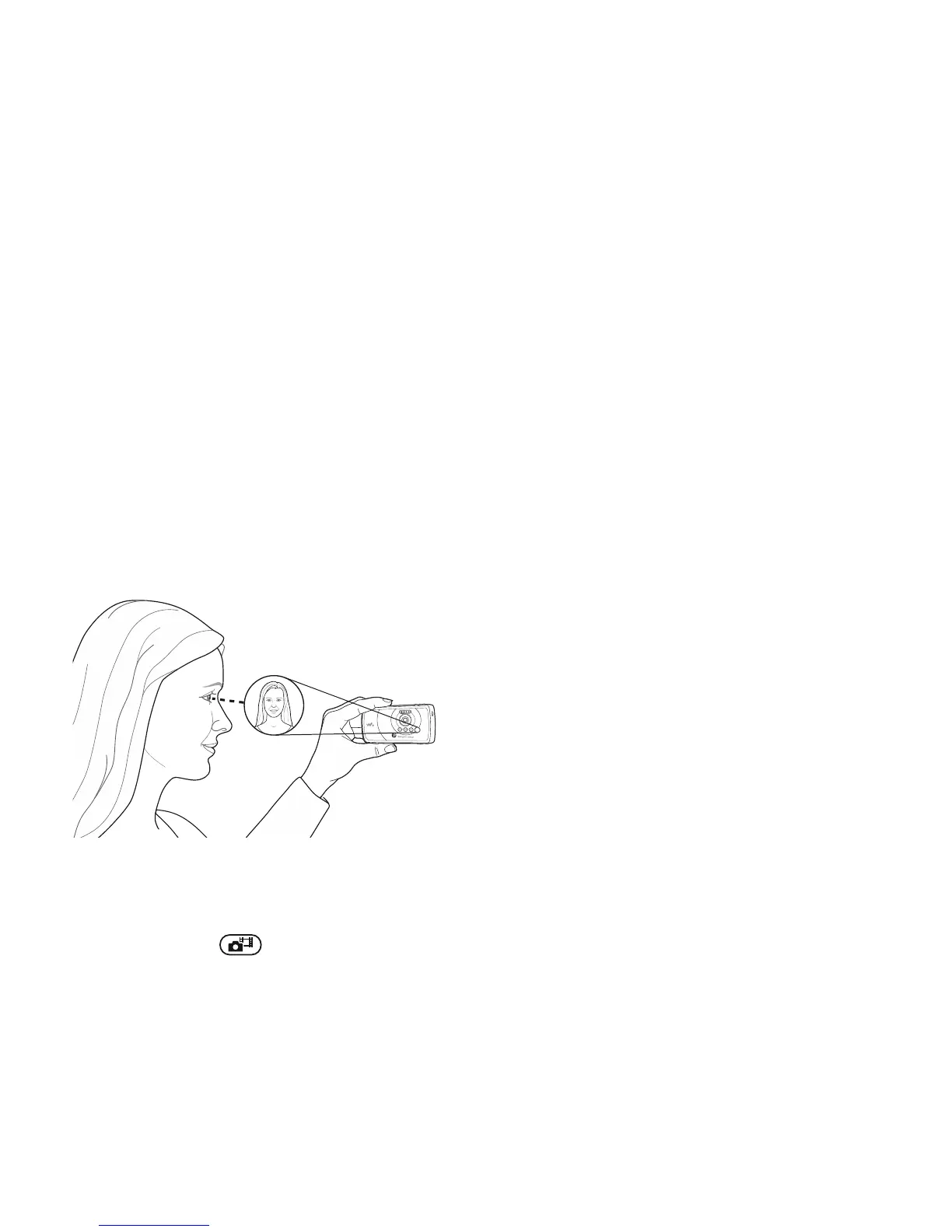
Take a self-portrait
Hold the phone as shown in the
illustration, so that you can see your
reflection in the mi
rror next to the lens.
Press and hold to take the picture.
Saving pictures and video clips
When you have ta
ken a picture or
recorded a video clip, the phone saves
it in the phone memory or on the
Memory Stick PRO Duo™, if it is
inserted.
If the phone memory or Memory Stick
is full, you canno
t save any more
pictures or vide
o clips unless you
delete or move files
%
23 File
manager
.
Sending pictures and video clips
When you have ta
ken a picture or
recorded a video clip, you can send it
as a picture message if the file size
has not exceeded the limit. To
exchange pictures and video clips
using other transfer methods
%
51 Exchanging pictures
.
To manage a video clip or a picture
Record a video clip or take a picture
} More
and select an option.
You can also view your video clips on
a computer,
%
61 To view a video clip
on a computer
.
Transferring pictures to your
computer
Using the USB cable, you can drag-
and-drop camera
pictures onto a
computer
%
71 Transferring files using
the USB cable
.
Remote screen
Use a compatible Bluetooth accessory
to view pictures on a remote screen
such as a TV. The accessory is not
included with your phone. For a
complete list of compatible
accessories, please visit
www.sonyericsson.com/support
.
To connect to a remote screen
}
File manager
} Pictures
} View
} More } Remote screen
.
%
68 To add a device to your phone.
This is the Internet version of the user's guide. © Print only for private use.
Contents 1
Contents
Getting to know your phone 4
Key functions, quick keys, entering letters and characters.
Personalizing your phone 22
Download settings or choose from the phone.
Calling 31
Use the Phonebook, voice control, call options.
Messaging 51
Multimedia messaging, chat and e-mail.
Camera 60
Use the camera.
Setting up WAP and e-mail 63
All you need to know about setting up WAP and e-mail.
Using WAP 71
WAP browser, bookmarks.
Transferring and exchanging information 74
Bluetooth wireless technology, synchronization.
More features 79
Calendar, alarm clock, stopwatch, timer, games.
Security 87
SIM card lock, phone lock.
Troubleshooting 89
Why doesn’t the phone work the way I want?
Additional information 91
Safe and efficient use, warranty, declaration of conformity.
Icons 98
What do the icons mean?
Index 105
Sony Ericsson T618






 To Next Page