13
Remote
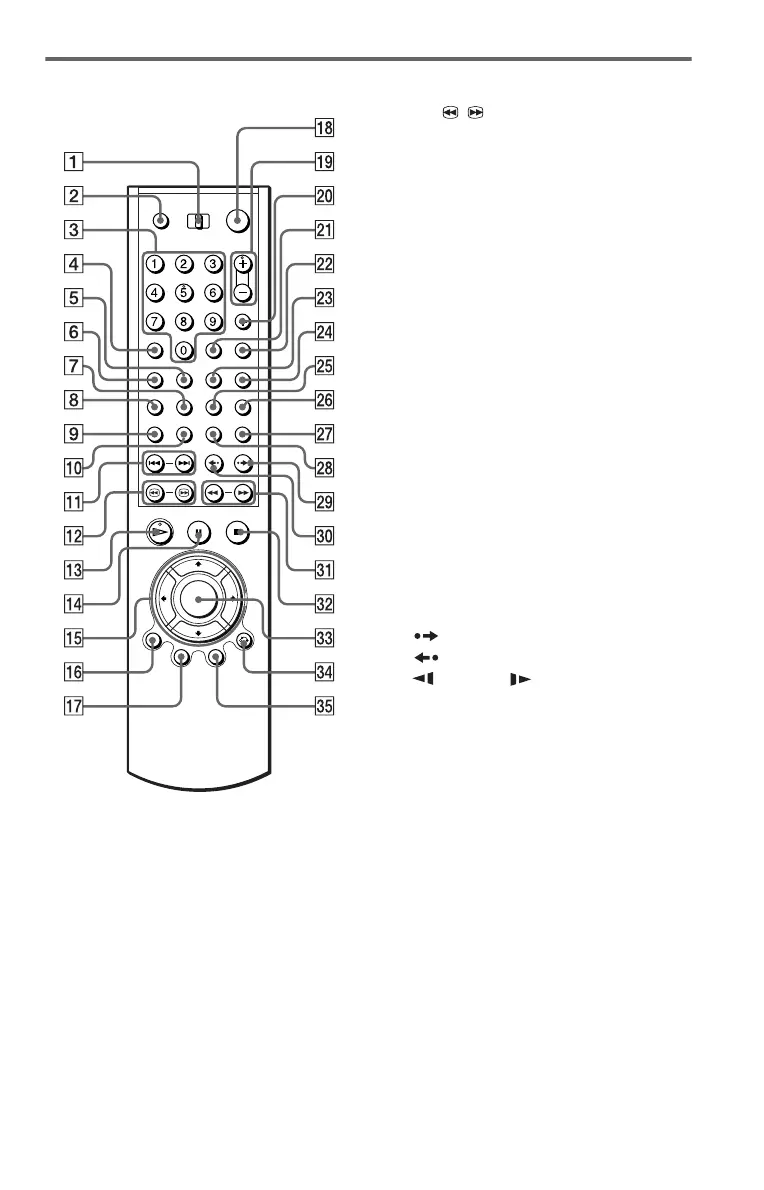
A TV/DISC EXPLORER/DVD switch
(50)(82)
B OPEN/CLOSE button (34)
C Number buttons (37)
The number 5 button has a tactile dot.*
D CLEAR button (44)
E SUR (surround) button (69)
F PICTURE MODE button (75)
G SUBTITLE button (73)
H AUDIO button (68)
I PICTURE NAVI (picture navigation)
button (62)
J REPEAT button (46)
K ./> PREV/NEXT (previous/
next) buttons (34)
L c / C SEARCH/STEP
buttons (59)
M H PLAY button (33)
The H button has a tactile dot.*
N X PAUSE button (34)
O C/X/x/c buttons (37)
P DISPLAY/FILE button (14)(52)
Q TOP MENU/EDIT button (37)(54)
R [/1 (on/standby) button (32)
S VOL (volume) +/– buttons (82)
The + button has a tactile dot.*
T TV/VIDEO/DISC SKIP + button
(34)(82)
U ENTER button (82)
V WIDE MODE/DISC SKIP – button
(34)(82)
W FOLDER button (49)
X PICTURE MEMORY button (51)
Y ANGLE button (73)
Z TIME/TEXT button (64)
wj SACD/CD (Super Audio CD/CD)
button (39)
wk SACD MULTI/2CH (Super Audio CD
multi/2 channel) button (39)
wl INSTANT SEARCH button (34)
e; INSTANT REPLAY button (34)
ea m/M SCAN/SLOW
buttons (59)
es x STOP button (34)
ed ENTER button (37)
ef O RETURN button (35) (40) (50)
eg MENU/SORT button (37) (41) (57)
* Use the tactile dot as a reference when operating
the player.


 To Next Page