54
Labeling Discs and
Folders (Edit Mode)
You can label the disc with a personal title of
16 characters (Disc Memo) (when DVD/CD
text is not recorded on the disc). you can also
label the folders “A” to “D” with a title of 3
characters.
The Disc Memo can be anything you like,
such as a title, musician’s name, category or
date of purchase.
You can also assign a genre label to the disc.
This will help you keep your discs organized.
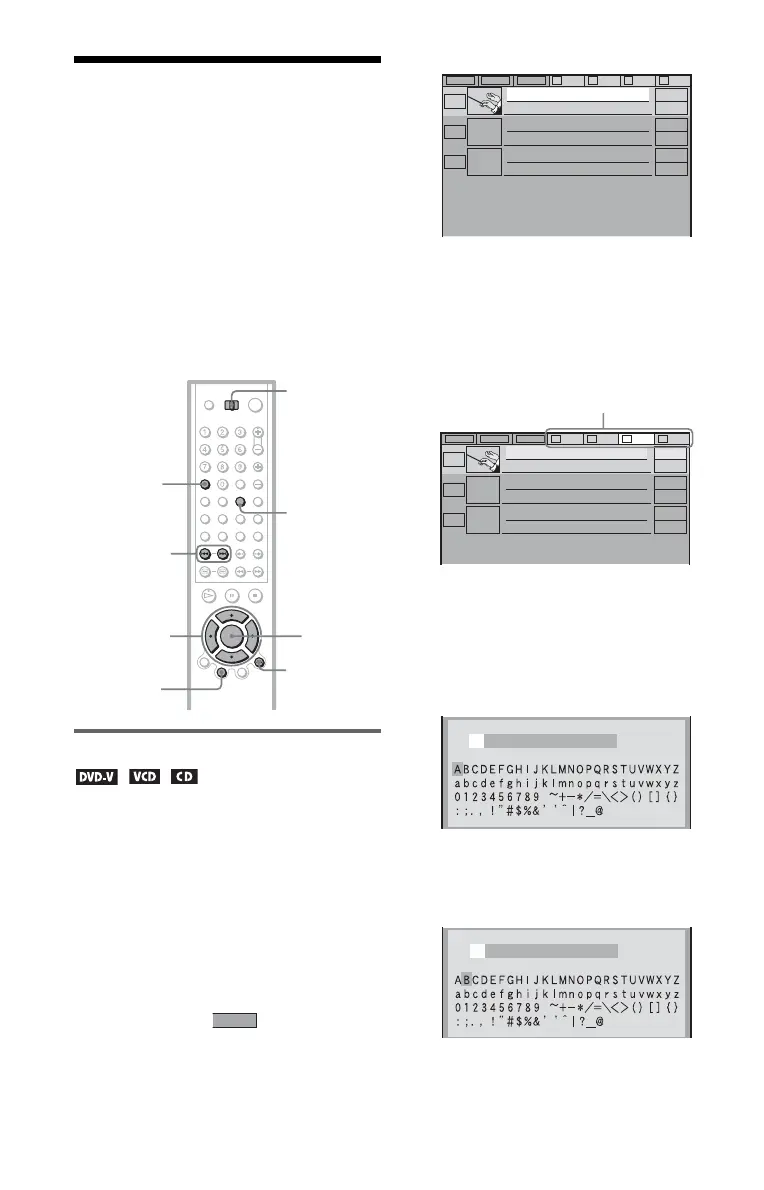
Labeling a disc or folder
1 Select the disc or folder you want to
label.
◆ To label a disc
Select the disc on the Disc Explorer (for
details, see steps 1 and 2 of “Searching
for a disc on the Disc Explorer” on
page 50). After sliding the TV/DISC
EXPLORER/DVD switch to DISC
EXPLORER, press TOP MENU/EDIT.
The selected disc’s text only is
highlighted and appears in the
bottom right corner.
◆ To label a folder
Press FOLDER. After sliding the TV/
DISC EXPLORER/DVD switch to DISC
EXPLORER, press TOP MENU/EDIT.
Then, press
X. Select the folder you want
to label by pressing
C/X/x/c.
2 Press ENTER.
The “DISC MEMO INPUT” display
appears when you have selected a disc.
The “FOLDER NAME INPUT” display
appears when you have selected a folder.
3 Press C/X/x/c to select a character.
The selected character changes color.
4 Press ENTER.
The selected character is input.
TOP
MENU/EDIT
TV/DISC
EXPLORER/
DVD switch
ENTER
ORETURN
C/X/x/c
./>
CLEAR
FOLDER
EDIT
ALL DVD CD A B C D
2
Music Madness
4
23
CD
CD
CD
Classical
ALL DVD CD A B C D
2
Music Madness
4
23
CD
CD
CD
Classical
Select from here
DISC MEMO INPUT
DISC MEMO INPUT
B


 To Next Page