21
Hookups
Step 4: Connecting the Audio Cords
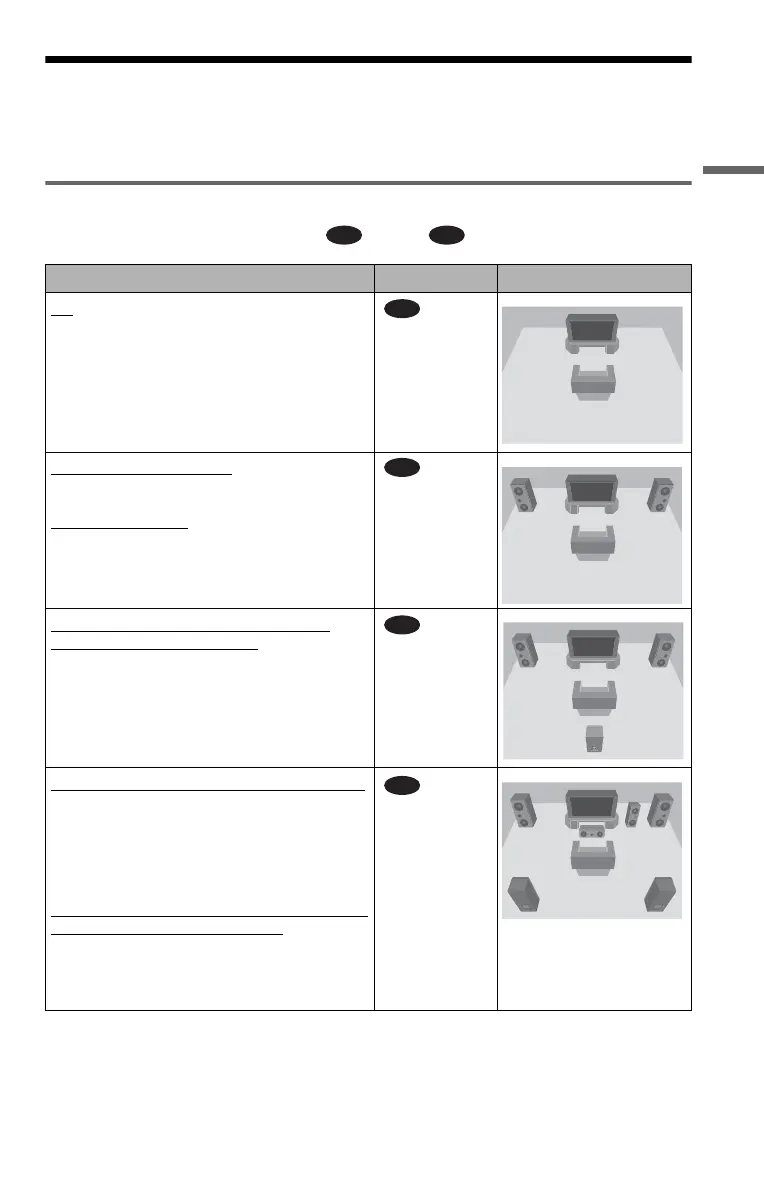
Refer to the chart below to select the connection that best suits your system. Be sure to also read
the instructions for the components you wish to connect.
Select a connection
Select one of the following connections, through .
Components to be connected Connection Your setup (example)
TV
• Surround effects: TVS DYNAMIC (page 70),
TVS WIDE (page 70)
(page 23)
Stereo amplifier (receiver)
and two speakers
• Surround effects: TVS STANDARD (page 70)
or
MD deck/DAT deck
• Surround effects: None
(page 24)
AV amplifier (receiver) having a Dolby*
Surround (Pro Logic) decoder and 3 to 6
speakers
• Surround effects: Dolby Surround (Pro Logic)
(page 91)
(page 25)
AV amplifier (receiver) with 5.1 ch input jacks
and 4 to 6 speakers
• Surround effects:
– Dolby Digital (5.1 ch) (page 98)
– DTS (5.1 ch) (page 98)
– Super Audio CD Multi channel (page 98)
or
AV amplifier (receiver) with digital input jacks
having a Dolby or DTS** decoder and 6
speakers
• Surround effects:
– Dolby Digital (5.1 ch) (page 98)
– DTS (5.1 ch) (page 98)
(page 26)
A D
A
B
C
D
c continued


 To Next Page