18
When you have more than one Sony DVD player
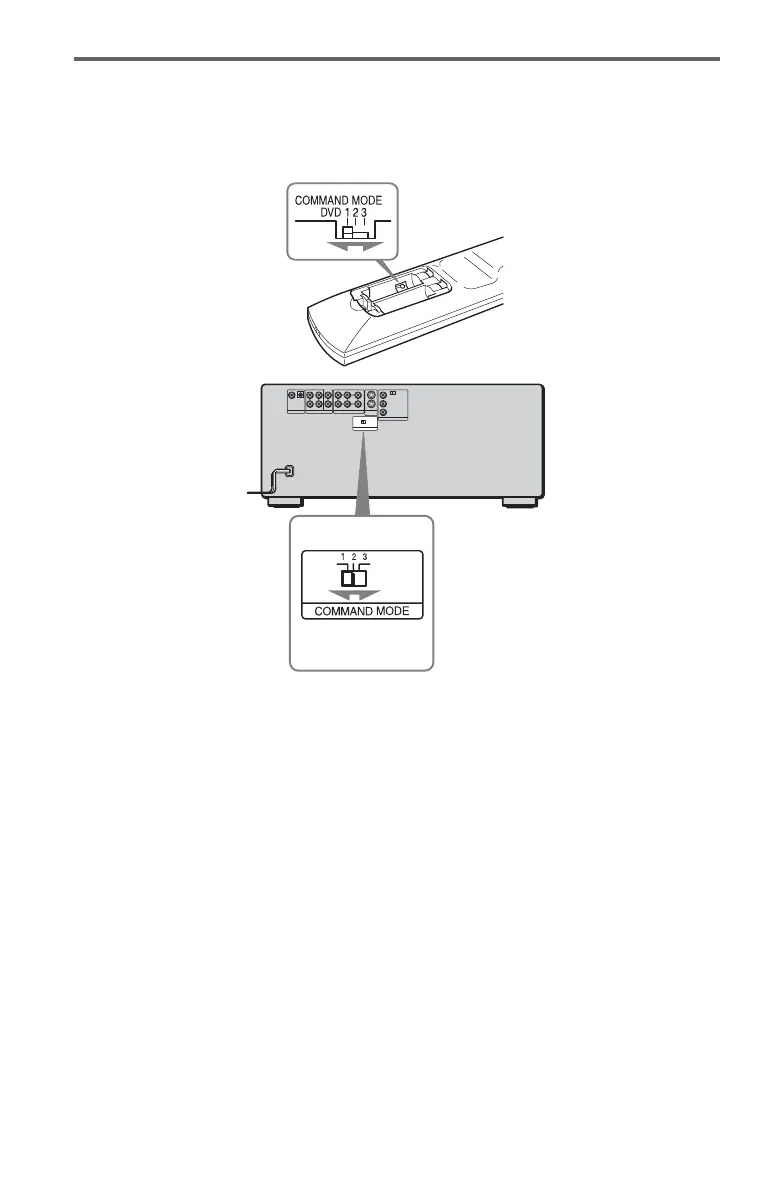
If the supplied remote interferes with your other Sony DVD player, set the command mode for
this player and the supplied remote to one that differs from the other Sony DVD player.
The default command mode setting for this player and the supplied remote is DVD1.
1 Slide the COMMAND MODE switch on the remote to select the command mode (DVD
1, DVD 2, or DVD 3) so that the setting for the remote differs from the other DVD
players.
For example, if other DVD players respond to the default command mode setting for the
supplied remote (DVD 1), set the remote to DVD 2 or DVD 3.
2 Slide the COMMAND MODE switch on the rear of the player so it matches that of the
supplied remote.


 To Next Page