Using the shooting function
111
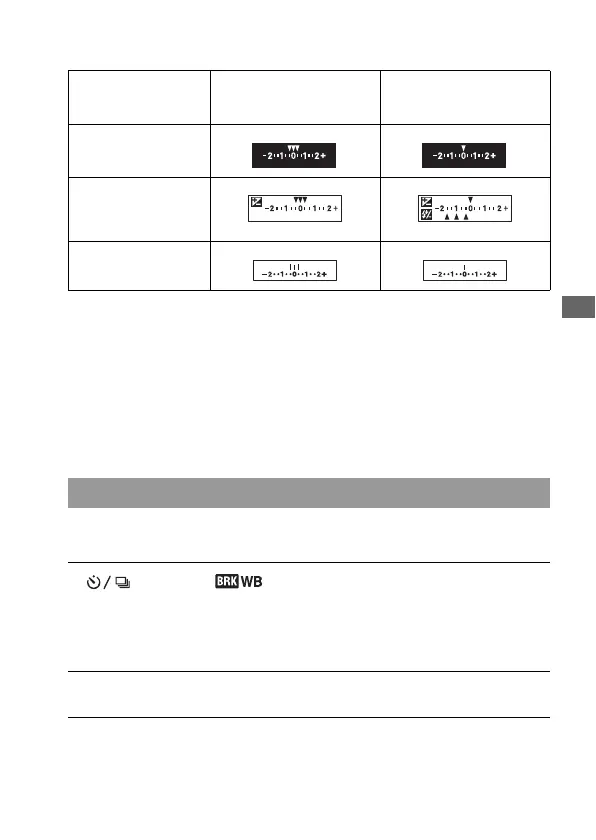
The EV scale in bracket shooting
* Ambient light: Any light other than the flash light that shines on the scene
for an extended period of time, such as natural light, a light bulb, or a
fluorescent light.
• In bracket shooting, the same number of indices as the number of
recordable images is displayed on the EV scale. However, in flash bracket
shooting, the indices are not displayed in the viewfinder.
• When the bracket shooting starts, the indices that indicate already
recorded images start to disappear one by one.
Based on the selected white balance, and the color temperature/color filter,
three images are recorded with the white balance shifted.
* Mired: a unit to indicate the color conversion quality in color temperature filters.
Ambient light* bracket
0.3 steps, three shots
Exposure compensation 0
Flash bracket
0.7 steps, three shots
Flash compensation –1.0
LCD monitor (Live View
mode)
LCD monitor
(Viewfinder mode/
Standard Display)
Shown in the top row. Shown in the bottom row.
Viewfinder
Shooting with white balance shifted (WB bracket)
1 button t (WB bracket) t Select the desired
setting
• When Lo is selected, it is shifted by 10 mired*, and when Hi is selected, it is
shifted by 20 mired.
2 Adjust the focus and shoot the subject.


 To Next Page