SLT-A65/A65V
4-287-953-11(1)
G:\Works\CX86800\DTP\IM\4287953111\4287953111SLTA65A65VU2\01GB-
SLTA65A65VU2\090TPC.fm
Master: Right
71
Viewing images on a computer
Selecting the method for creating a
disc of movies
You can create a disc from AVCHD View movies that have been recorded
with this camera.
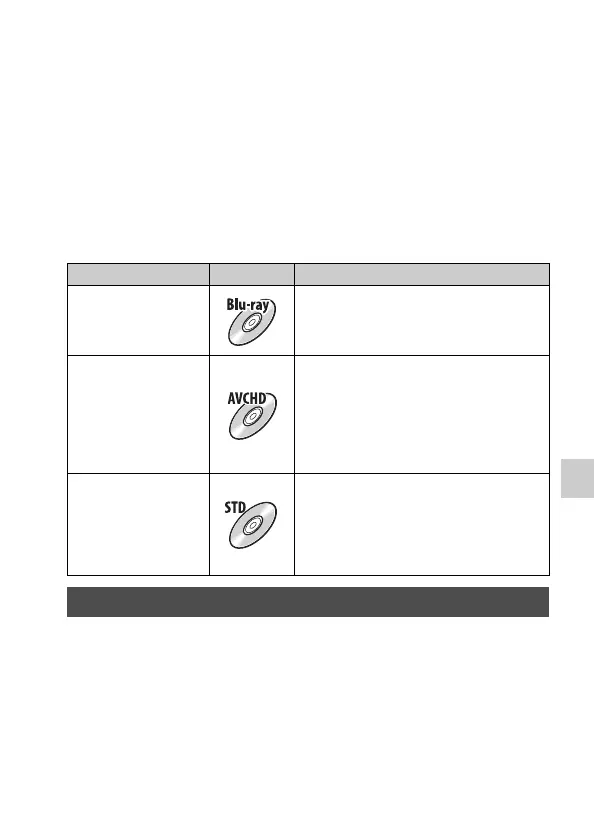
Depending on the disc type, playable devices may vary. Select the method
that suits your disc player.
Here, 2 ways of creating a disc of movies are described; creating a disc with
a computer using “PMB” or creating a disc with devices other than a
computer such as a DVD writer.
You can import AVCHD View movies to a computer using “PMB” and
create an AVCHD format disc or a standard definition image quality (STD)
disc.
For details on the method for creating a disc using “PMB,” see “PMB
Help.”
Notes
• To create Blu-ray discs, be sure to install [BD Add-on Software] from the “PMB”
installation screen.
Player Disc type Feature
Blu-ray disc playback
devices
(Blu-ray disc player,
PlayStation®3, etc.)
Using a Blu-ray disc enables you to record
high-definition image quality (HD) movies
of a longer duration than DVD discs.
AVCHD format
playback devices
(Sony Blu-ray disc
player, PlayStation®3,
etc.)
High-definition image quality (HD) movies
can be recorded on DVD media, such as
DVD-R discs, and a high-definition image
quality (HD) disc is created.
• You cannot play a high-definition image
quality (HD) disc on ordinary DVD
players.
Ordinary DVD playback
devices
(DVD player, computer
that can play DVDs,
etc.)
Standard definition image quality (STD)
movies converted from high-definition
image quality (HD) movies can be recorded
on DVD media, such as DVD-R discs, and a
standard definition image quality (STD)
disc is created.
Creating a disc using a computer



 To Next Page