80
Notes on use
To protect the saved data on the “Memory Stick,” note the following:
• The supplied AIBO-ware “Memory Stick” is an accessory of AIBO Explorer
ERF-220AW02E. Do not use it for anything other than AIBO such as a PC or
camcorder. AIBO may not operate normally depending on the units used to
configure it.
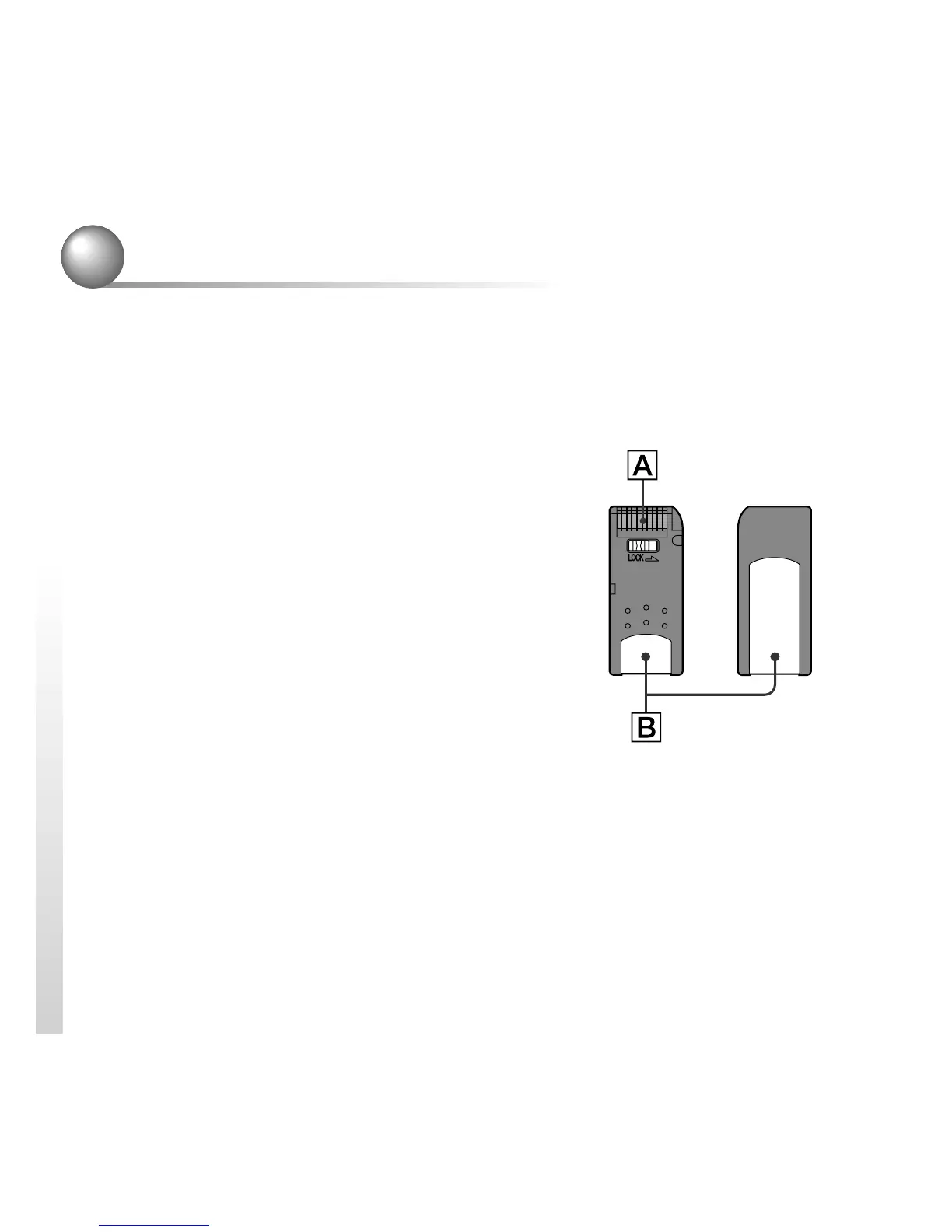
• Do not touch the terminal A with your hand or
metal objects.
• The saved data may be erased or damaged if the
“Memory Stick” is used in a place subject to static
electricity or electrical noise.
• Do not stick anything other than a dedicated
“Memory Stick” sticker in the area indicated by
B. A sticker has already been attached to the
AIBO-ware “Memory Stick” supplied with AIBO
Explorer at the factory.
• Do not bend, drop or apply a strong physical shock
to the “Memory Stick.”
• Do not disassemble or modify the “Memory Stick.”
• To remove the “Memory Stick” from AIBO while it is still operating, first press
the pause button to stop AIBO’s movement and wait until the battery pack lock
indicator appears white.
• Keep the “Memory Stick” away from water and other liquids.



 To Next Page