GB
11
GB
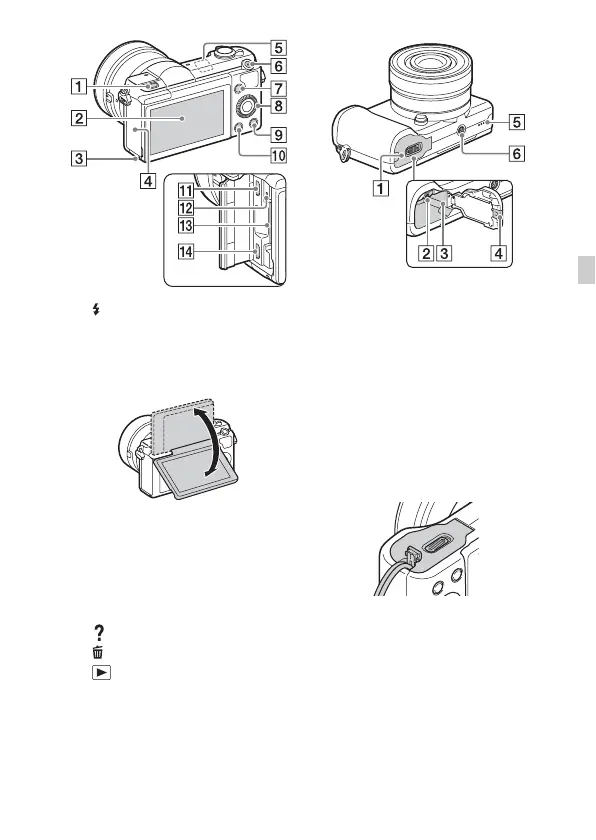
A (Flash pop-up) button
B LCD screen
• You can adjust the LCD screen to
an easily viewable angle and
shoot from any position.
C Access lamp
D Memory card/terminal cover
E Wi-Fi sensor (built-in)
F MOVIE (Movie) button
G MENU button
H Control wheel
I (In-Camera Guide) /
(Delete) button
J (Playback) button
K Multi/Micro USB Terminal
• Supports Micro USB compatible
device.
L Charge lamp
M Memory card slot
N HDMI micro jack
A Battery cover
B Battery eject lever
C Battery insertion slot
D Connection plate cover
• Use this when using an AC-
PW20 AC Adaptor (sold
separately). Insert the connection
plate into the battery
compartment, and then pass the
cord through the connection plate
cover as shown below.
• Make sure that the cord is not
pinched when you close the
cover.
E Speaker
F Tripod socket hole
• Use a tripod with a screw less
than 5.5 mm (7/32 inches) long.
Otherwise, you cannot firmly
secure the camera, and damage to
the camera may occur.



 To Next Page