GB
22
Preparing the camera
x
Removing the lens
• If dust or debris gets inside the camera while you are changing the lens and
adheres to the surface of the image sensor (the part that converts the light source to
a digital signal), it may appear as dark spots on the image, depending on the
shooting environment. The camera vibrates slightly when it is turned off, due to
the anti-dust function, to prevent dust from adhering to the image sensor.
However, attach or remove the lens quickly somewhere away from dusty
locations.
• Do not leave the camera with the lens removed.
• When you want to use body caps or rear lens caps, please purchase ALC-B1EM
(Body cap) or ALC-R1EM (Rear lens cap) (sold separately).
• When you use a lens with a power zoom, set the power switch of the camera to
OFF and confirm that the lens is completely retracted before switching lenses. If
the lens has not retracted, do not press the lens in by force.
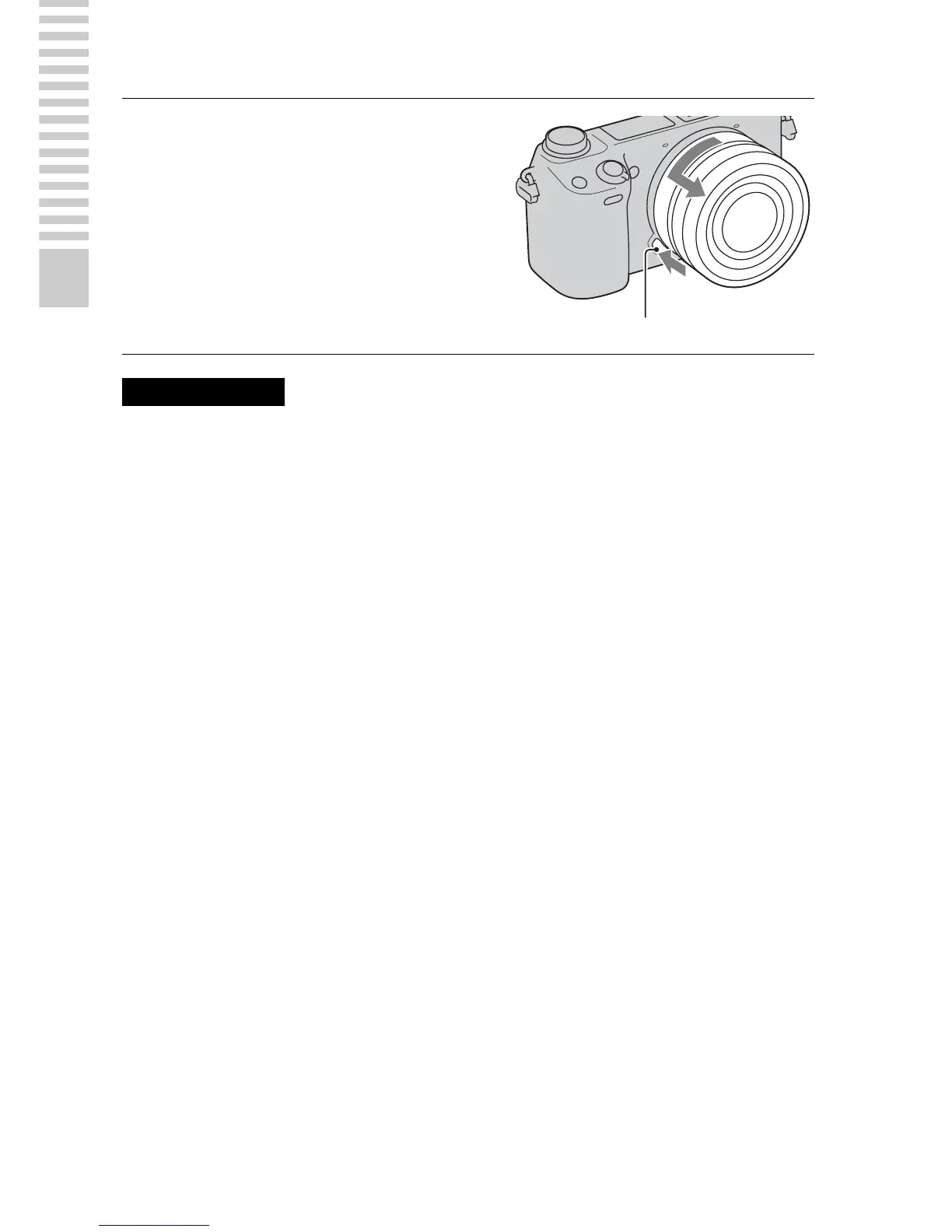
1
Press the lens release button
all the way in and turn the lens
counterclockwise until it
stops.
Lens release button
Notes


 To Next Page